Generate a Board Skeleton with -n
idf.py bmgr -n generates a fully annotated YAML template through an interactive selection of chip, devices, and peripherals. It is suited for first-time integrations or when you are unfamiliar with the default values of individual fields. The generated template still requires manual editing to fill in hardware pin numbers and parameters; it cannot be used directly.
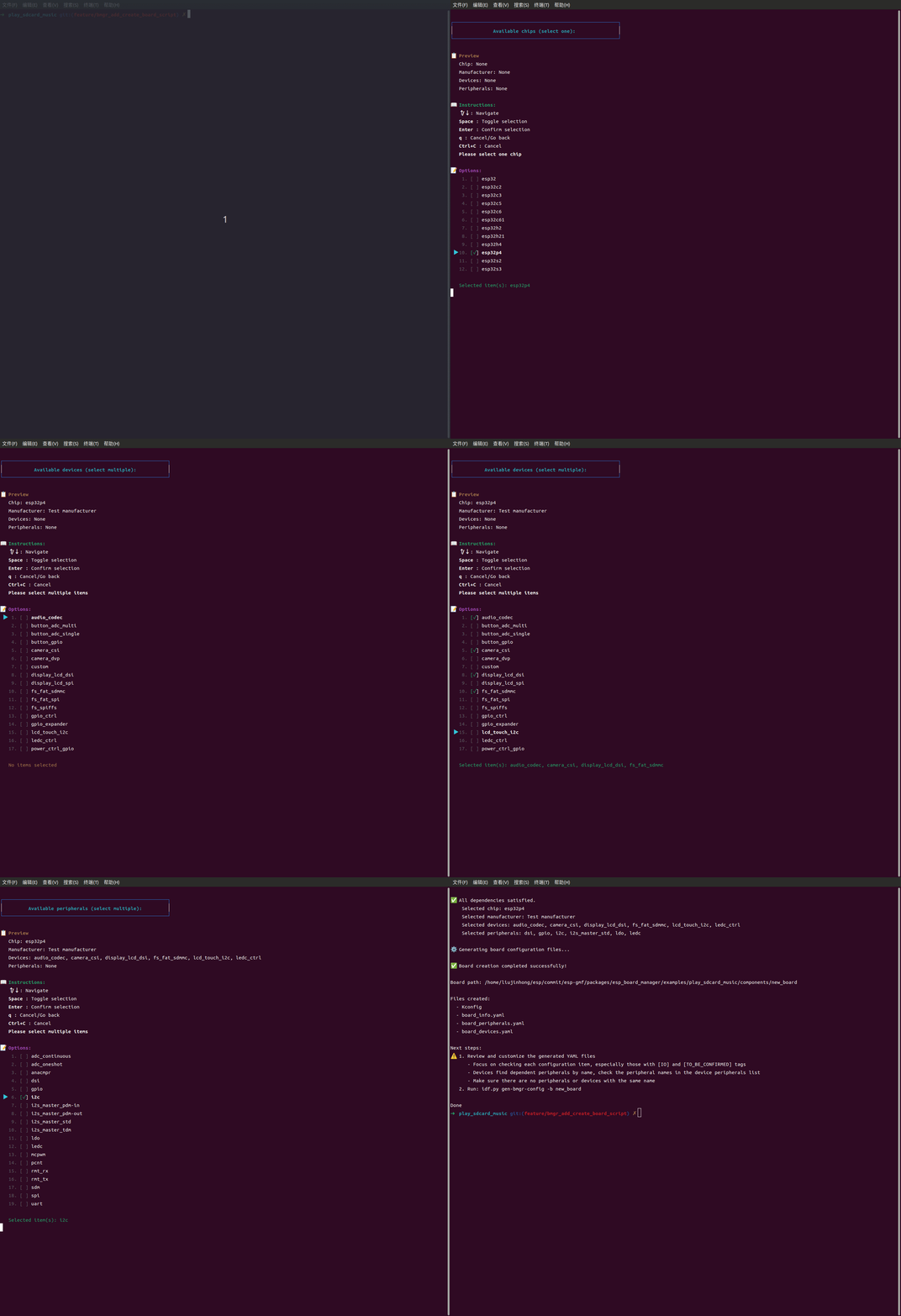
Generate the Template
The -n flag accepts a board name or path:
# Create at the default location ({PROJECT_ROOT}/components/<board_name>)
idf.py bmgr -n my_board

# Create at a specified path
idf.py bmgr -n path/to/boards/my_board
After running, follow the prompts to select the chip, devices, and peripherals. The script checks device-to-peripheral dependencies and prompts you to add any missing peripherals.
Fill in the Template
After generation, the template contains two types of markers that require attention. For details, see YAML Conventions and Syntax:
[IO]: Corresponds to actual hardware pins. Must be filled in according to the board schematic.[TO_BE_CONFIRMED]: Placeholder or generic default value. Must be confirmed and replaced by consulting the component datasheet.
Also verify:
Device names and peripheral names are unique within their respective files.
The peripheral
namereferenced by each device exactly matches the name defined inboard_peripherals.yaml.
For complete field descriptions for each file, see Board Directory Structure and File Responsibilities.
Verify
# Match by board name
idf.py bmgr -b my_board

# Specify the board root directory explicitly
idf.py bmgr -b my_board -c /path/to/boards

# Point directly to the board directory on disk
idf.py bmgr -b /abs/path/to/my_board
After a successful run, components/gen_bmgr_codes/ should contain: gen_board_periph_config.c, gen_board_device_config.c, gen_board_info.c, board_manager.defaults, Kconfig.projbuild, idf_component.yml, and related files.
Before using the board in production, verify the following:
The board name in
board_info.yamlmatches the directory name.All
[IO]fields have been filled in from the schematic.All
[TO_BE_CONFIRMED]fields have been replaced with actual values.All peripheral names referenced by devices exist in
board_peripherals.yaml.All components listed in
dependenciescan be resolved.Devices requiring special initialization sequences (LCD display, touchscreen controller, camera, etc.) have been assessed to determine whether
setup_device.cis needed.
After passing the checks above, run an example or test app on the new board to further verify that peripheral and device initialization works correctly:
Examples:
esp_board_manager/examples/provides audio playback, recording, and LVGL display examples that can be run directly on the new board to validate actual hardware behavior.Test app:
esp_board_manager/test_apps/provides system-level tests covering the board initialization flow, suitable for comprehensive validation of the generated code.