Provisioning Scheme Introduction
Note
This document is automatically translated using AI. Please excuse any detailed errors. The official English version is still in progress.
Attention
The provisioning scheme in this document refers to the scheme for configuring and connecting ESP devices to Wi-Fi in different ways. Other schemes such as BLE-MESH provisioning are not included in this document.
Scheme Overview
During the code development phase, Wi-Fi information (SSID and PASSWORD) is often written directly into the program, which cannot be changed at any time to connect to the desired Wi-Fi, which is obviously impractical. New projects should use unified provisioning. BluFi is in maintenance mode and is no longer a recommended scheme. The available provisioning schemes are as follows:
Unified Provisioning (network_provisioning, recommended)
Smartconfig Provisioning
BluFi Provisioning (maintenance mode, no longer recommended)
WEB Provisioning (not recommended)
Taking the common application scenario of provisioning smart sockets as an example, as follows.
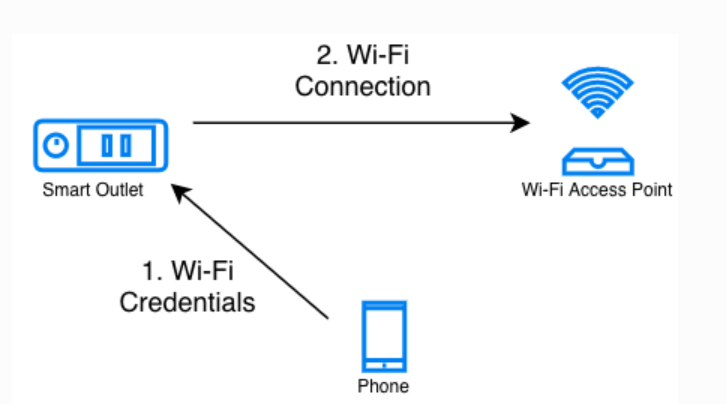
Allow users to configure Wi-Fi information to ESP devices through mobile phones. Different provisions have their own advantages and disadvantages, and the next section elaborates on the details of these provisioning schemes.
Common Provisioning Application Scenarios
1. Unified Provisioning (Recommended)
Unified provisioning is the recommended Wi-Fi provisioning scheme. It is provided by the network_provisioning component. The same protocol can use Bluetooth LE or SoftAP + HTTP as the transport, and can protect provisioning data with Security 0, Security 1, or Security 2. Starting with ESP-IDF v6.0, the built-in wifi_provisioning component has been moved out of ESP-IDF and renamed to network_provisioning. The component can also provision a Thread network over Bluetooth LE. This document only discusses Wi-Fi provisioning.
Starting with ESP-IDF v6.0, Security 0 and Security 1 are disabled by default. A project that still needs either scheme must enable it explicitly in menuconfig.
With the Bluetooth LE transport, the user does not switch away from the phone’s current Wi-Fi network. The provisioning channel is more stable, and the connection result can be reported back to the phone reliably, so the experience is usually better than SoftAP. The Bluetooth LE stack uses about 110 KB of memory at runtime. If the product no longer uses Bluetooth after provisioning, that memory can be reclaimed. Chips without Bluetooth LE, such as ESP32-S2, can only use the SoftAP transport.
The SoftAP transport does not depend on Bluetooth and is more compatible, but the user must switch the phone from the current network to the device hotspot. On iOS, an app cannot scan for and connect to the hotspot directly, so the user has to connect it manually in Settings. The device and the target AP may be on different channels, and the phone may not keep receiving the connection status.
To add this component to an existing project, or to create a project from an example, open the network_provisioning component page and follow the install command and example instructions shown there.
Software Code & APP Reference Links:
2. Smartconfig Provisioning
This method does not require the establishment of any communication link. The mobile phone sends UDP broadcast packets of different lengths to represent Wi-Fi information. The ESP device listens to all data frames within the signal coverage range in promiscuous mode and obtains Wi-Fi information through a certain algorithm. The disadvantage is that the success rate of provisioning is greatly affected by the environment.
Software Code & APP Reference Links:
3. BluFi Provisioning (Maintenance Mode, No Longer Recommended)
The ESP device broadcasts over Bluetooth LE. After the phone connects, it sends the target Wi-Fi information to the device. The user does not switch Wi-Fi networks, but the device must include a Bluetooth stack, which takes extra firmware space and memory until provisioning finishes.
BluFi is currently in maintenance mode, and no new features are planned. It is no longer recommended for new projects. The reference materials below remain available.
Software Code & APP Reference Links:
4. WEB Provisioning (Currently Not Recommended, and No Mature Reference Example)
Establish a hotspot on the ESP device, connect with the phone, and open the configuration page in the browser to complete the provision. This method is very reliable and allows provisioning to be completed on the computer. The disadvantage is that it requires space on the device to embed the webpage.
This solution is currently not recommended. If you still need code references, you can refer to WEB Provision Example. Please note that this example is very old and it is not guaranteed whether it can be executed normally on the new version of ESP-IDF. It only has some reference value in terms of code logic.
The table below summarizes the key parameters of the provisioning schemes mentioned above.
Provisioning Scheme |
Need Extra BLE |
Need Extra Mobile APP |
Provisioning Success Rate |
Operation Complexity |
Recommendation Level |
|---|---|---|---|---|---|
Unified Provisioning (BLE) |
✔ |
✔ |
High |
Simple |
Recommended |
Unified Provisioning (SoftAP) |
✖ |
✔ |
High |
Complex |
Recommended |
Smartconfig Provisioning |
✖ |
✔ |
Relatively High |
Simple |
Medium |
BluFi Provisioning |
✔ |
✔ |
High |
Simple |
Not Recommended |
WEB Provisioning |
✖ |
✖ |
High |
Complex |
Not Recommended |
Reference Materials
The brief summary of the provisioning scheme materials is as follows:
Attention
If you need more references like provision APP, please get the corresponding information in Common Provisioning Application Scenarios.