ESP32-C3-DevKit-RUST-2
This user guide is intended to help you get started with the ESP32-C3-DevKit-RUST-2 and to provide more detailed technical information for development and integration. The ESP32-C3-DevKit-RUST-2 is a development board based on the ESP32-C3-MINI-1 module, a general-purpose module featuring 4 MB of SPI flash. The board integrates full Wi-Fi and Bluetooth® Low Energy (BLE) connectivity, making it suitable for a wide range of IoT and embedded applications.
In addition to the ESP32-C3, the board integrates onboard sensors and a Li-Ion battery charging circuit, enabling portable and sensor-based applications without requiring external components.
Most I/O pins are routed to pin headers on both sides of the board, allowing easy access to the ESP32-C3 peripherals. Developers can connect external components using jumper wires or mount the ESP32-C3-DevKit-RUST-2 directly on a breadboard for rapid prototyping.
ESP32-C3-DevKit-RUST-2
The document consists of the following major sections:
Getting Started: Overview of ESP32-C3-DevKit-RUST-2 and hardware/software setup instructions to get started.
Hardware Reference: More detailed information about the ESP32-C3-DevKit-RUST-2’s hardware.
Hardware Revision Details: Revision history, known issues, and links to user guides for previous versions (if any) of ESP32-C3-DevKit-RUST-2.
Related Documents: Links to related documentation.
Getting Started
This section provides a brief introduction of ESP32-C3-DevKit-RUST-2, instructions on how to do the initial hardware setup and how to flash firmware onto it.
Description of Components
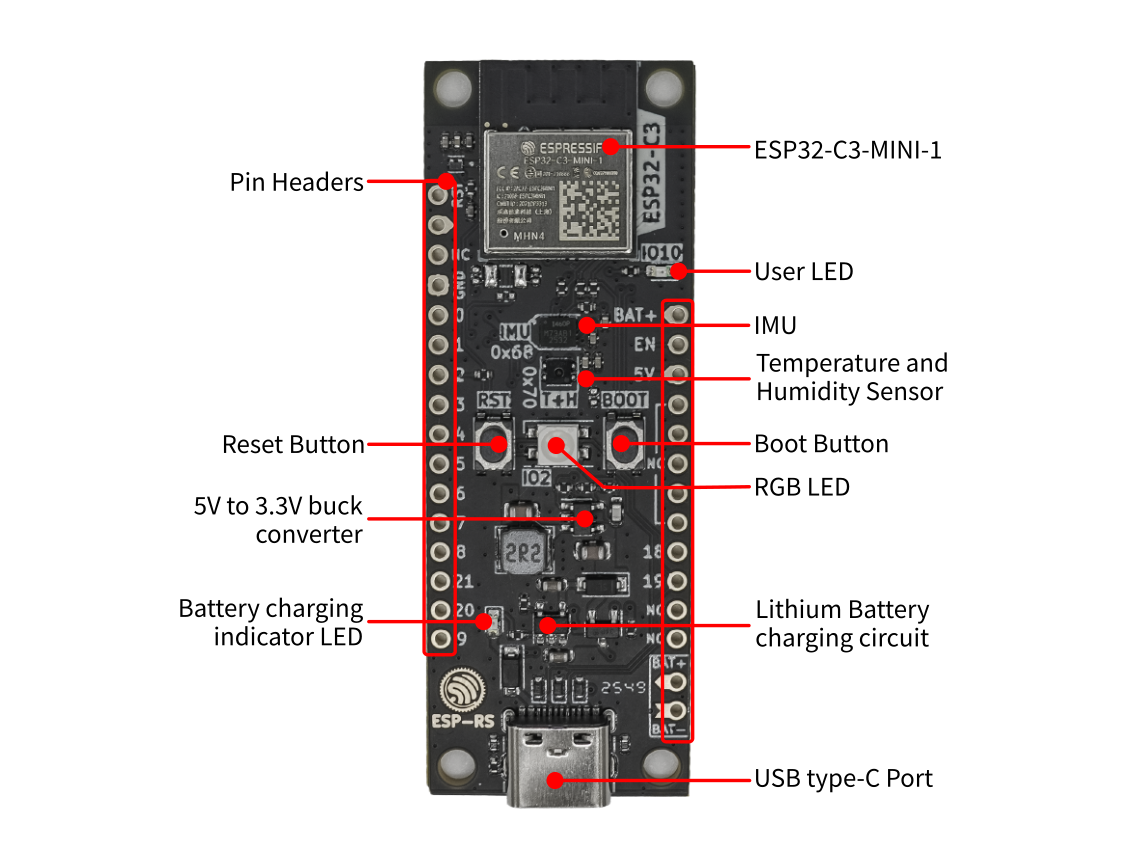
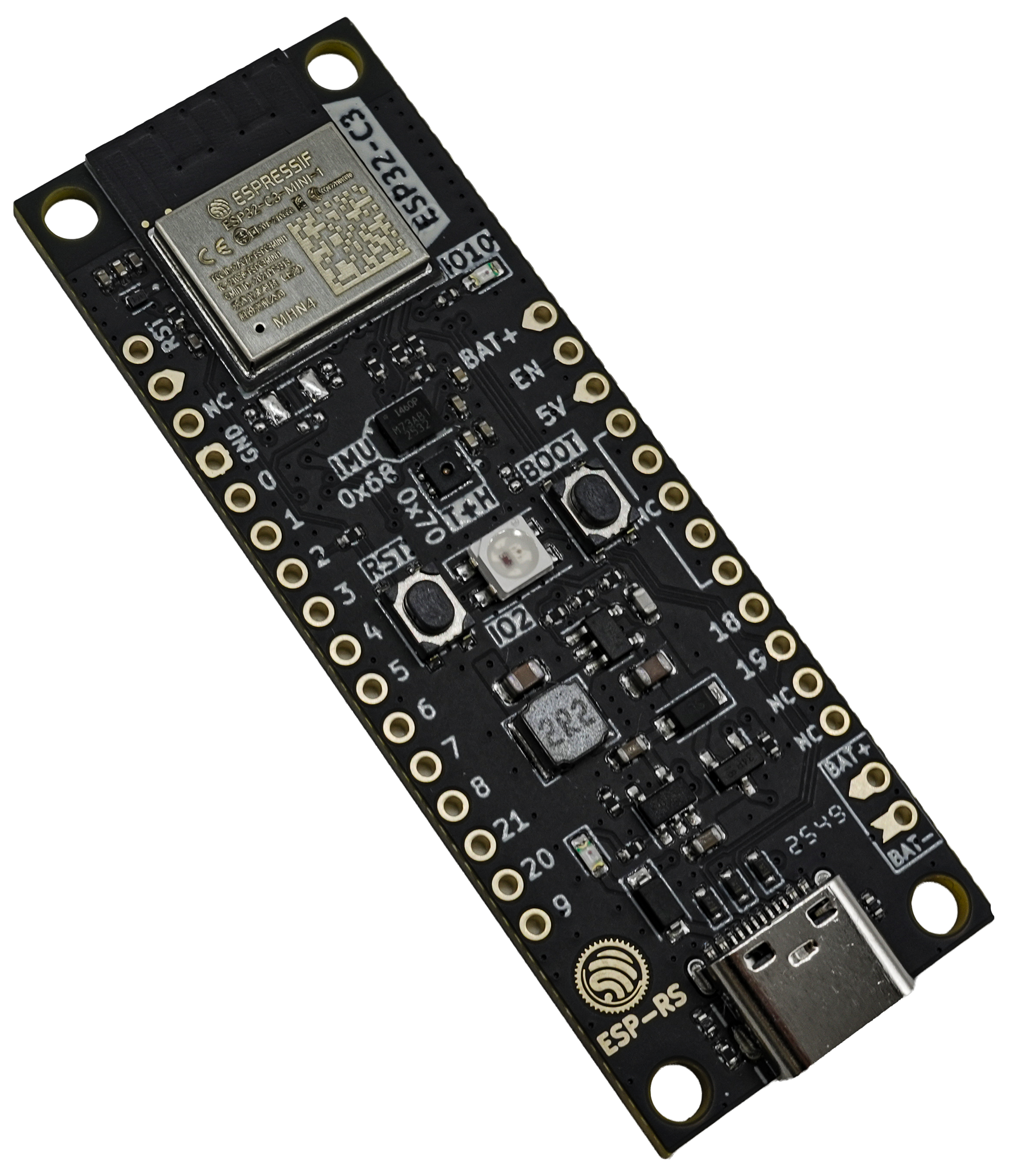
ESP32-C3-DevKit-RUST-2 (with the ESP32-C3-MINI-1 module) - front
The key components of the board are described starting from the module and continue in the clockwise direction.
Key Component |
Description |
|---|---|
ESP32-C3-MINI-1 |
ESP32-C3-MINI-1 is a powerful general-purpose Espressif module that offers Wi-Fi and Bluetooth Low Energy coexistence. It integrates a 4 MB SPI flash. |
User LED |
User GPIO LED, connected to GPIO10. |
IMU |
Inertial Measurement Unit (IMU) ICM-42670-P, connected via I2C interface |
Temperature and Humidity Sensor |
SHTC3, connected via I2C interface |
Boot Button |
Download button. Holding down Boot and then pressing Reset initiates Firmware Download mode for downloading firmware through the serial port. |
RGB LED |
Addressable RGB LED, driven by GPIO2. |
Lithium Battery charging circuit |
Built-in charging circuit for single-cell lithium batteries |
USB type-C Port |
USB-CDC port. Power supply for the board as well as the communication interface between a computer and the ESP32-C3 chip (flashing and debug). |
Battery charging indicator LED |
The red LED indicates that the battery is being charged. |
5V to 3.3V buck converter |
Power regulator that converts a 5 V supply into a 3.3 V output. |
Reset Button |
Press this button to restart the system. |
Pin Headers |
Most of the available GPIO pins are broken out to the pin headers for external access. For details, please see Header Block. |
Application Examples
The following application examples are available for ESP32-C3-DevKit-RUST-2:
To explore the application examples or to develop your own, please follow the steps outlined in the Start Application Development section.
Start Application Development
Before powering up your ESP32-C3-DevKit-RUST-2, please make sure that it is in good condition with no obvious signs of damage.
Required Hardware
ESP32-C3-DevKit-RUST-2
USB 2.0 cable (USB Type-C)
Computer running Windows, Linux, or macOS
Note
Be sure to use an appropriate USB cable. Some cables are for charging only and do not provide the needed data lines nor work for programming the boards.
Hardware Setup
Connect the board with the computer using the USB type-C Port.
Software Setup
Please proceed to ESP-IDF Get Started, which will quickly help you set up the development environment then flash an application example onto your board.
Contents and Packaging
Retail Orders
If you order a few samples, each ESP32-C3-DevKit-RUST-2 comes in an individual package in either antistatic bag or any packaging depending on your retailer.
For retail orders, please go to https://www.espressif.com/en/contact-us/get-samples.
Hardware Reference
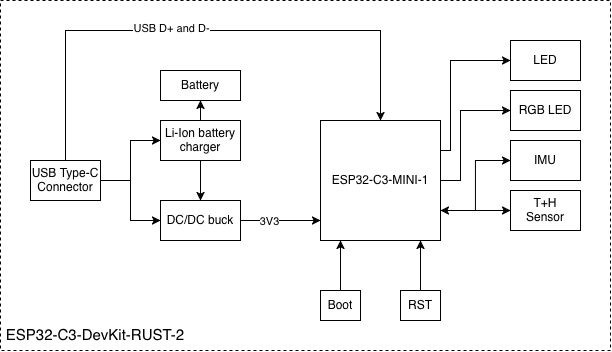
Block Diagram
The block diagram below shows the components of ESP32-C3-DevKit-RUST-2 and their interconnections.
ESP32-C3-DevKit-RUST-2 (click to enlarge)
Power Supply Options
There are three mutually exclusive ways to provide power to the board:
USB type-C port, default power supply
5V and GND pin headers
BAT and GND pin headers (for single-cell lithium battery)
It is recommended to use the first option: USB type-C port.
Note
The board operates at a 5 V power supply and requires a minimum current of 0.5 A. If your application demands a current exceeding 0.5 A, consider connecting the board via a powered USB hub to ensure stable operation.
Header Block
The two tables below provide the Name and Function of the pin headers on both sides of the board (left and right). The pin header names are shown in ESP32-C3-DevKit-RUST-2 (with the ESP32-C3-MINI-1 module) - front. The numbering is the same as in the ESP32-C3-DevKit-RUST-2 Schematic (PDF).
Left Header
No. |
Name |
Type 1 |
Function |
|---|---|---|---|
1 |
RST |
I |
EN / CHIP_PU |
2 |
3V3 |
P |
3.3 V power supply |
3 |
N/C |
Not connected |
|
4 |
GND |
G |
Ground |
5 |
IO0 |
I/O/T |
GPIO0, ADC1_CH0 |
6 |
IO1 |
I/O/T |
GPIO1, ADC1_CH1 |
7 |
IO2 |
I/O/T |
GPIO2 2, ADC1_CH2 |
8 |
IO3 |
I/O/T |
GPIO3, ADC1_CH3 |
9 |
IO4 |
I/O/T |
GPIO4, ADC2_CH0 |
10 |
IO5 |
I/O/T |
GPIO5, ADC2_CH1 |
11 |
IO6 |
I/O/T |
GPIO6, MTCK |
12 |
IO7 |
I/O/T |
GPIO7, MTDO, LED |
13 |
IO8 |
I/O/T |
GPIO8 2, LOG |
14 |
RX |
I/O/T |
GPIO21, U0RXD |
15 |
TX |
I/O/T |
GPIO20, U0TXD |
16 |
IO9 |
I/O/T |
GPIO9 2, BOOT |
Right Header
No. |
Name |
Type 1 |
Function |
|---|---|---|---|
1 |
BAT+ |
P |
Battery supply |
2 |
EN |
I |
Enable |
3 |
5V |
P |
USB VBUS |
4 |
N/C |
Not connected |
|
5 |
N/C |
Not connected |
|
6 |
N/C |
Not connected |
|
7 |
N/C |
Not connected |
|
8 |
N/C |
Not connected |
|
9 |
IO18 |
I/O/T |
GPIO18, USB_D- |
10 |
IO19 |
I/O/T |
GPIO19, USB_D+ |
11 |
N/C |
Not connected |
|
12 |
N/C |
Not connected |
- 1(1,2)
P: Power supply; I: Input; O: Output; T: High impedance.
- 2(1,2,3)
GPIO2, GPIO8, and GPIO9 are strapping pins of the ESP32-C3 chip. These pins are used to control several chip functions depending on binary voltage values applied to the pins during chip power-up or system reset. For description and application of the strapping pins, please refer to Section Boot Configurations in ESP32-C3 Datasheet.
I2C Peripherals
Peripheral |
Part number |
Address |
|---|---|---|
IMU |
ICM-42670-P |
0x68 |
Temperature and Humidity |
SHTC3 |
0x70 |
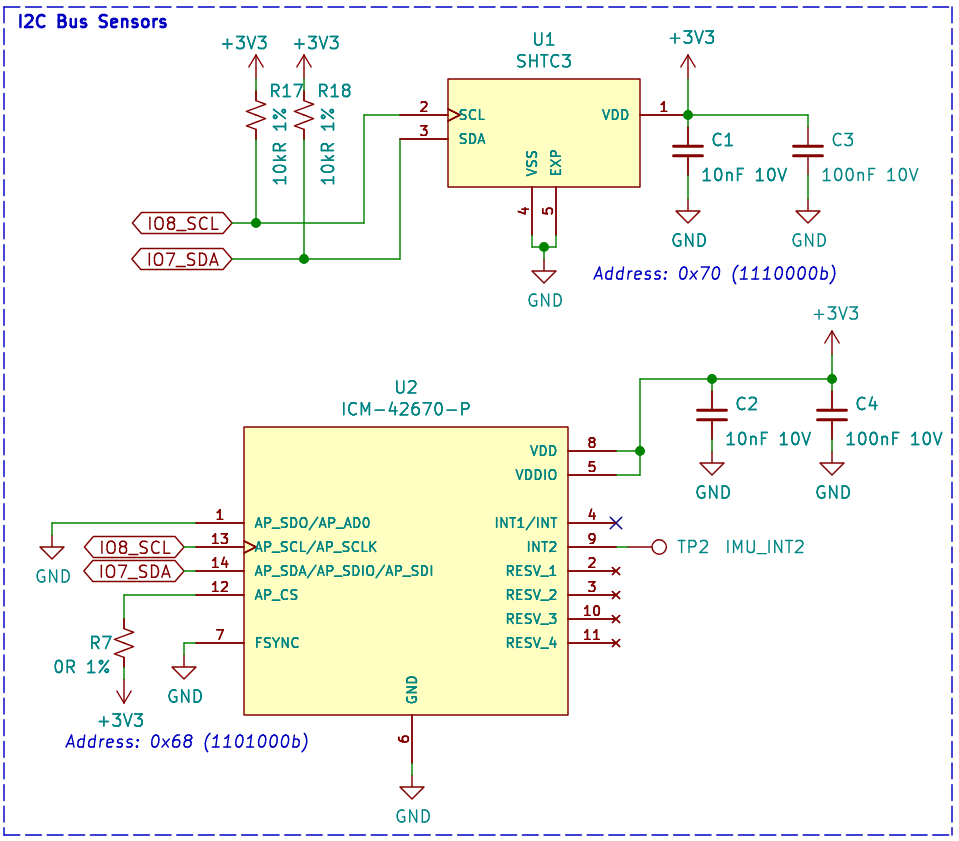
Sensors
Sensors on I2C bus (click to enlarge)
I2C Signal Mapping
Signal |
GPIO |
|---|---|
SDA |
GPIO10 |
SCL |
GPIO8 |
Peripherals Connected to GPIOs
I/O Device |
GPIO |
|---|---|
WS2812 LED |
GPIO2 |
LED |
GPIO7 |
Button/Boot |
GPIO9 |
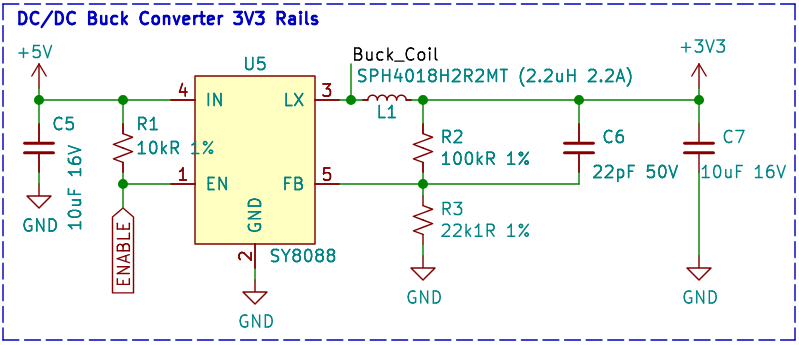
Power Supply
Power Supply Circuit (click to enlarge)
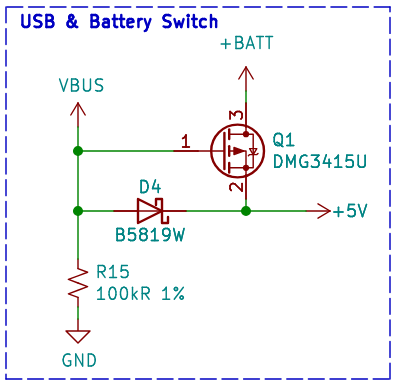
Power Supply from USB
Power Switch Circuit (click to enlarge)
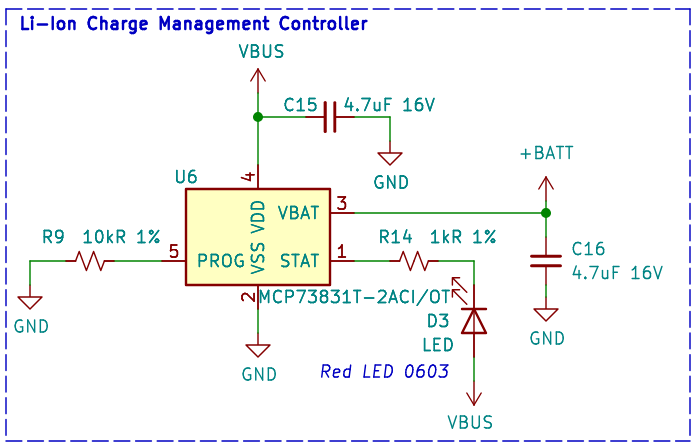
Lithium Battery Charging
Lithium Battery charging circuit (click to enlarge)
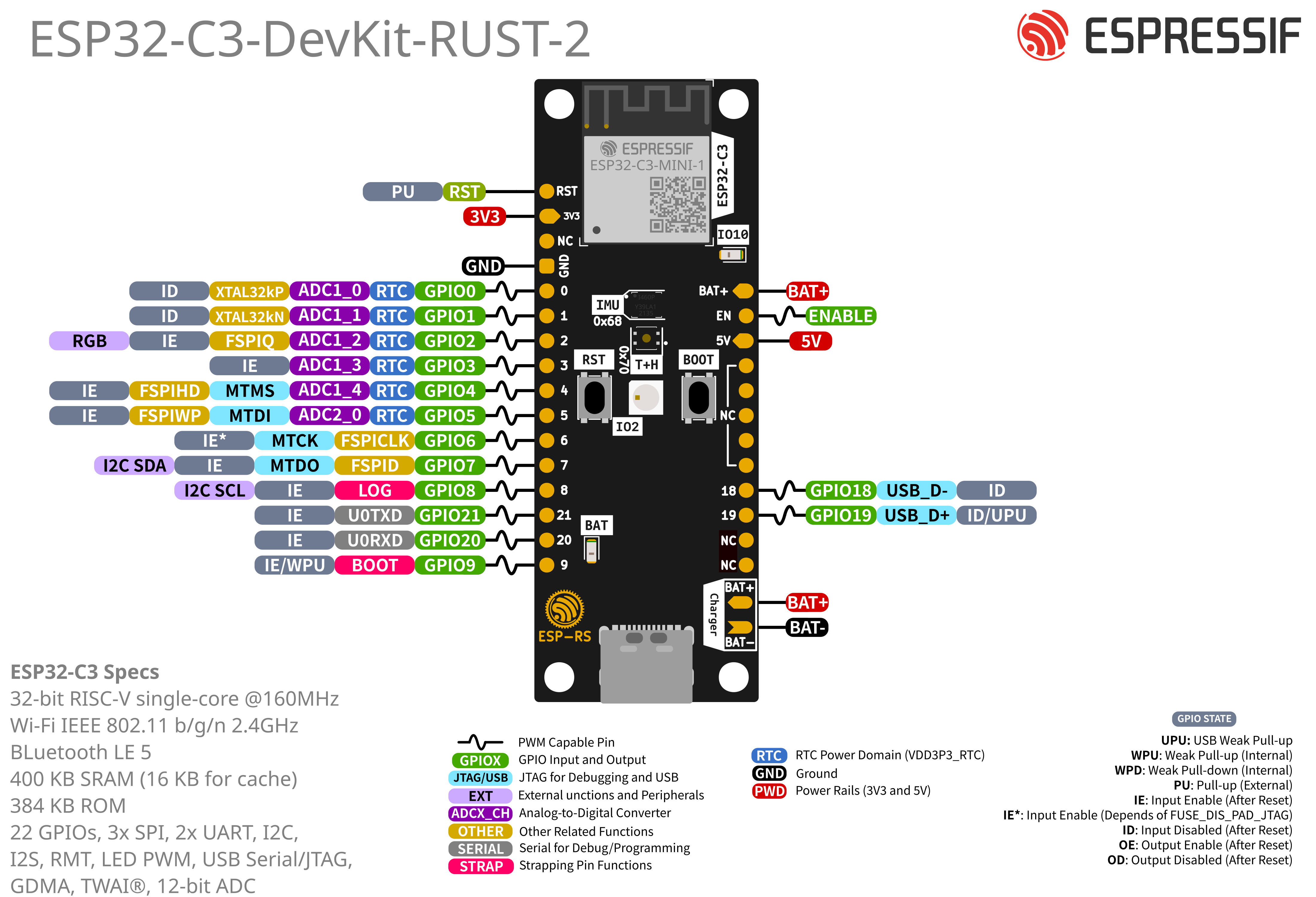
Pin Layout
ESP32-C3-DevKit-RUST-2 Pin Layout (with the ESP32-C3-MINI-1 module, click to enlarge)
Hardware Revision Details
This is a new version with minor changes from the previous ESP32-C3-DevKit-RUST-1 board. The list of changes are as follows:
Changed the GPIO for the user LED from GPIO7 to GPIO10.
Changed the pin header hole diameter from 0.8 mm to 1.0 mm.
Fixed issues on the silkscreen layer.
Changes on the traces on the I2C bus for better signal integrity.