Schematic Checklist
Overview
The integrated circuitry of ESP32-S31 requires only 30 electrical components (resistors, capacitors, and inductors) and a crystal, as well as an SPI flash. The high integration of ESP32-S31 allows for simple peripheral circuit design. This chapter details the schematic design of ESP32-S31.
The following figure shows a reference schematic design of ESP32-S31. It can be used as the basis of your schematic design.
Note
The core circuit is the minimum required circuit. Please do not remove components arbitrarily.
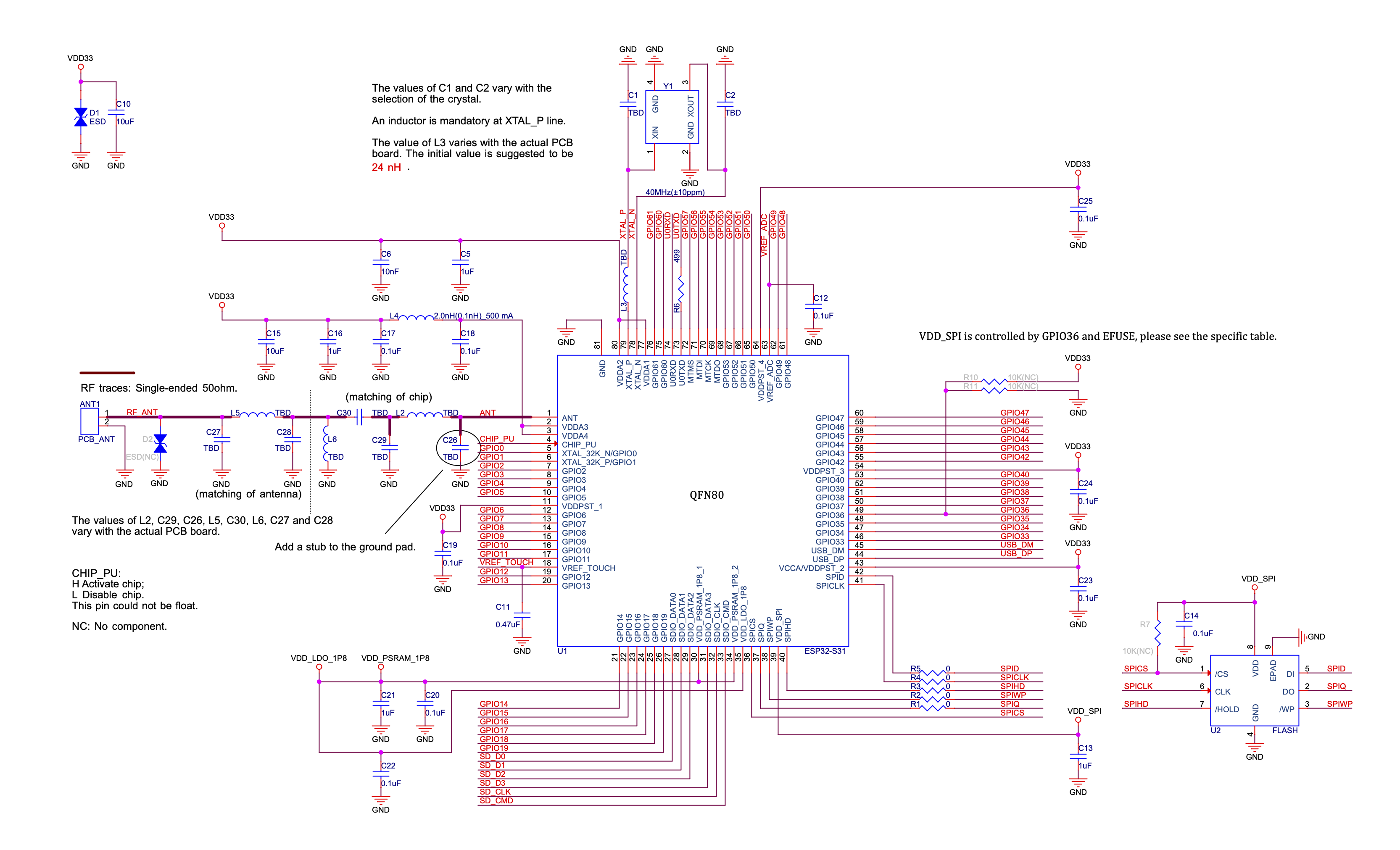
ESP32-S31 Reference Schematic
Any basic ESP32-S31 circuit design may be broken down into the following major building blocks:
The rest of this chapter details the specifics of circuit design for each of these sections.
Power Supply
The general recommendations for power supply design are:
When using a single power supply, the recommended power supply voltage is 3.3 V and the output current is no less than 600 mA.
It is suggested to add an ESD protection diode and at least 10 μF capacitor at the main power entrance (where the external power supply enters the PCB).
The power scheme is shown in Figure ESP32-S31 Power Scheme.
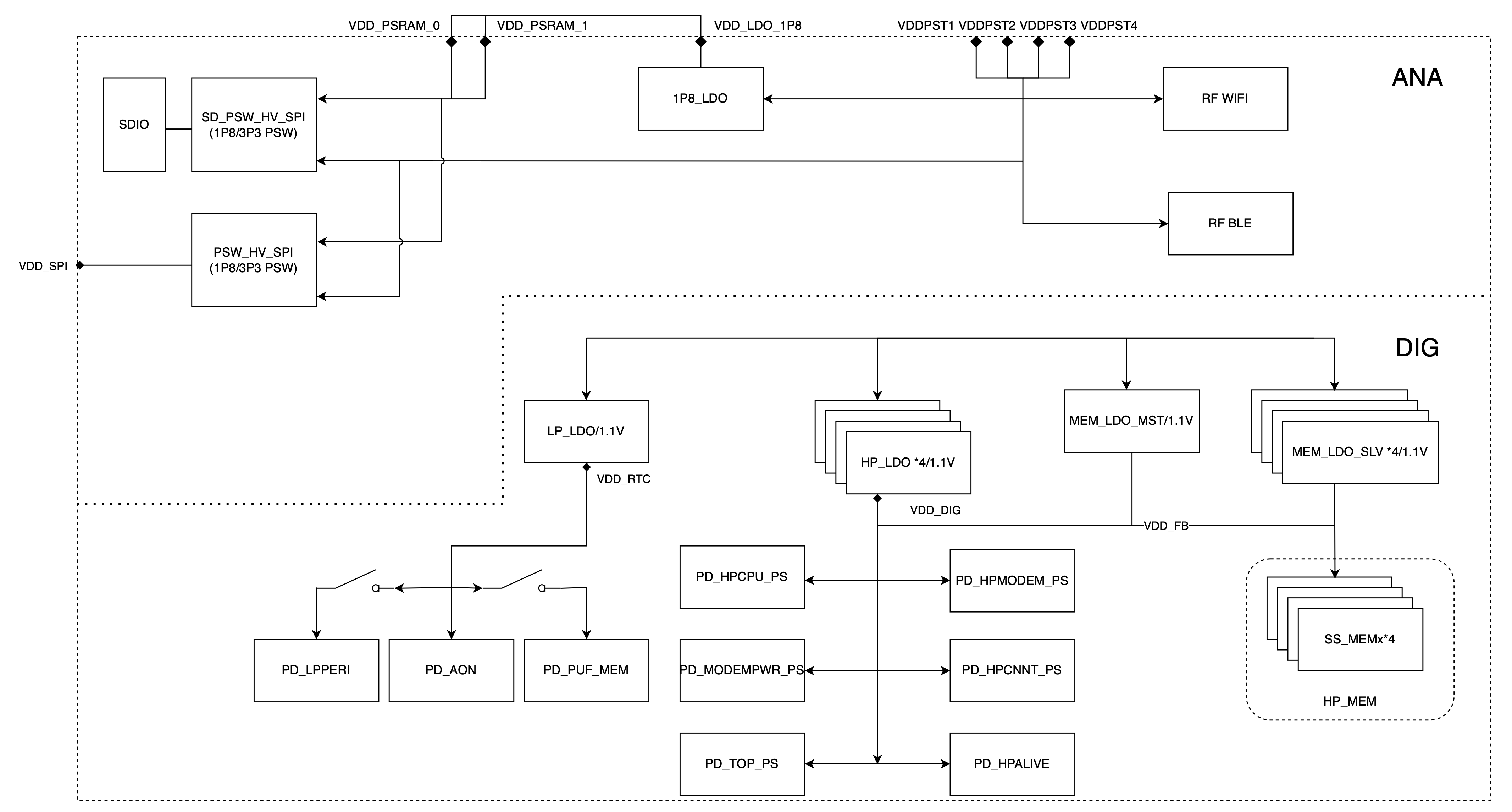
ESP32-S31 Power Scheme
More information about power supply pins can be found in ESP32-S31 Series Datasheet > Section Power Supply.
Digital Power Supply
Pin VDDPST_1 of ESP32-S31 is a power supply input pin associated with the digital LP power domain, with an operating voltage range of 3.0 V ~ 3.6 V. It is recommended to add a 0.1 μF capacitor close to this power supply pin in the circuit.
Pins VDDPST_3 and VDDPST_4 are power supply input pins associated with the digital HP power domain, with an operating voltage range of 3.0 V ~ 3.6 V. It is recommended to add a 0.1 μF capacitor close to each of these power supply pins in the circuit.
Pin VCCA/VDDPST_2 is a power supply input pin associated with USB_PHY and the digital HP power domain, with an operating voltage range of 3.0 V ~ 3.6 V. It is recommended to add a 0.1 μF capacitor close to this power supply pin in the circuit.
Pin VDD_SPI is a power supply input/output pin associated with the flash power domain. It is recommended to use the VDD_SPI output power to supply the off-package flash. It is recommended to add 0.1 μF and 1 μF decoupling capacitors close to this power supply pin and the flash.
Currently, pin VDD_SPI can only output 3.3 V. Please add an external pull-up resistor on GPIO36.
Pins VDD_PSRAM_1P8_1 and VDD_PSRAM_1P8_2 are power supply input pins associated with the PSRAM power domain. It is recommended to add 0.1 μF and 1 μF capacitors close to each of these power supply pins in the circuit.
Pin VDD_LDO_1P8 is a power output pin that can be used to supply in-package PSRAM, off-package flash, and internal SD GPIO.
It is recommended to use the VDD_LDO_1P8 output power to supply the in-package PSRAM, that is, connect VDD_PSRAM_1P8_1 and VDD_PSRAM_1P8_2 to VDD_LDO_1P8.
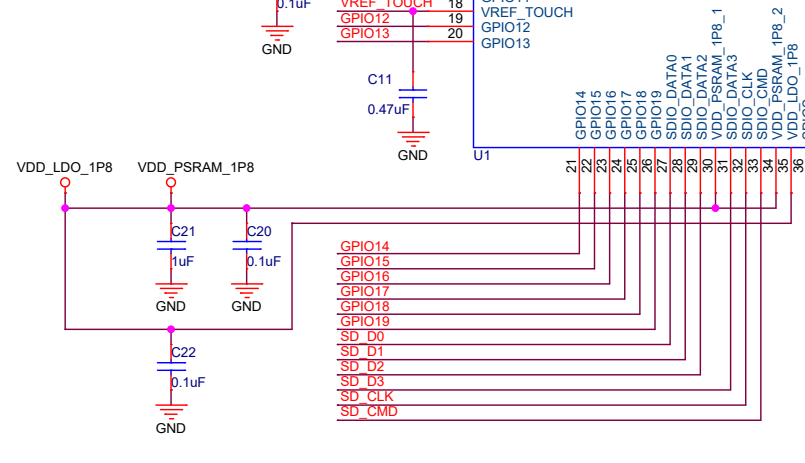
ESP32-S31 Series Chip PSRAM Power Schematic
Analog Power Supply
ESP32-S31’s VDDA1 to VDDA4 pins are the analog power supply pins, working at 3.0 V ~ 3.6 V.
It is recommended to add 10 nF and 1 μF capacitors close to the VDDA1 and VDDA2 power supply pins in the circuit.
For VDDA3 and VDDA4, when ESP32-S31 is transmitting signals, there may be a sudden increase in the current draw, causing power rail collapse. Therefore, it is highly recommended to add a 10 μF capacitor to the power rail, which can work in conjunction with the 1 μF capacitor(s) or other capacitors.
It is suggested to add an extra 10 μF capacitor at the main power entrance. If the main power entrance is close to VDDA3 and VDDA4, then the two 10 μF capacitors can be merged into one.
Add an LC circuit to the VDDA3 and VDDA4 power rail to suppress high-frequency harmonics. The inductor’s rated current is preferably 500 mA and above.
For the remaining capacitor circuits, please refer to ESP32-S31 Reference Schematic.
Chip Power-up and Reset Timing
ESP32-S31’s CHIP_PU pin can enable the chip when it is high and reset the chip when it is low.
When ESP32-S31 uses a 3.3 V system power supply, the power rails need some time to stabilize before CHIP_PU is pulled up and the chip is enabled. Therefore, CHIP_PU needs to be asserted high after the 3.3 V rails have been brought up.
To reset the chip, keep the reset voltage VIL_nRST in the range of (–0.3 ~ 0.15 × VDDPST_1) V. To avoid reboots caused by external interferences, make the CHIP_PU trace as short as possible.
Figure ESP32-S31 Power-up and Reset Timing shows the power-up and reset timing of ESP32-S31.
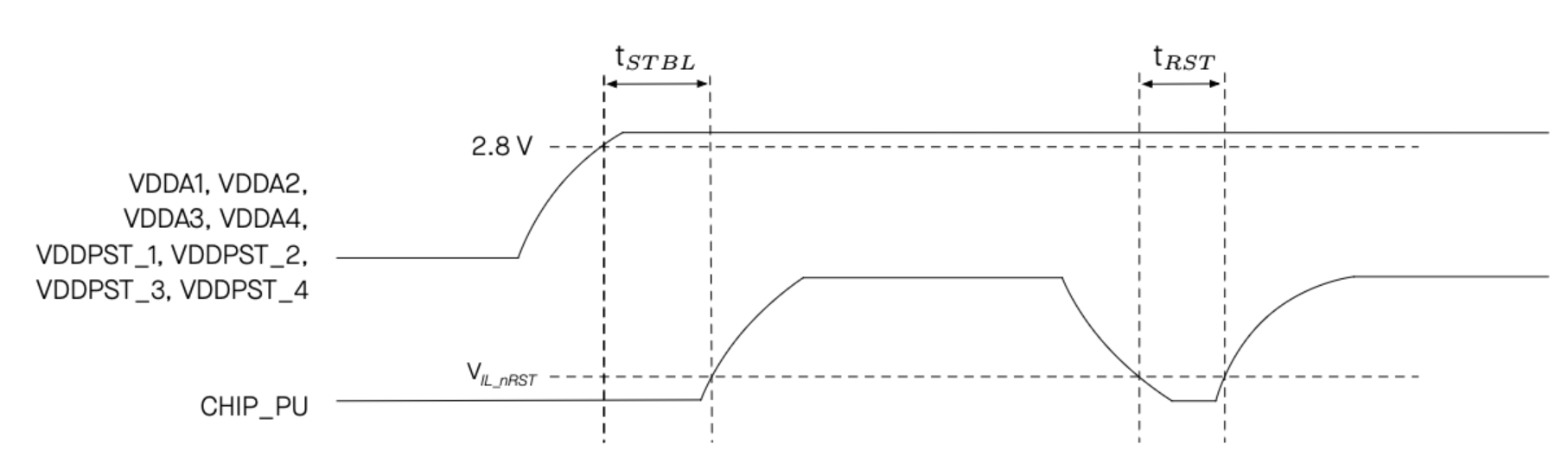
ESP32-S31 Power-up and Reset Timing
Table Description of Timing Parameters for Power-up and Reset provides the specific timing requirements.
Parameter |
Description |
Minimum (ms) |
|---|---|---|
tSTBL |
Time required for VDDA1, VDDA2, VDDA3, VDDA4, VDDPST_1, VDDPST_2, VDDPST_3, and VDDPST_4 to stabilize before the CHIP_PU pin is pulled high to activate the chip |
1 |
tRST |
Time reserved for CHIP_PU to stay below VIL_nRST to reset the chip |
1 |
Attention
CHIP_PU must not be left floating.
To ensure the correct power-up and reset timing, it is advised to add an RC delay circuit at the CHIP_PU pin. The recommended setting for the RC delay circuit is usually R = 10 kΩ and C = 1 μF. However, specific parameters should be adjusted based on the characteristics of the actual power supply and the power-up and reset timing of the chip.
If the user application has one of the following scenarios:
Slow power rise or fall, such as during battery charging.
Frequent power on/off operations.
Unstable power supply, such as in photovoltaic power generation.
Then, the RC circuit alone may not meet the timing requirements, which may prevent the chip from entering normal operating mode or cause flash erase operations to occasionally fail to complete. In this case, please reserve a power monitor chip to reset the chip when the power supply is abnormal, and the threshold of the power monitor chip is recommended to be around 3.0 V.
Flash and PSRAM
Currently, ESP32-S31 firmware only supports NOR flash.
ESP32-S31 requires off-package flash to store application firmware and data. ESP32-S31 supports connecting flash via SPI, Dual SPI, Quad SPI/QPI, and other interface modes, with a maximum supported flash size of 256 MB.
ESP32-S31 has in-package octal 1.8 V PSRAM, but the PSRAM pins are not bonded out.
Table Pin Mapping Between Chip and Off-Package Flash lists the pin-to-pin mapping between the chip and off-package flash in all SPI modes.
Pin No. |
Pin Name |
Single SPI |
Dual SPI |
Quad SPI/QPI |
|---|---|---|---|---|
36 |
SPICS |
CS# |
CS# |
CS# |
37 |
SPIQ |
DO |
DO |
DO |
38 |
SPIWP |
WP# |
WP# |
WP# |
40 |
SPIHD |
HOLD# |
HOLD# |
HOLD# |
41 |
SPICLK |
CLK |
CLK |
CLK |
42 |
SPID |
DI |
DI |
DI |
To reduce the risk of software compatibility issues, it is recommended to use flash models officially validated by Espressif. For detailed model selection, consult the sales or technical support team. It is recommended to add zero-ohm resistor footprints in series on the SPI communication lines as shown in Figure ESP32-S31 Schematic for External Flash. These footprints provide flexibility for future adjustments, such as tuning drive strength, mitigating RF interference, correcting signal timing, and reducing noise, if needed.
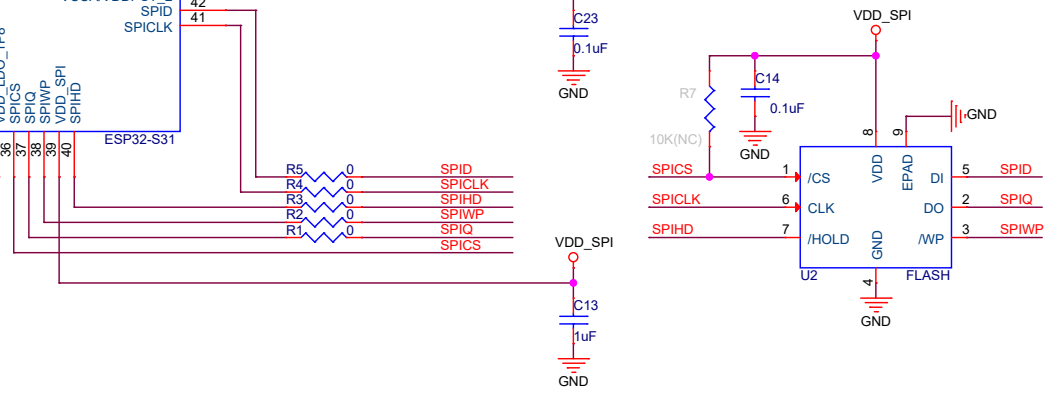
ESP32-S31 Schematic for External Flash
Clock Source
ESP32-S31 supports two external clock sources:
External Crystal Clock Source (Compulsory)
The ESP32-S31 firmware only supports 40 MHz crystal.
The circuit for the crystal is shown in Figure ESP32-S31 Schematic for External Crystal. Note that the accuracy of the selected crystal should be within ±10 ppm.
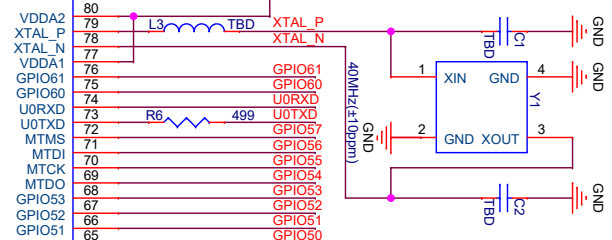
ESP32-S31 Schematic for External Crystal
A series inductor must be added on the XTAL_P clock trace. Initially, it is suggested to use an inductor of 24 nH (0201). This inductor is required for normal system startup. Even if RF function is not used, this inductor is still required. It can also be used to reduce the impact of high-frequency crystal harmonics on RF performance, and the value should be confirmed after testing.
The initial values of external capacitors C1 and C2 can be determined according to the formula:
where the value of CL (load capacitance) can be found in the crystal’s datasheet, and the value of Cstray refers to the PCB’s stray capacitance. The values of C1 and C2 need to be further adjusted after an overall test as below:
Select TX tone mode using the Certification and Test Tool.
Observe the 2.4 GHz signal with a radio communication analyzer or a spectrum analyzer and demodulate it to obtain the actual frequency offset.
Adjust the frequency offset to be within ±10 ppm (recommended) by adjusting the external load capacitance.
When the center frequency offset is positive, it means that the equivalent load capacitance is small, and the external load capacitance needs to be increased.
When the center frequency offset is negative, it means the equivalent load capacitance is large, and the external load capacitance needs to be reduced.
External load capacitance at the two sides are usually equal, but in special cases, they may have slightly different values.
Note
Defects in the manufacturing of crystal (for example, large frequency deviation of more than ±10 ppm, unstable performance within the operating temperature range, etc) may lead to the malfunction of ESP32-S31, resulting in a decrease of the RF performance.
It is recommended that the amplitude of the crystal is greater than 500 mV.
When Wi-Fi or Bluetooth connection fails, after ruling out software problems, you may follow the steps mentioned above to ensure that the frequency offset meets the requirements by adjusting capacitors at the two sides of the crystal.
RTC Clock Source (Optional)
ESP32-S31 supports an external 32.768 kHz crystal to act as the RTC clock. The external RTC clock source enhances timing accuracy and consequently decreases average power consumption, without impacting functionality.
Figure ESP32-S31 Schematic for 32.768 kHz Crystal shows the schematic for the external 32.768 kHz crystal.
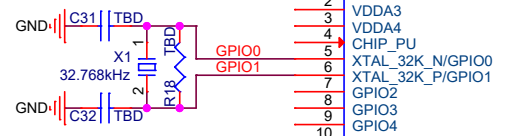
ESP32-S31 Schematic for 32.768 kHz Crystal
Please note the requirements for the 32.768 kHz crystal:
Equivalent series resistance (ESR) ≤ 70 kΩ.
Load capacitance at both ends should be configured according to the crystal’s specification.
The parallel resistor R is used for biasing the crystal circuit (5 MΩ < R ≤ 10 MΩ).
In general, you do not need to populate the resistor.
If the RTC clock source is not required, then the pins for the 32.768 kHz crystal can be used as GPIOs.
RF
RF Circuit
ESP32-S31’s RF circuit is mainly composed of three parts, the RF traces on the PCB board, the chip matching circuit, the antenna and the antenna matching circuit. Each part should meet the following requirements:
For the RF traces on the PCB board, 50 Ω impedance control is required.
For the chip matching circuit, it must be placed close to the chip. A CLCCL structure is preferred.
The CLCCL structure forms a bandpass filter, which is mainly used to adjust impedance points, suppress high-frequency harmonics and low-frequency noise, and improve anti-interference capability.
The RF matching circuit is shown in Figure ESP32-S31 Schematic for RF Matching.
For the antenna and the antenna matching circuit, to ensure radiation performance, the antenna’s characteristic impedance must be around 50 Ω. Adding a CLC matching circuit near the antenna is recommended to adjust the antenna.
It is recommended that the overall matching circuit include at least two CLC structures.
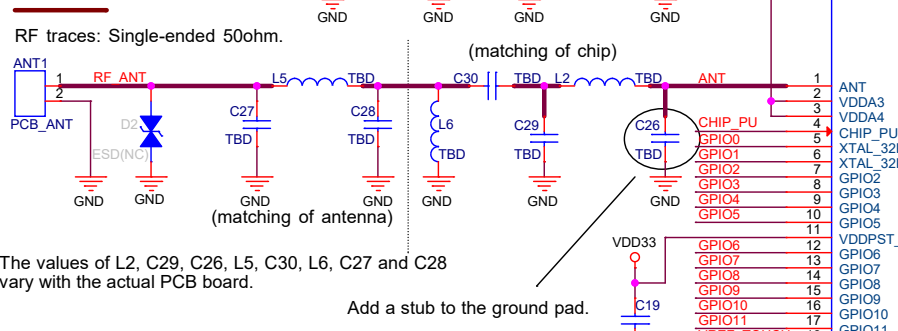
ESP32-S31 Schematic for RF Matching
RF Tuning
The RF matching parameters vary with the board, so the ones used in Espressif modules could not be applied directly. Follow the instructions below to do RF tuning.
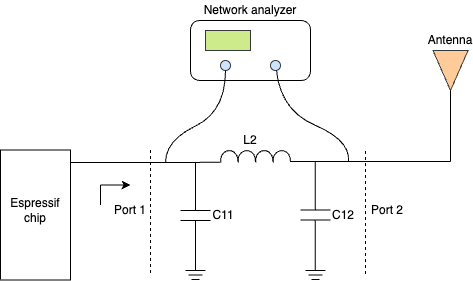
Figure ESP32-S31 RF Tuning Diagram shows the general process of RF tuning.
ESP32-S31 RF Tuning Diagram
In the matching circuit, define the port near the chip as Port 1 and the port near the antenna as Port 2. S11 describes the ratio of the signal power reflected back from Port 1 to the input signal power, the transmission performance is best if the matching impedance is conjugate to the chip impedance. S21 is used to describe the transmission loss of signal from Port 1 to Port 2. If S11 is close to the chip conjugate point 40+j0 and S21 is less than -35 dB at 4.8 GHz and 7.2 GHz, the matching circuit can satisfy transmission requirements.
Connect the two ends of the matching circuit to the network analyzer, and test its signal reflection parameter S11 and transmission parameter S21. Adjust the values of the components in the circuit until S11 and S21 meet the requirements. If your PCB design of the chip strictly follows the PCB design stated in Chapter PCB Layout Design, you can refer to the value ranges in Table Recommended Value Ranges for Components to debug the matching circuit.
Reference Designator |
Recommended Value Range |
Serial No. |
|---|---|---|
C11 |
1.2 ~ 1.8 pF |
GRM0335C1H1RXBA01D |
L2 |
2.0 ~ 3.0 nH |
LQP03TN2NXB02D |
C12 |
1.8 ~ 1.2 pF |
GRM0335C1H1RXBA01D |
Please use 0201 packages for RF matching components and add a stub to the first capacitor in the matching circuit at the chip end.
Note
If RF function is not required, it is recommended not to initialize the RF stack in firmware. In this case, the RF pin can be left floating. However, if RF function is enabled, make sure an antenna is connected. Operation without an antenna may result in unstable behavior or potential damage to the RF circuit.
UART
ESP32-S31 includes 4 UART interfaces, UART0 ~ UART3. U0TXD and U0RXD are GPIO58 and GPIO59 by default. Other UART signals can be mapped to any available GPIOs via the GPIO matrix.
ESP32-S31 also has one LP UART, which can be configured to any LP GPIO pin.
Usually, UART0 is used as the serial port for download and log printing. For instructions on download over UART0, please refer to Section Download Guidelines. It is recommended to connect a 499 Ω series resistor to the U0TXD line to suppress harmonics.
For application communication, use UART interfaces other than UART0 if possible. Add a series resistor on the TX line to suppress harmonics.
SPI
When using the SPI function, to improve EMC performance, add a series resistor (or ferrite bead) and a capacitor to ground on the SPI_CLK trace. If space allows, it is recommended to also add a series resistor and capacitor to ground on other SPI traces. Ensure that the RC/LC components are placed close to the pins of the chip or module.
Strapping Pins
At each startup or reset, a chip requires some initial configuration parameters, such as in which boot mode to load the chip, etc. These parameters are passed over via the strapping pins. After reset, the strapping pins work as normal function pins.
GPIO37, GPIO60, and GPIO61 are strapping pins.
All the information about strapping pins is covered in ESP32-S31 Series Datasheet > Chapter Boot Configurations.
In this section, we will mainly cover the strapping pins related to boot mode.
After chip reset is released, the combination of GPIO60 and GPIO61 controls the boot mode. See Table Chip Boot Mode Control.
Boot Mode |
GPIO61 |
GPIO60 |
|---|---|---|
SPI Boot (default) |
1 |
Any value |
Joint Download Boot |
0 |
1 |
Note
Bold indicates default values and default configurations.
The Joint Download Boot mode supports the following download methods:
USB-Serial-JTAG Download Boot
USB-OTG Download Boot
UART Download Boot
GPSPI Download Boot
In addition to SPI Boot and Joint Download Boot modes, ESP32-S31 also supports SPI Download Boot mode.
Signals applied to the strapping pins should have specific setup time and hold time. For more information, see Figure Setup and Hold Times for Strapping Pins and Table Description of Timing Parameters for Strapping Pins.

Setup and Hold Times for Strapping Pins
Parameter |
Description |
Minimum (ms) |
|---|---|---|
tSU |
Time reserved for the power rails to stabilize before the chip enable pin (CHIP_PU) is pulled high to activate the chip. |
0 |
tH |
Time reserved for the chip to read the strapping pin values after CHIP_PU is already high and before these pins start operating as regular IO pins. |
3 |
Attention
It is recommended to place a pull-up resistor at the GPIO61 pin.
Do not add high-value capacitors at GPIO61, or the chip may enter download mode.
External Capacitor
ESP32-S31 has the following pins that require external capacitors:
VREF_TOUCH is the TOUCH reference voltage capacitor pin. It is recommended to add a 0.47 μF capacitor close to this pin in the circuit. If the TOUCH function is not used, this pin can be left floating.
VREF_ADC is the ADC reference voltage capacitor pin. It is recommended to add a 0.1 μF capacitor close to this pin in the circuit. If the ADC function is not used, this pin can be left floating.
GPIO
The pins of ESP32-S31 can be configured via IO MUX or GPIO matrix. IO MUX provides the default pin configurations (see ESP32-S31 Series Datasheet > Appendix ESP32-S31 Consolidated Pin Overview), whereas the GPIO matrix is used to route signals from peripherals to GPIO pins. For more information about IO MUX and GPIO matrix, please refer to ESP32-S31 Technical Reference Manual > Chapter IO MUX and GPIO Matrix.
Some peripheral signals have already been routed to certain GPIO pins, while some can be routed to any available GPIO pins. For details, please refer to ESP32-S31 Series Datasheet > Section Peripherals.
When using GPIOs, please:
Pay attention to the states of strapping pins during power-up.
Pay attention to the default GPIO configurations after reset (see the table below). For unused pins in the high-impedance state without an internal pull-up or pull-down, it is recommended to add a pull-up or pull-down resistor or enable the internal pull during software initialization to avoid extra power consumption, selecting the direction as required by the external circuit.
Avoid using the pins already occupied by flash.
In Deep-sleep mode, only LP GPIOs can be controlled, which are GPIO0 to GPIO7.
No. |
Name |
Power |
At Reset |
After Reset |
|---|---|---|---|---|
1 |
ANT |
|||
2 |
VDDA3 |
|||
3 |
VDDA4 |
|||
4 |
CHIP_PU |
|||
5 |
XTAL_32K_N/GPIO0 |
VDDPST_1 |
||
6 |
XTAL_32K_P/GPIO1 |
VDDPST_1 |
||
7 |
GPIO2 |
VDDPST_1 |
||
8 |
GPIO3 |
VDDPST_1 |
||
9 |
GPIO4 |
VDDPST_1 |
||
10 |
GPIO5 |
VDDPST_1 |
||
11 |
VDDPST_1 |
|||
12 |
GPIO6 |
VDDPST_1 |
||
13 |
GPIO7 |
VDDPST_1 |
||
14 |
GPIO8 |
VDDPST_1 |
IE |
|
15 |
GPIO9 |
VDDPST_1 |
IE |
|
16 |
GPIO10 |
VDDPST_1 |
IE |
|
17 |
GPIO11 |
VDDPST_1 |
IE |
|
18 |
VREF_TOUCH |
|||
19 |
GPIO12 |
VDDPST_1 |
IE |
|
20 |
GPIO13 |
VDDPST_1 |
IE |
|
21 |
GPIO14 |
VDDPST_1 |
IE |
|
22 |
GPIO15 |
VDDPST_1 |
IE |
|
23 |
GPIO16 |
VDDPST_1 |
IE |
|
24 |
GPIO17 |
VDDPST_1 |
IE |
|
25 |
GPIO18 |
VDDPST_1 |
IE |
|
26 |
GPIO19 |
VDDPST_1 |
IE |
|
27 |
SDIO_DATA0 |
VDDPST_SD |
IE |
|
28 |
SDIO_DATA1 |
VDDPST_SD |
IE |
|
29 |
SDIO_DATA2 |
VDDPST_SD |
IE |
|
30 |
VDD_PSRAM_1P8_1 |
|||
31 |
SDIO_DATA3 |
VDDPST_SD |
IE |
|
32 |
SDIO_CLK |
VDDPST_SD |
IE |
|
33 |
SDIO_CMD |
VDDPST_SD |
IE |
|
34 |
VDD_PSRAM_1P8_2 |
|||
35 |
VDD_LDO_1P8 |
|||
36 |
SPICS |
VDD_SPI |
WPU |
WPU, IE |
37 |
SPIQ |
VDD_SPI |
WPU |
WPU, IE |
38 |
SPIWP |
VDD_SPI |
WPU |
WPU, IE |
39 |
VDD_SPI |
|||
40 |
SPIHD |
VDD_SPI |
WPU |
WPU, IE |
41 |
SPICLK |
VDD_SPI |
WPU |
WPU, IE |
42 |
SPID |
VDD_SPI |
WPU |
WPU, IE |
43 |
VCCA/VDDPST_2 |
|||
44 |
USB_DP |
VDDPST_2 |
||
45 |
USB_DM |
VDDPST_2 |
||
46 |
GPIO33 |
VDDPST_3 |
DRV=3 |
USB_PU, IE, DRV=3 |
47 |
GPIO34 |
VDDPST_3 |
DRV=3 |
USB_PU, IE, DRV=3 |
48 |
GPIO35 |
VDDPST_3 |
IE |
|
49 |
GPIO36 |
VDDPST_3 |
IE |
IE |
50 |
GPIO37 |
VDDPST_3 |
IE |
IE |
51 |
GPIO38 |
VDDPST_3 |
IE |
IE |
52 |
GPIO39 |
VDDPST_3 |
IE |
IE |
53 |
GPIO40 |
VDDPST_3 |
IE |
IE |
54 |
VDDPST_3 |
|||
55 |
GPIO42 |
VDDPST_3 |
IE |
|
56 |
GPIO43 |
VDDPST_3 |
IE |
|
57 |
GPIO44 |
VDDPST_3 |
IE |
|
58 |
GPIO45 |
VDDPST_3 |
IE |
|
59 |
GPIO46 |
VDDPST_3 |
IE |
|
60 |
GPIO47 |
VDDPST_3 |
IE |
|
61 |
GPIO48 |
VDDPST_3 |
||
62 |
GPIO49 |
VDDPST_3 |
||
63 |
VREF_ADC |
|||
64 |
VDDPST_4 |
|||
65 |
GPIO50 |
VDDPST_4 |
||
66 |
GPIO51 |
VDDPST_4 |
||
67 |
GPIO52 |
VDDPST_4 |
IE |
|
68 |
GPIO53 |
VDDPST_4 |
IE |
|
69 |
MTDO |
VDDPST_4 |
IE |
|
70 |
MTCK |
VDDPST_4 |
IE |
|
71 |
MTDI |
VDDPST_4 |
IE |
|
72 |
MTMS |
VDDPST_4 |
IE |
|
73 |
GPIO58 |
VDDPST_4 |
IE |
|
74 |
GPIO59 |
VDDPST_4 |
IE |
|
75 |
GPIO60 |
VDDPST_4 |
WPU, IE |
WPU, IE |
76 |
GPIO61 |
VDDPST_4 |
WPU, IE |
WPU, IE |
77 |
VDDA1 |
|||
78 |
XTAL_N |
|||
79 |
XTAL_P |
|||
80 |
VDDA2 |
|||
81 |
GND |
IE – input enabled
WPU – internal weak pull-up resistor enabled
DRV – drive strength
Values 0 ~ 3 correspond to approximately 5, 10, 20, and 40 mA respectively.
The default drive current of GPIO33 and GPIO34 is 40 mA. The default drive current of all other IO pins is 20 mA.
USB_PU – USB pull-up resistor enabled
USB pins (GPIO33 and GPIO34) are configured for the USB function by default. Whether these pins are pulled up is determined by the USB pull-up resistor. The USB pull-up is controlled by USB_SERIAL_JTAG_DP/DM_PULLUP, and the USB pull-up resistor value can be controlled through the USB_SERIAL_JTAG_PULLUP_VALUE bit.
When the USB function is disabled, the USB pins are used as regular GPIOs, with their internal weak pull-up and pull-down resistors disabled by default. They can be configured through IO_MUX_GPIOn_MCU_WPU/WPD.
ADC
Table below shows the correspondence between ADC channels and GPIOs.
GPIO Pin |
ADC Function |
|---|---|
GPIO42 |
ADC1_CH0_N |
GPIO43 |
ADC1_CH0_P |
GPIO44 |
ADC1_CH1_N |
GPIO45 |
ADC1_CH1_P |
GPIO46 |
ADC1_CH2_N |
GPIO47 |
ADC1_CH2_P |
GPIO48 |
ADC1_CH3_N |
GPIO49 |
ADC1_CH3_P |
GPIO50 |
ADC2_CH0_N |
GPIO51 |
ADC2_CH0_P |
GPIO52 |
ADC2_CH1_N |
GPIO53 |
ADC2_CH1_P |
MTDO/GPIO54 |
ADC2_CH2_N |
MTCK/GPIO55 |
ADC2_CH2_P |
MTDI/GPIO56 |
ADC2_CH3_N |
MTMS/GPIO57 |
ADC2_CH3_P |
Please add a 0.1 μF filter capacitor between ESP pins and ground when using the ADC function to improve accuracy.
SD/MMC Host Controller
ESP32-S31 series chips integrate one SD/SDIO/MMC host controller (cannot be used as a slave). The SD/MMC host peripheral has two slots that can be used to insert SD cards, connect SDIO devices, or connect eMMC chips. Each slot can be used independently.
Slot 1 (SDMMC_HOST_SLOT_0) signals are routed via IO MUX using GPIO20 ~ GPIO25, and support SD 3.0 with 1.8 V/3.3 V automatic switching inside the chip.
Slot 2 (SDMMC_HOST_SLOT_1) signals are routed via IO MUX using GPIO35 ~ GPIO40.
DATA0 |
DATA1 |
DATA2 |
DATA3 |
CLK |
CMD |
|
|---|---|---|---|---|---|---|
SLOT0 |
GPIO20 |
GPIO21 |
GPIO22 |
GPIO23 |
GPIO24 |
GPIO25 |
SLOT1 |
GPIO35 |
GPIO36 |
GPIO37 |
GPIO38 |
GPIO39 |
GPIO40 |
When using slot0, the GPIO power domain is internally powered, so external pull-up resistors are not required. It is recommended to place a series resistor on each signal line and reserve a capacitor to ground on the CLK line for potential debugging and signal tuning. In addition, if 1-bit mode is used, the unused pins must not be repurposed for other functions.
When using slot1, please add pull-up resistors to the GPIO pins. It is also recommended to place a series resistor on each signal line and reserve a capacitor to ground on the CLK line for potential debugging and signal tuning.
USB
ESP32-S31 has a USB 2.0 High-Speed OTG peripheral with integrated transceivers. Pin 44 USB_DP and pin 45 USB_DM serve as the dedicated digital pins for USB_D+ and USB_D- of the USB 2.0 High-Speed OTG interface respectively. Other signals can be routed to any GPIO via the GPIO Matrix.
ESP32-S31 integrates a USB Serial/JTAG controller. GPIO33 and GPIO34 serve as the dedicated digital pins for USB_D- and USB_D+ of the USB Serial/JTAG controller interface respectively.
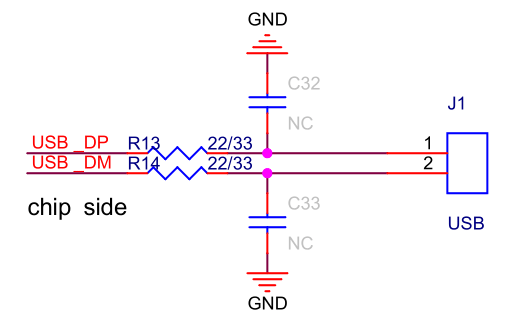
It is recommended to reserve series resistors (initial value can be 22/33 Ω) and capacitors to ground on the GPIO33 and GPIO34 traces (initially can be unpopulated), and place them close to the chip.
The USB RC circuit is shown in Figure ESP32-S31 USB RC Schematic.
ESP32-S31 USB RC Schematic
ESP32-S31 also supports download functions and log message printing via USB. For details please refer to Section Download Guidelines.
Touch Sensor
ESP32-S31 has 14 capacitive-sensing GPIOs, which detect variations induced by touching or approaching the GPIOs with a finger or other objects. The low-noise nature of the design and the high sensitivity of the circuit allow relatively small pads to be used. Arrays of pads can also be used, so that a larger area or more points can be detected.
The touch sensing performance is further enhanced by the waterproof design, frequency hopping detection, and digital filtering feature.
Table below shows the correspondence between touch sensor channels and GPIOs.
GPIO Pin |
Touch Sensor Function |
|---|---|
GPIO6 |
TOUCH_CH0 |
GPIO7 |
TOUCH_CH1 |
GPIO8 |
TOUCH_CH2 |
GPIO9 |
TOUCH_CH3 |
GPIO10 |
TOUCH_CH4 |
GPIO11 |
TOUCH_CH5 |
GPIO12 |
TOUCH_CH6 |
GPIO13 |
TOUCH_CH7 |
GPIO14 |
TOUCH_CH8 |
GPIO15 |
TOUCH_CH9 |
GPIO16 |
TOUCH_CH10 |
GPIO17 |
TOUCH_CH11 |
GPIO18 |
TOUCH_CH12 |
GPIO19 |
TOUCH_CH13 |
When using the touch function, it is recommended to populate a series resistor at the chip side to reduce the coupling noise and interference on the line, and to strengthen the ESD protection. The recommended resistance is from 470 Ω to 2 kΩ, preferably 510 Ω. The specific value depends on the actual test results of the product.
Ethernet MAC
ESP32-S31 provides an IEEE-802.3 compliant Media Access Controller (MAC) interface for Ethernet communication. It supports communication with an external fast Ethernet PHY through the MII, RMII, or RGMII interface (only one interface can be used at a time).
The interface definitions and the corresponding GPIOs are listed below:
GPIO Pin |
MII Interface Pin |
RMII Interface Pin |
RGMII Interface Pin |
|---|---|---|---|
GPIO8 |
MII_TXD0 |
RMII_TXD0 |
RGMII_TXD0 |
GPIO9 |
MII_TXD1 |
RMII_TXD1 |
RGMII_TXD1 |
GPIO10 |
MII_TXD2 |
N/A |
RGMII_TXD2 |
GPIO11 |
MII_TXD3 |
N/A |
RGMII_TXD3 |
GPIO12 |
MII_TXEN |
RMII_TXEN |
RGMII_TX_CTL |
GPIO13 |
MII_TX_CLK |
RMII_CLK |
RGMII_TX_CLK |
GPIO14 |
MII_RX_CLK |
N/A |
RGMII_RX_CLK |
GPIO15 |
MII_RXDV |
RMII_CRS_DV |
RGMII_RX_CTL |
GPIO16 |
MII_RXD3 |
N/A |
RGMII_RXD3 |
GPIO17 |
MII_RXD2 |
N/A |
RGMII_RXD2 |
GPIO18 |
MII_RXD1 |
RMII_RXD1 |
RGMII_RXD1 |
GPIO19 |
MII_RXD0 |
RMII_RXD0 |
RGMII_RXD0 |
Any GPIO |
MII_RX_ER |
N/A |
N/A |
Any GPIO |
MII_CRS |
N/A |
N/A |
Any GPIO |
MII_COL |
N/A |
N/A |
Any GPIO |
MDIO |
MDIO |
MDIO |
Any GPIO |
MDC |
MDC |
MDC |
It is recommended to add a series resistor on the MII/RMII/RGMII CLK line for tuning.
The clock signal on the RMII interface (GPIO13) is input only. If a clock output scheme is needed, please use the REF_GMAC_CLK_PAD signal (GPIO35) and connect it to GPIO13 and the PHY side.
LCD and Camera Controller
The ESP32-S31 LCD_CAM controller contains a separate LCD control module and a Camera control module. It can connect to external LCD and camera devices.
The LCD and CAM interfaces of the LCD_CAM controller can be configured to use any GPIO pin via the GPIO matrix. For high-speed requirements, please use the GPIOs defined in the IO MUX, as shown in the table below.
GPIO Pin |
Parallel LCD Interface Pin |
RGB 888 Interface Pin |
RGB565 Interface Pin |
|---|---|---|---|
GPIO2 |
LCD_DATA19 |
R3 |
– |
GPIO3 |
LCD_DATA20 |
R4 |
– |
GPIO4 |
LCD_DATA21 |
R5 |
– |
GPIO5 |
LCD_DATA22 |
R6 |
– |
GPIO7 |
LCD_DATA23 |
R7 |
– |
GPIO8 |
LCD_DATA0 |
B0 |
B3 |
GPIO9 |
LCD_DATA1 |
B1 |
B4 |
GPIO10 |
LCD_DATA2 |
B2 |
B5 |
GPIO11 |
LCD_DATA3 |
B3 |
B6 |
GPIO12 |
LCD_DATA4 |
B4 |
B7 |
GPIO13 |
LCD_DATA5 |
B5 |
G2 |
GPIO14 |
LCD_DATA6 |
B6 |
G3 |
GPIO15 |
LCD_DATA7 |
B7 |
G4 |
GPIO16 |
LCD_DATA8 |
G0 |
G5 |
GPIO17 |
LCD_DATA9 |
G1 |
G6 |
GPIO18 |
LCD_DATA10 |
G2 |
G7 |
GPIO19 |
LCD_DATA11 |
G3 |
R3 |
GPIO33 |
LCD_DATA12 |
G4 |
R4 |
GPIO34 |
LCD_DATA13 |
G5 |
R5 |
GPIO35 |
LCD_DATA14 |
G6 |
R6 |
GPIO36 |
LCD_DATA15 |
G7 |
R7 |
GPIO37 |
LCD_DATA16 |
R0 |
– |
GPIO38 |
LCD_DATA17 |
R1 |
– |
GPIO39 |
LCD_DATA18 |
R2 |
– |
GPIO40 |
LCD_PCLK |
LCD_PCLK |
LCD_PCLK |
GPIO43 |
LCD_H_ENABLE |
LCD_H_ENABLE |
LCD_H_ENABLE |
GPIO44 |
LCD_H_SYNC |
LCD_H_SYNC |
LCD_H_SYNC |
GPIO45 |
LCD_V_SYNC |
LCD_V_SYNC |
LCD_V_SYNC |
GPIO Pin |
Camera Interface Pin |
|---|---|
GPIO46 |
CAM_DATA0 |
GPIO47 |
CAM_DATA1 |
GPIO48 |
CAM_DATA2 |
GPIO49 |
CAM_DATA3 |
GPIO50 |
CAM_DATA4 |
GPIO51 |
CAM_DATA5 |
GPIO52 |
CAM_DATA6 |
GPIO53 |
CAM_DATA7 |
GPIO54 |
CAM_PCLK |
GPIO55 |
CAM_XCLK |
GPIO56 |
CAM_V_SYNC |
GPIO57 |
CAM_H_SYNC |