Attestation is the process of securely providing information about a device to external parties through a cryptographically secured token. It enables IoT devices, especially those without user interfaces or in remote locations, to introduce themselves securely to networks and IoT platforms by offering attestation information.
Thus, the attestation service is employed by the device to communicate evidence regarding its credentials and operational state to a remote relying party. The collected information is structured into the Entity Attestation Token (EAT) format.
To ensure security, the EAT is cryptographically protected. The remote relying party can then verify the authenticity of the EAT and make decisions about engaging with the device based on its contents.
The attestation signing key (identified by CONFIG_SECURE_TEE_ATT_KEY_STR_ID) is owned exclusively by the TEE. When the TEE generates this key, it is marked with the SEC_STORAGE_FLAG_TEE_ONLY flag, and the REE is denied any access to it through the secure service interface - it cannot use the key for signing, regenerate it, or clear it. This ensures that the attestation evidence can only ever be signed from within the TEE.
In addition, the reserved key ID is treated as TEE-owned even before the key exists, which prevents the REE from "squatting" the ID with a key of its own before the TEE provisions it. If the key is pre-provisioned as part of an NVS image (see Secure Storage), it must be generated with the --tee-only flag of the esp_tee_sec_stg_keygen.py tool.
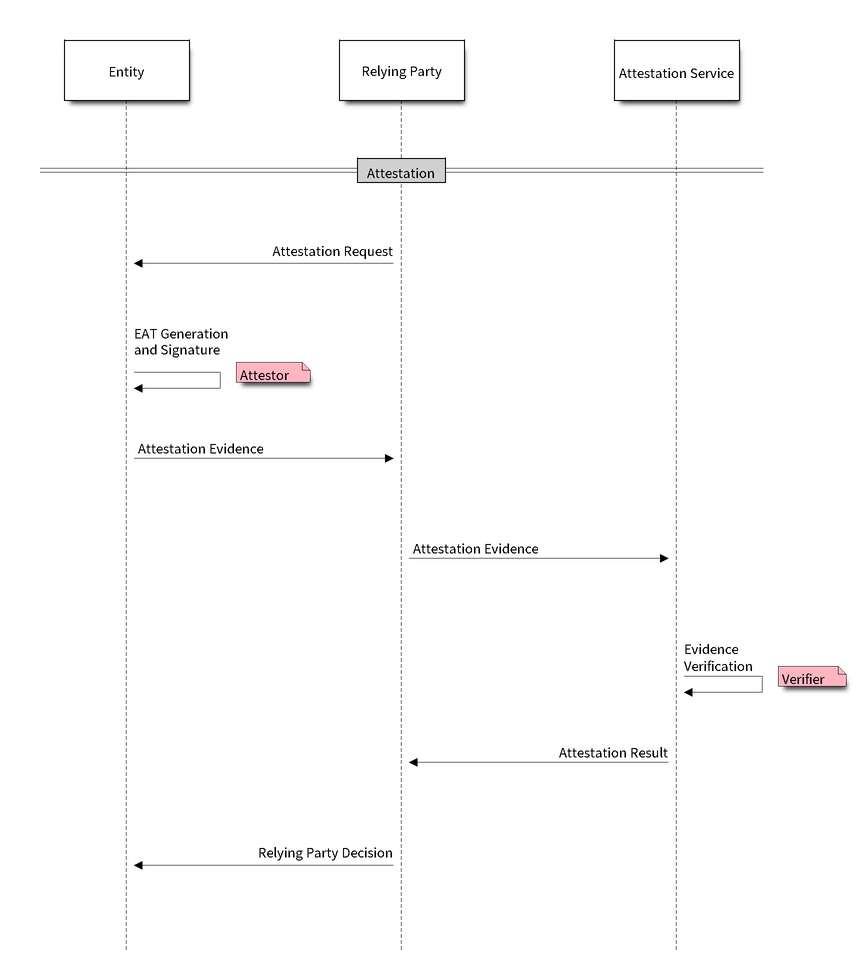
The Relying Party sends an Attestation Request (AR) to the device REE with some challenge or nonce (usually a random number).
The device REE forwards the request to the device TEE attestation service through the secure service call interface.
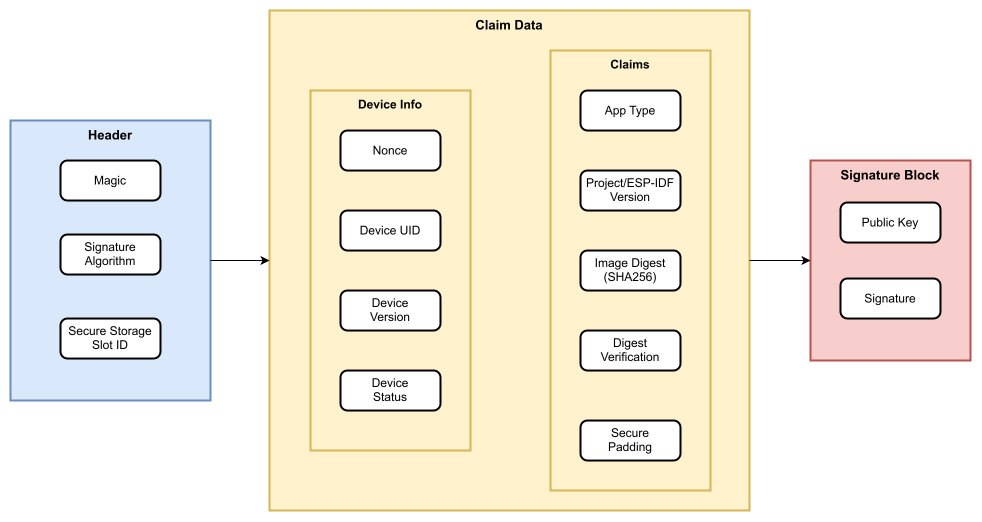
The TEE assembles the Entity Attestation Token (EAT) (the attestation evidence) by gathering all the relevant claim information as outlined in the EAT claim table. It then generates a signature on the claim data, appending it to the token.
The evidence is transmitted back to the remote attestation service (verifier) through the device REE and the relying party. In certain cases, the Relying Party itself may act as the attestation service.
The attestation service assesses the received evidence and, upon successful verification, compares the EAT claim data with the available reference values.
The relying party determines the trustworthiness of the device based on the attestation result and its predefined policy. Subsequently, it communicates this determination to the device.
The Entity Attestation Token (EAT) is a small blob of data that contains claims and is cryptographically signed. The cryptographic signing secures the token, so the means to convey the token does not need to provide any security.
When an attestation request is sent to the device, it generates the EAT in the predefined JSON format as given below. The token contains all the necessary information about the hardware and software entities on device. Here, an ECDSA key-pair from the TEE secure storage is used for signing the EAT, utilizing the slot ID mentioned in the attestation request. The EAT contains the compressed ECDSA public key as well as the R and S components of the signature.
Challenge data provided by the caller to protect against replay attacks. This is typically a cryptographic nonce (random value) or a hash of data that includes a nonce. When using a data hash, the caller must ensure replay protection by incorporating a nonce into the hashed data.
Client ID
Relying Party identification
Chip ID
SoC chip identifier
UEID
Universal Entity Identifiers, factory-burnt in eFuse
Device MAC address and the Optional Unique ID from eFuse
Device ID
Device identification (should be unique)
SHA256 digest of the device MAC address
Device Version
SoC H/W revision from eFuse
Instance ID
Instance identification
Public-key hash (SHA256) from the current secure storage slot for the active session
Certification Reference
PSA certification ID
Device State
Development/Production Mode
Software Measurement
Details of the active firmware components - for e.g. app version, ESP-IDF version, digest, etc. There will be one entry of this type in the EAT for each firmware in the device.
The tee_attestation example demonstrates how to generate an entity attestation token containing validation details for all active firmware components (bootloader, TEE, and REE app).
This header file is a part of the API provided by the mbedtls component. To declare that your component depends on mbedtls, add the following to your CMakeLists.txt:
Generates an attestation token containing device identity and security claims, signed and encoded in the JSON format.
参数:
auth_challenge -- Pointer to a buffer containing the challenge data from the verifier
challenge_size -- Size of the challenge in bytes. Must be 32, 48, or 64 bytes
token_buf -- Pointer to a buffer where the attestation token will be written
token_buf_size -- Size of the token buffer in bytes
token_size -- On success, will be set to the actual size of the generated token
返回:
psa_status_t PSA_SUCCESS on success, PSA_ERROR_INVALID_ARGUMENT if parameters are invalid, PSA_ERROR_BUFFER_TOO_SMALL if token_buf is too small, PSA_ERROR_NOT_SUPPORTED if the requested challenge size is not supported, or another error code on failure
Get the size of the attestation token that would be generated.
This can be used to allocate an appropriately sized buffer before calling psa_initial_attest_get_token().
参数:
challenge_size -- Size of the challenge in bytes. Must be 32, 48, or 64 bytes
token_size -- On success, will be set to the size of the token that would be generated
返回:
psa_status_t PSA_SUCCESS on success, PSA_ERROR_INVALID_ARGUMENT if challenge_size is invalid, PSA_ERROR_NOT_SUPPORTED if the requested challenge size is not supported, or another error code on failure