TEE 空中升级 (OTA)
概述
OTA 更新机制允许设备在正常固件运行期间,根据接收到的数据(例如通过 Wi-Fi 或蓝牙)更新自身。应用程序镜像的 OTA 更新在 空中升级 (OTA) 中已有详细说明,本节专门介绍如何安全管理 TEE 镜像的 OTA 更新。
TEE OTA 要求在设备分区表中至少配置两个 TEE OTA 应用程序分区槽(即 tee_0 和 tee_1)以及一个 TEE OTA 数据分区(类型为 data,子类型为 tee_ota)。
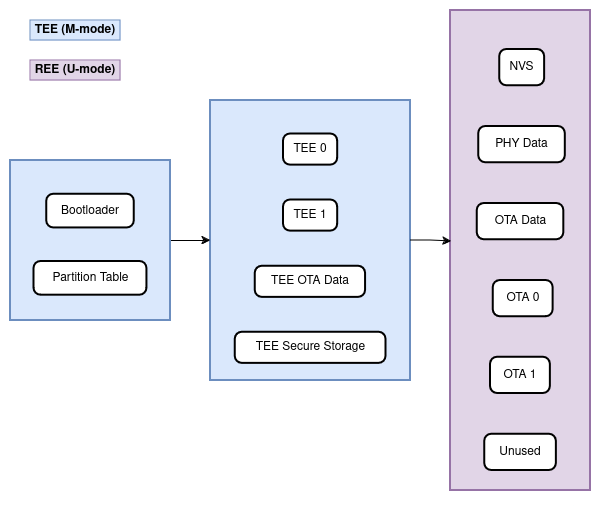
支持 TEE 与应用程序 OTA 的 flash 分区布局示例
TEE OTA 数据分区
任何使用 OTA 功能的项目,其分区表都必须包含 TEE 镜像的 OTA 数据分区(类型为 data,子类型为 tee_ota)。请注意,TEE 应用程序拥有自己的 OTA 数据分区,与 REE 应用程序的 OTA 数据分区相互独立。
出厂启动设置下,TEE OTA 数据分区中应没有数据(所有字节均擦除为 0xFF)。此时,二级引导加载程序会启动第一个可用的 TEE OTA 槽(通常是 tee_0)。第一次 OTA 更新后,TEE OTA 数据分区会被更新,以指定下次应启动哪个 OTA 应用槽分区。
TEE OTA 数据分区的大小为两个 flash 扇区(0x2000 字节),以防止写入过程中断电引发问题。各扇区独立擦除并写入相同的数据;如果两者不一致,则使用 CRC 有效的扇区,并将其复制覆盖另一个扇区。
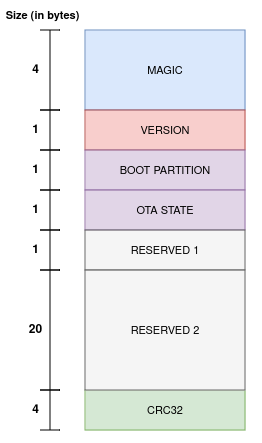
ESP-TEE:OTA 数据分区条目
OTA 流程:启动流程与镜像回滚
新的 TEE 应用程序已通过相应接口(Wi-Fi、蓝牙、以太网等)成功下载。REE 应用程序负责下载 TEE OTA 更新。由于它没有直接写入 TEE flash 区域的权限,它会发起相应的服务调用,将新固件写入 flash。
新固件被写入非活动 TEE 分区,并被设为可启动分区,状态为
NEW。这表示该应用程序是新的,应在首次启动期间受到监控。随后由 TEE 自身重启系统,即esp_tee_ota_end()在成功时不会返回。引导加载程序会验证
tee_otadata分区中第一个扇区的魔数和 CRC。如果无效,则使用第二个扇区。如果应用程序状态为
PENDING_VERIFY,它将被改写为INVALID。引导加载程序不会启动任何标记为INVALID的镜像。如果应用程序状态为
NEW,它将被改写为PENDING_VERIFY。这表示需要确认该应用程序可以正常运行。如果尚未确认就发生重启,状态将被改写为INVALID,该应用程序将无法再启动,即回滚到先前可正常工作的应用程序。新的 TEE 应用程序开始执行,但需要通过自测来确认其可操作性。到达非安全应用程序入口点时,即认为回滚自测成功。随后将该应用程序标记为有效(状态为
VALID)。如果设备没有进一步更新,之后每次重启都会启动该程序。如果 TEE 镜像存在问题,设备因此未能到达非安全应用程序入口点,则自测失败。设备将此次失败视为严重异常并重启。
备注
由 TEE 触发的复位(TEE OTA 更新成功后,或 TEE/REE 发生 panic 时)也会复位 RTC 域。
备注
任何通过串口烧录的分区都会在首次启动时自动标记为有效。
如果两个
tee_otadata扇区都有效,但内容不一致,引导加载程序应在将控制权交给 TEE 之前使它们保持一致。如果启用了 安全启动,引导加载程序将验证 TEE 和非安全应用程序。
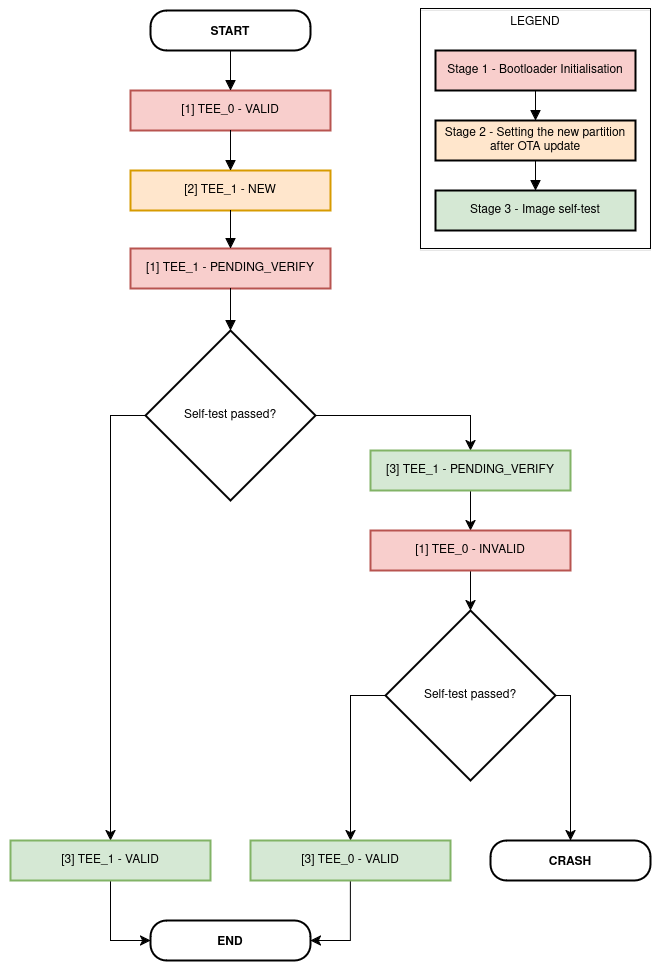
TEE OTA 流程
应用示例
tee_secure_ota 示例演示如何通过 HTTP/S 对 TEE 执行空中升级。
API 参考
备注
要在项目中使用 TEE OTA API,请确保组件管理器清单文件 idf_component.yml 将 tee_ota_ops 组件列为本地依赖。请参考 tee_secure_ota 示例。
Header File
Functions
-
esp_err_t esp_tee_ota_begin(void)
Commence the TEE OTA update.
This function does the following:
Initialize the internal TEE OTA state machine
Set the passive TEE partition as the destination for the new image and erase it
- 返回:
ESP_OKon successESP_ERR_NOT_FOUNDin case thetee_otadataor the passive TEE partition is not foundESP_ERR_FLASH_OP_FAILin case erasing the passive TEE partition fails
-
esp_err_t esp_tee_ota_write(uint32_t rel_offset, const void *data, size_t size)
Write TEE OTA update data to the partition. This function can be called multiple times as data is received during the OTA operation and can write data in non-contiguous manner.
- 参数:
rel_offset -- Address offset at which the given data should be written at - relative to the start address of the passive TEE partition
data -- Data buffer to write
size -- Size of data buffer in bytes
- 返回:
ESP_OKon successESP_ERR_INVALID_ARGin case thetee_otadataor the passive TEE partition is not foundESP_ERR_INVALID_STATEin case the TEE OTA state machine is in an invalid stateESP_ERR_FLASH_OP_FAILin case writing the new TEE image failsESP_FAILfor other errors
-
esp_err_t esp_tee_ota_end(void)
Finish the TEE OTA update and validate newly written TEE image.
备注
On success, this call does not return: the TEE restarts the device (RTC WDT system reset)
- 返回:
Only on failure:
ESP_ERR_INVALID_STATEin case the TEE OTA state machine is in an invalid stateESP_ERR_IMAGE_INVALIDin case the new TEE OTA image verification failsESP_FAILfor other errors