ESP32-S3
Note
This document is automatically translated using AI. Please excuse any detailed errors. The official English version is still in progress.
ESP32-S3 Chip/Module Startup Conditions
The operating voltage range of the ESP32-S3 chip is 3.0 V ~ 3.6 V; when using a single power supply, it is recommended that the power supply voltage is 3.3 V, and the output current needs to reach 500 mA or more.
The operating voltage range of the ESP32-S3 module is 3.0 V ~ 3.6 V; when using a single power supply, it is recommended that the power supply voltage is 3.3 V, and the output current needs to reach 500 mA or more.
The CHIP_PU (EN) pin of the ESP32-S3 is the chip’s boot pin. When CHIP_PU (EN) is at a high level, the chip is enabled; when it is at a low level, the chip is turned off. Note: The CHIP_PU pin must not be left floating. When the ESP32-S3 is powered by a 3.3V system power supply, the CHIP_PU (EN) pin must be at a high level.
Hardware Connection
The ESP32-S3 supports two firmware download methods: UART0 and USB.
When downloading firmware based on the ESP32-S3 Module, for
UART0, users need to prepare:3.3V Power Supply
Serial debugging tool
Dupont wire
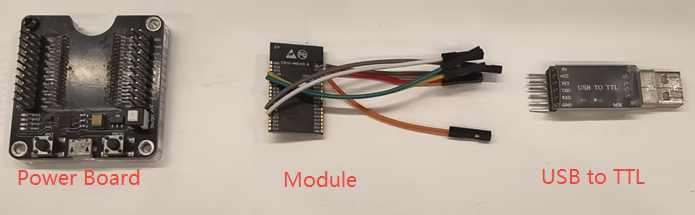
When using the
UART0pin to download firmware, the following wiring conditions need to be met to satisfy the hardware requirements forchip power supply,power-on startup, andentering download mode.ESP32-S3
3.3V External Power Supply
Serial debugging tool
3V3
VDD
GND
GND
GND
EN
VDD
GPIO0 (Pull down, default is weak pull-up)
GND
GPIO46 (pull-down, default is weak pull-down)
GND
TXD0(GPIO43)
RXD
RXD0(GPIO44)
TXD
Note
The strapping pin
GPIO45is used to select the VDD_SPI Flash voltage.When using
1.8VVDD_SPI Flash,GPIO45needs to be pulled high when the chip is powered on.When using
3.3VVDD_SPI Flash,GPIO45needs to be pulled low when the chip is powered on.
When downloading firmware based on the ESP32-S3 Module, users need to prepare:
3.3V Power Supply
USB cable
Dupont wire
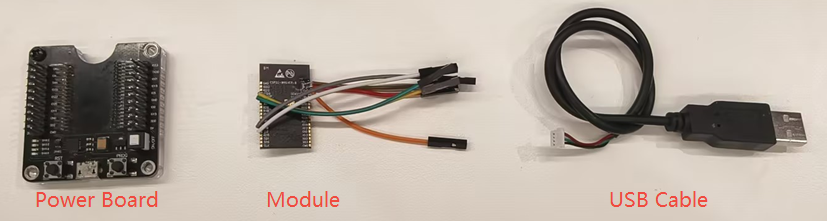
When using the
USBpin to download firmware, the following wiring conditions need to be met to satisfy the hardware requirements forchip power supply,power-on startup, andentering download mode.ESP32-S3
3.3V External Power Supply
USB cable
3V3
VDD
GND
GND
GND
EN
VDD
GPIO0 (Pull down, default is weak pull-up)
GND
GPIO46 (pull-down, default is weak pull-down)
GND
GPIO19
USB_D- (White)
GPIO20
USB_D+ (Green)
When testing with the ESP32-S3 Development Board, you can directly use a USB Type-C cable to connect to the UART or USB interface on the board for firmware download. If you are using the USB interface for firmware download for the first time, you need to manually pull down the GPIO0 pin, that is, hold down the Boot button and then power up to manually enter the download mode.
Chip Power-On Startup Log
After powering on the ESP32-S3 chip/module, you can use the PC-side serial debugging software (such as XCOM) to view the UART0 serial output during chip power-up to confirm whether the chip has entered download mode. If the chip powers up and enters download mode, UART0 will print the following log:
ESP-ROM:esp32s3-20210327
Build:Mar 27 2021
rst:0x1 (POWERON),boot:0x0 (DOWNLOAD(USB/UART0))
waiting for download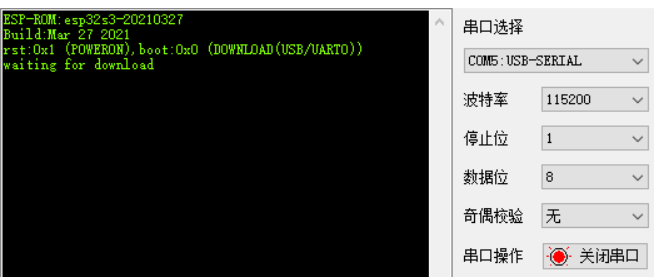
Note
After powering on the ESP32-S3 chip/module, if you do not see the log printing, you can trigger the log printing by pulling down and then pulling up the CHIP_PU (EN) pin to perform a hardware reset.
In addition, you can get the Strapping pins level state at power-on from the chip power-on startup log. For detailed instructions, please refer to ESP32-S3 Boot Log instructions.
In terms of software, Espressif provides a PC-based Flash download tool, which can directly download firmware (.bin) to Flash. For usage instructions, refer to the Flash Download Tool User Guide.
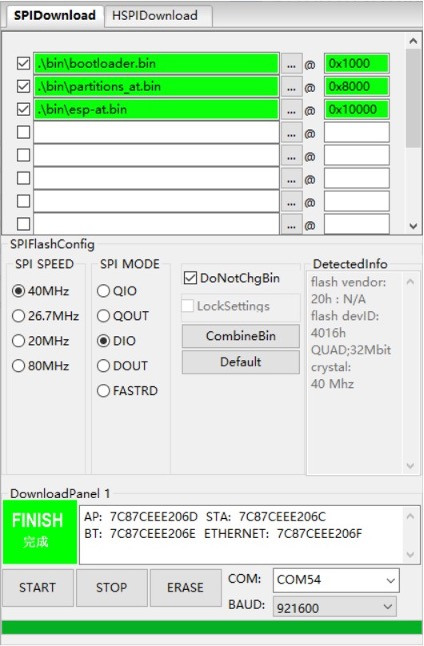
After the firmware download is complete, if you want to run the burned firmware, you can pull up GPIO0 (default is high level) based on the aforementioned hardware wiring, and then pull down and pull up the CHIP_PU (EN) pin for hardware reset and restart, allowing the chip to re-enter the Flash boot mode. Finally, use the serial debugging software to view the UART0 log printout to check the firmware running status.
References
Hardware wiring principle summary:
Official documentation: