ESP-Extractor Component
Note
This document is automatically translated using AI. Please excuse any detailed errors. The official English version is still in progress.
In multimedia products, audio and video are usually stored in container files such as MP4, TS, FLV, WAV, OGG, AVI, or CAF. These files are convenient for storage and sharing, but before the device can play, analyze, or reuse the content, it needs to split the container back into audio frames and video frames.
ESP-Extractor is an ESP-IDF component used to read media files and extract audio, video, and metadata from them. With it, Espressif devices can build local playback, media preview, AI analysis, and format conversion functions without having to implement container parsing from scratch.
Table of Contents
What is ESP-Extractor
ESP-Extractor is the “unpacking” part of the multimedia pipeline. If ESP-Muxer Component is responsible for packaging encoded audio and video into playable files, then ESP-Extractor does the opposite: it opens existing files or streams, recognizes the container format, and outputs frames that the next module can use.
For users and product developers, this means that devices can:
Play local media files stored on SD cards or Flash.
Preview recorded clips on the device.
Extract video frames or audio clips for AI processing.
Re-encapsulate existing content into another type of container.
Read media from custom storage or cached network data sources.
Why it is needed
Without an extractor, each product must handle the container format itself: find tracks, read timestamps, separate audio and video, and maintain playback order. Especially when the product needs to support multiple file formats, the complexity of this work is easily underestimated.
ESP-Extractor provides a reusable extraction layer, allowing applications to focus on user experience: open files, start playback, display thumbnails, run AI analysis, or send media to other modules.
Typical use cases
Local media playback
Devices can read media files from SD cards or Flash, extract audio frames and video frames, and send them to the decoder for output through speakers and displays. This is suitable for smart screens, toys, educational devices, voice products with local media, and camera products with playback functions.
Preview of recorded clips
Smart cameras, doorbells, and recorders often need to playback captured video clips on the device or quickly generate previews. ESP-Extractor can separate stored files into decodable or inspectable media streams.
AI media processing
For AI cameras or detection devices, recorded files may need to be analyzed after capture. ESP-Extractor can provide video frames or audio frames for detection, classification, or event review in the AI pipeline.
Format conversion and re-encapsulation
Sometimes products need to convert one media format to another, such as converting recorded clips into a format more suitable for streaming. ESP-Extractor can read the original container and pass the encoded frames to ESP-Muxer to create new files or media streams.
Stream-like input
Some products do not read media from ordinary files. The content may come from Flash partitions, RAM buffers, or network caches. ESP-Extractor can be used in such designs to maintain the consistency of the media pipeline.
Simple architecture
ESP-Extractor is located between the media source and the module that consumes audio or video frames:
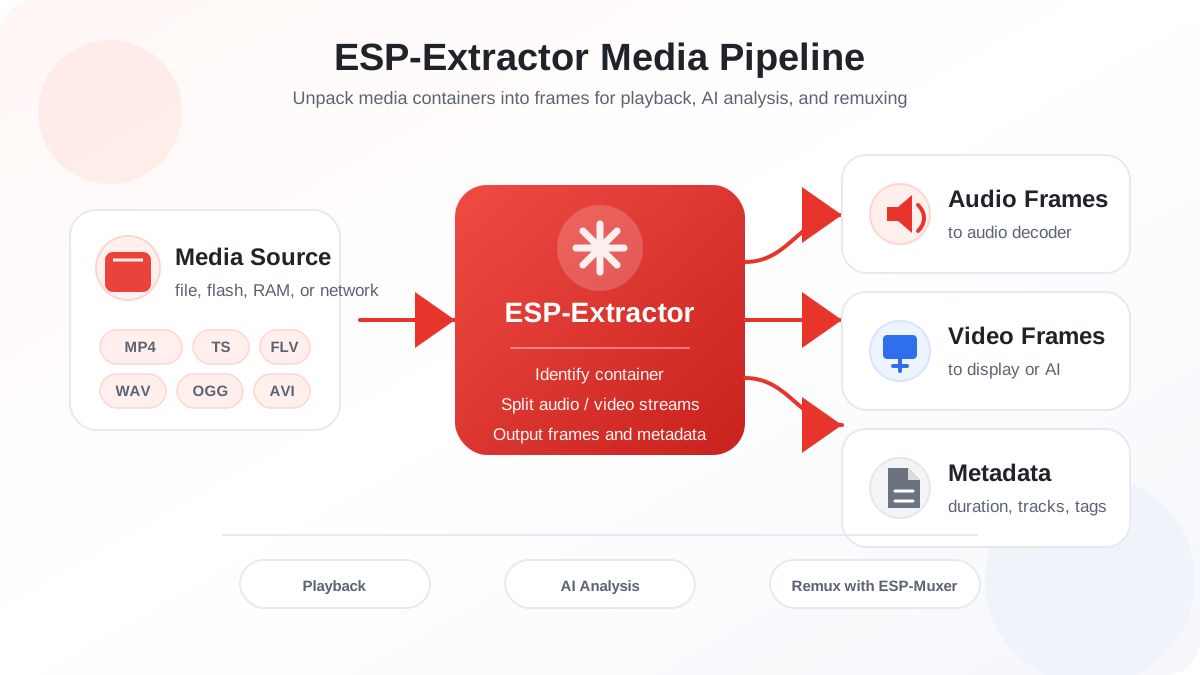
ESP-Extractor does not replace audio or video decoders. It is responsible for preparing media streams for decoders, AI modules, playback modules, or ESP-Muxer.
Supported media types
ESP-Extractor supports common embedded multimedia containers and codec formats, including MP4, TS, FLV, WAV, OGG, AVI, CAF, AAC, MP3, H.264, MJPEG, PCM, OPUS, FLAC, etc.; the specific support depends on the container format.
For accurate support matrix and integration details, please refer to the module documentation.
Further Reading
Please refer to ESP-Extractor README for detailed media support and integration guide.
If you need to package the extracted audio frames and video frames into a new container, please refer to ESP-Muxer Component.