ESP-Media-Protocols Component
Note
This document is automatically translated using AI. Please excuse any detailed errors. The official English version is still in progress.
Overview
Multimedia protocols are a collection of various communication protocols, widely used in scenarios such as streaming media transmission, device control, and device interconnection communication. Typical applications are as follows:
Most network cameras in security systems have built-in RTSP servers, which compress the collected video and provide video streams using the RTP protocol, allowing access to monitoring platforms, NVRs, VLC players, etc. for stream pulling;
GB28181 (full name: GB/T 28181-2016), a national standard issued by the Chinese Ministry of Public Security, defines the technical requirements for information transmission, exchange, and control of public safety video surveillance networking systems. It uses the SIP protocol to complete device registration, heartbeat, call and other signaling controls, uses SDP to describe media session information, and uses RTP and RTCP to transmit and control media data in real time;
VoIP, video conferencing, visual intercom systems, complete call and voice, video communication functions based on the SIP protocol;
Broadcasting systems, live streaming platforms, devices collect media streams and push them to the server based on the RTMP protocol, and multiple client devices pull streams from the server and play them based on the RTMP protocol.
ESP-Media-Protocols is a multimedia protocol library launched by Espressif Systems, providing support for basic and mainstream multimedia protocols.
Protocol |
Layer |
Function |
Common Application Scenarios |
|---|---|---|---|
RTP/RTCP |
Transport Layer |
Real-time transmission of audio and video streams, providing quality information |
Network cameras, low-latency transmission of media data for real-time calls/conferences, RTCP provides transmission quality statistics |
RTSP |
Application Layer |
As a server, it supports being pulled, as a client, it supports pulling and pushing streams |
Low-latency unidirectional transmission of media data from network cameras, playback control |
SIP |
Application Layer |
Session terminal, supports registration to SIP server, supports initiating/receiving sessions, instant messages, dynamic adjustment during calls, as well as SDES-SRTP media encryption negotiation. |
Low-latency bidirectional transmission of media data between intercoms and telephone terminals, realized through session management for intercom, conference, device control, and business notification; encryption and authentication can be applied to RTP media. |
RTMP |
Application Layer |
As a server, it supports being pulled and receiving pushed streams, as a client, it supports pulling and pushing streams |
Live streaming and backend distribution (device pushes streams to live server/platform), live access |
MRM |
/ |
Multi-device master-slave synchronized music playback |
Multi-room audio synchronized playback (smart speakers, home theater multi-device synchronization) |
UPnP |
/ |
Device interconnection, media and service sharing |
Device discovery and media sharing within the home (mobile/PC discovers TV/NAS and casts or plays) |
Performance Data
Protocol |
Real-time |
Data Stream |
Control Stream |
Device Discovery |
TLS Encryption |
Complexity |
|---|---|---|---|---|---|---|
RTSP |
High |
Yes |
Yes |
Manual |
No |
Medium |
SIP |
High |
Yes |
Yes |
Manual |
Yes |
Medium |
RTMP |
Medium |
Yes |
Basic |
Manual |
Yes |
Medium |
MRM |
High |
Yes |
Yes |
Automatic |
No |
Low |
UPnP |
Low |
Yes |
Yes |
Automatic |
No |
Medium |
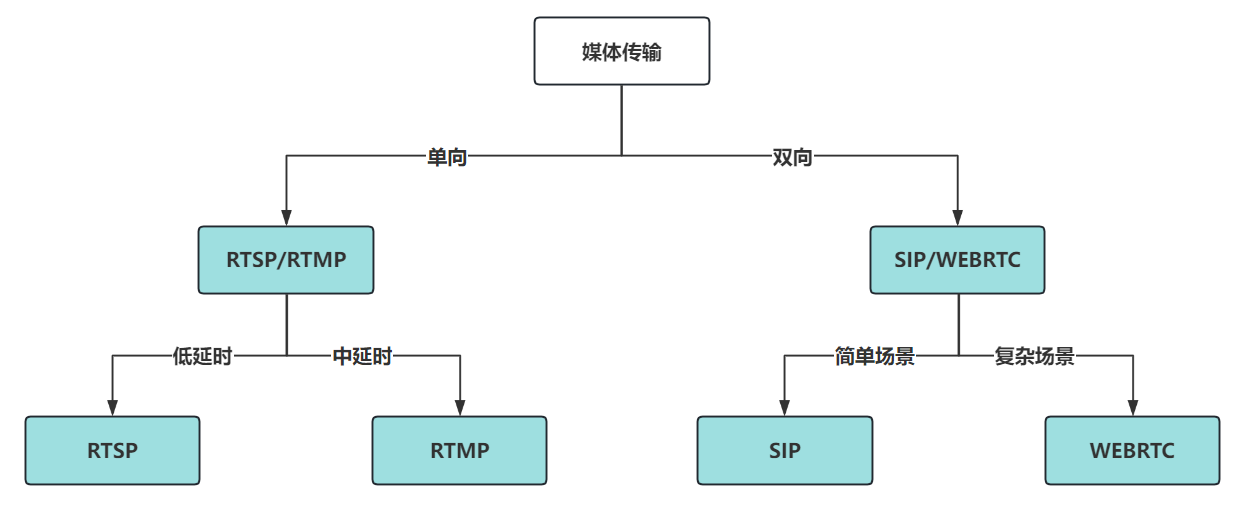
You can easily identify the protocol to use through the following flowchart:
New Features and Typical Applications
With the continuous iteration of components, ESP-Media-Protocols has added the following capabilities in SIP session management and media transmission:
Added capability |
Function Description |
Typical application scenarios |
|---|---|---|
Instant Message (MESSAGE) |
Messages can be sent and received in a SIP session without the need to establish a media call. |
Device control command issuance, business notifications and alarm push (such as door access opening, alarm prompts, status reporting) |
Dynamic adjustment during call (re-INVITE) |
Dynamically enable/disable audio and video, switch codecs, update NAT, and refresh session duration in an established call. |
Upgrading from pure voice to video calls, switching audio and video during a call, long call keep-alive |
JPEG over RTP(RFC2435) |
Supports standard RFC2435 JPEG (MJPEG) over RTP assembly and parsing |
Interoperable with standard network cameras/monitoring devices, transmitting MJPEG video streams |
Multi-domain registration |
Registration and isolation can be carried out on the same SIP server according to different domains. |
Multi-tenant, multi-region/multi-building deployment, devices managed by domain ownership |
Enhanced device compatibility |
Supports custom and negotiated dynamic RTP Payload Type |
Enhance the interoperability with third-party devices from different manufacturers |
SDES-SRTP(SIP) |
In SIP calls, encryption and authentication can be applied to the media stream, supporting three strategies: disable, prioritize encryption, and enforce encryption. |
Scenarios requiring media protection such as video intercom, VoIP, meetings, etc. (beyond signaling TLS) |
Real-time
Low latency: For data used for control or command transmission, the delay is about 20 ms.
Low latency: For audio, video or other media stream transmission, the delay is about 300 ms.
Medium latency: For live streams based on RTMP, the delay is about 2 seconds.
Security
TLS (Optional, Signaling)
MD5 digest authentication (mandatory for SIP)
SIP Media Face SDES-SRTP (encryption can be selected based on the scenario)
Scalability
Customizable protocol header and body
Supports subscription and notification, can register services
Concurrency
Supports multiple client connections (RTMP)
Compatibility
SIP supports linphone, Asterisk FreePBX, Freeswitch, Kamailio
RTSP supports ffmpeg, vlc, live555, mediamtx
RTMP supports ffmpeg, vlc
UPnP supports NetEase Cloud Music
Media support
Please refer to the README.
Memory consumption data
Please refer to the README.
How to use
The ESP-Media-Protocols component is hosted on Github. You can add this component to your project by entering the following command in the project.
idf.py add-dependency "espressif/esp_media_protocols^0.5.1"
Before using the ESP-Media-Protocols component, it is recommended to refer to and debug the following example projects to familiarize yourself with the use of APIs and the specific application of the protocol stack.
FAQ
Q: Does ESP-Media-Protocols support all protocols and features?
A: ESP-Media-Protocols currently supports widely used basic protocols and functions in the embedded field. HLS playback is not included in this component, please use playback components such as ESP Player. SIP now supports SDES-SRTP media encryption; the media side of RTSP/RTMP is still in plaintext (RTMP signaling can go through TLS). The supported protocol specifications will be continuously iterated and extended, and we will also update and consider extensions according to customer needs. In the future, we plan to support some new protocols with strong functions.
Q: Some protocol features overlap, how to choose when using?
A: Depending on the application scenario, specifically analyze the functional requirements, latency requirements, and network environment. For example, if real-time requirements are high and real-time control (pause, fast forward, rewind, positioning) is needed, RTSP is usually used; if real-time requirements are high and real-time interaction is needed, SIP can be used to create sessions; for large-scale live broadcasts in browsers, where stability and compatibility are highly required and real-time is not highly required, RTMP can be considered.