ESP-New-JPEG Component
Note
This document is automatically translated using AI. Please excuse any detailed errors. The official English version is still in progress.
Note
For basic knowledge about JPEG, refer to JPEG
Overview
ESP-New-JPEG is a lightweight JPEG encoding and decoding library launched by Espressif Systems. To improve efficiency, the JPEG encoder and decoder have been deeply optimized to reduce memory consumption and enhance processing performance. For ESP32-S3 chips that support SIMD instructions, these instructions are used to further increase processing speed. In addition, rotation, cropping, and scaling functions have been extended, which can be performed simultaneously during the encoding and decoding process, thereby simplifying user operations. For chips with smaller memory, a block mode has been introduced to support processing part of the image content multiple times, effectively reducing memory pressure.
ESP-New-JPEG supports JPEG encoding and decoding of the Baseline Profile. The rotation, cropping, scaling, and block mode functions can only take effect under specific configurations.
JPEG Encoder Features
The basic features supported by the encoder are as follows:
Supports decoding of any width and height
Supports the following pixel formats: RGB888, RGB565 (big-endian), RGB565 (little-endian), RGBA, YCbYCr, CbYCrY, YCbY2YCrY2, GRAY
When using the YCbY2YCrY2 format, only YUV420 and Gray subsampling are supported
Supports YUV444, YUV422, YUV420, Gray subsampling
Supports quality setting range: 1-100
The extended features are as follows:
Supports 0°, 90°, 180°, 270° clockwise rotation
Supports dual-task encoding
Supports block mode encoding
Dual-task encoding can be used on dual-core chips, fully utilizing the advantages of dual-core parallel encoding. The principle is that one core handles the main encoding task, and the other core is responsible for the entropy encoding part of the work. In most cases, enabling dual-core encoding can bring about a 1.5 times performance improvement. You can choose whether to enable dual-core decoding through menuconfig configuration, and adjust the core and priority of the entropy encoding task.
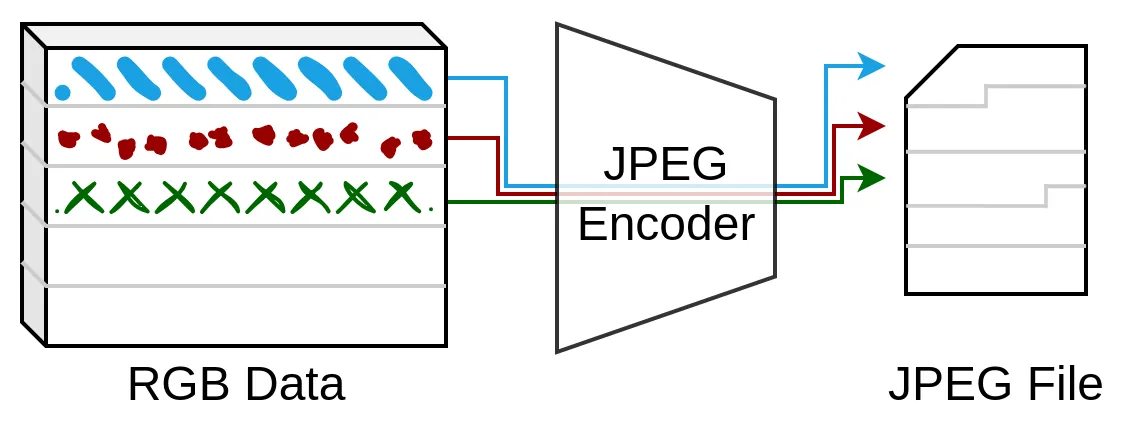
Block encoding refers to encoding the data of an image block at a time, and encoding the complete image after multiple processing. When subsampling YUV420, the height of each block is 16 rows and the width is the image width; under other subsampling formats, the height of each block is 8 rows and the width is the image width. Since the amount of data processed by block encoding each time is small, the image buffer can be placed in DRAM, thereby improving the encoding speed. The workflow of block encoding is shown in the following figure:
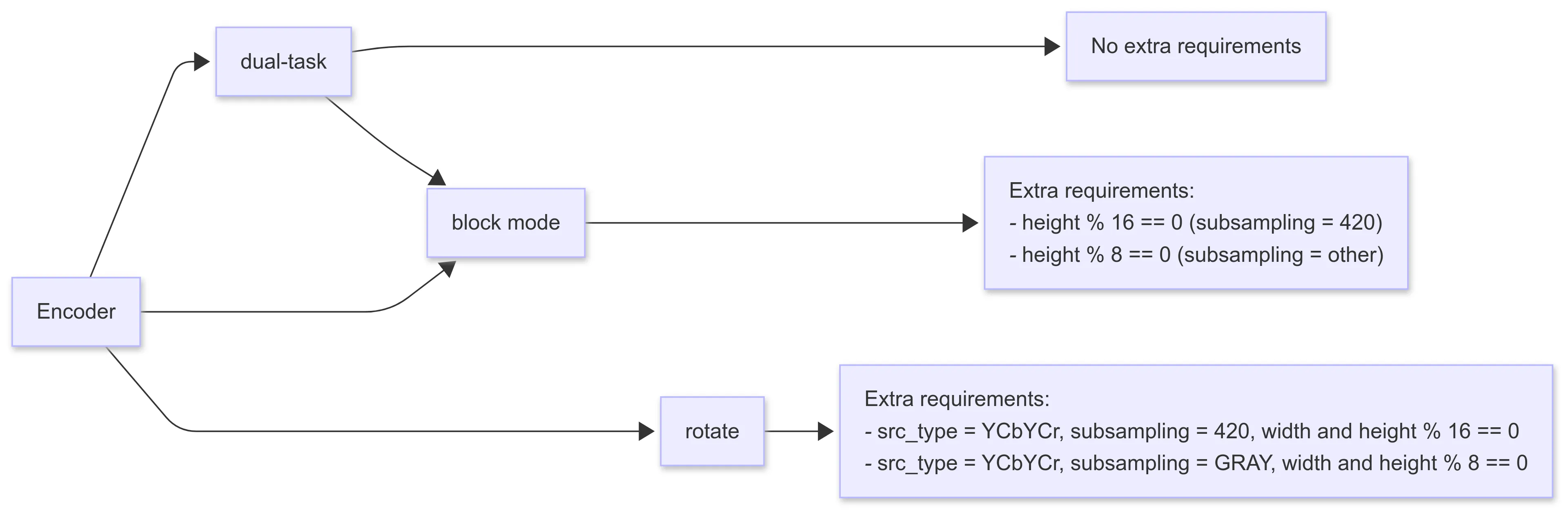
The configuration requirements for extended features are as follows:
JPEG Decoder Features
The basic features supported by the decoder are as follows:
Supports decoding of any width and height
Supports single-channel and three-channel decoding
Supports the following pixel format outputs: RGB888, RGB565 (big-endian), RGB565 (little-endian), CbYCrY
The extended features are as follows:
Supports scaling (maximum reduction ratio is 1/8)
Supports cropping (cropping from the upper left corner)
Supports 0°, 90°, 180°, 270° clockwise rotation
Supports block mode decoding
The processes of scaling, cropping, and rotating are performed in sequence, as shown in the diagram below. The decoded JPEG data stream is first scaled, then cropped, and finally rotated and output.
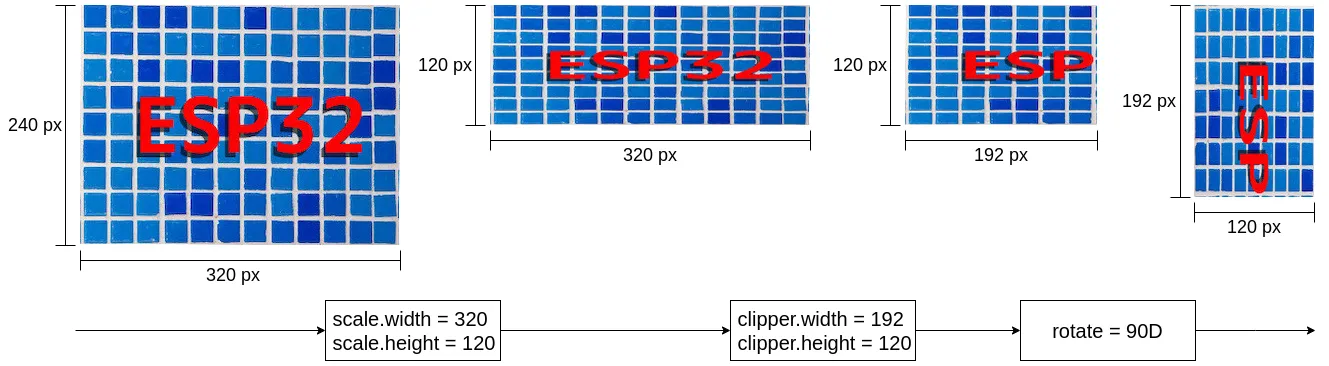
When using the scaling and cropping functions, you need to configure the corresponding parameters in the jpeg_resolution_t structure. The component supports processing width or height separately. For example, when only cropping the width and keeping the height unchanged, you can set clipper.height = 0, and the height of the image will remain the original JPEG image height. The processing flow can be completed through the following detailed or simplified configuration.
// Detailed configuration
jpeg_dec_config_t config = DEFAULT_JPEG_DEC_CONFIG();
config.output_type = JPEG_PIXEL_FORMAT_RGB565_LE;
config.scale.width = 320;
config.scale.height = 120;
config.clipper.width = 192;
config.clipper.height = 120;
config.rotate = JPEG_ROTATE_90D;

// Simplified configuration
jpeg_dec_config_t config = DEFAULT_JPEG_DEC_CONFIG();
config.output_type = JPEG_PIXEL_FORMAT_RGB565_LE;
config.scale.width = 0;  // keep width unchanged by setting to 0
config.scale.height = 120;
config.clipper.width = 192;
config.clipper.height = 0;  // keep height unchanged by setting to 0
config.rotate = JPEG_ROTATE_90D;
Block decoding refers to decoding only one image block at a time, and the entire image is decoded after multiple processes. In YUV420 subsampling, each block has a height of 16 rows and a width equal to the image width; for other subsampling formats, each block has a height of 8 rows and a width equal to the image width. Since block decoding processes less data each time, it is more friendly to chips without PSRAM, and placing the output image buffer in DRAM can also improve decoding speed. Block decoding can be seen as the reverse process of block encoding.
The typical usage of block decoding is as follows:
jpeg_dec_config_t config = DEFAULT_JPEG_DEC_CONFIG();
config.block_enable = true;

jpeg_dec_open();
jpeg_dec_parse_header();

int output_len = 0;
int process_count = 0;
jpeg_dec_get_outbuf_len(hd, &output_len);
jpeg_dec_get_process_count(hd, &process_count);

for (int block_cnt = 0; block_cnt < process_count; block_cnt++) {
  jpeg_dec_process();
}

jpeg_dec_close();
The configuration requirements for extended functions are shown below:
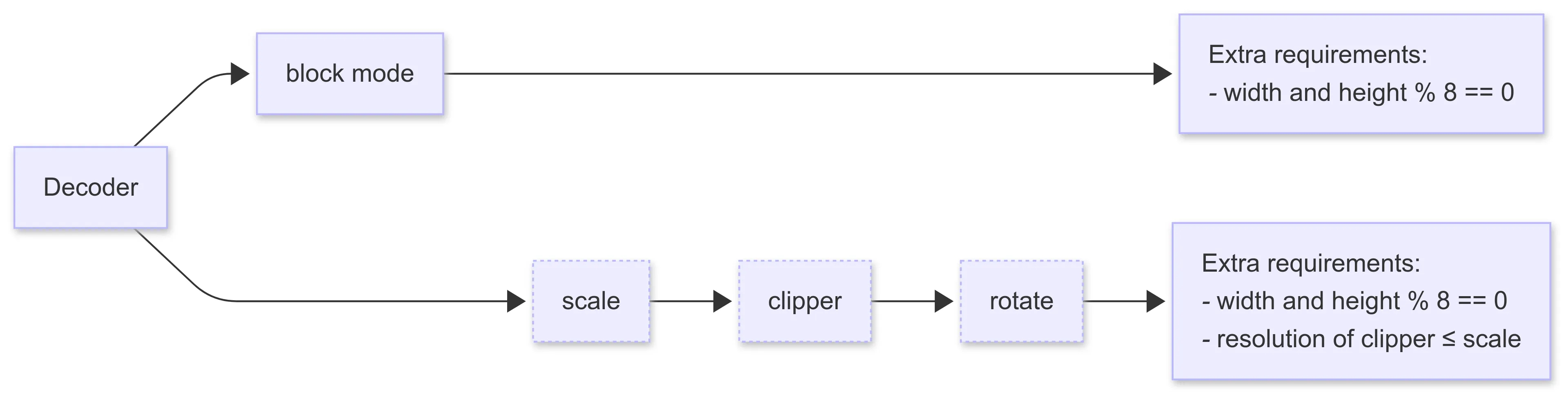
When block decoding is enabled, other extended features cannot be used
The width and height in the configuration parameters of scaling, cropping, and rotation are all required to be multiples of 8
When scaling and cropping are enabled at the same time, the size of the crop is required to be smaller than the size after scaling
Performance
ESP-New-JPEG has deeply optimized the JPEG encoding and decoding architecture:
Optimized data processing flow, improved the reuse efficiency of intermediate data, and reduced memory copy overhead.
Assembly-level optimization for Xtensa architecture chips; on ESP32-S3 chips that support SIMD instructions, computational performance is significantly improved.
Integrated multiple image operations such as cropping and rotation into the encoder and decoder, improving the overall system efficiency
For encoding and decoding performance test data, please refer to Performance.
Usage
The ESP-New-JPEG component is hosted on Github. You can add this component to your project by entering the following command in the project.
idf.py add-dependency “espressif/esp_new_jpeg”
The test_app folder under the esp_new_jpeg folder contains a runnable test project, which shows the related API call process. Before using the ESP-New-JPEG component, it is recommended to refer to and debug this test project to familiarize yourself with the API usage.
FAQ
Q: Does ESP-New-JPEG support decoding progressive JPEG?
A: No, ESP-New-JPEG only supports decoding baseline JPEG. You can use the following code to check whether the image is a progressive JPEG. Output 1 indicates progressive JPEG, and output 0 indicates baseline JPEG.
python
>>> from PIL import Image
>>> Image.open("file_name.jpg").info.get('progressive', 0)
Q: Why does the output image look misaligned?
A: This problem usually occurs when some columns appear on the left or right side of the image, and these columns appear on the other side of the image. If you are using ESP32-S3, the possible reason is that the output buffer of the decoder or the input buffer of the encoder is not aligned to 16 bytes. Please use the jpeg_calloc_align() function to allocate the buffer.
Q: How to preview the raw data of the image, such as viewing RGB888 data?
A: You can use yuvplayer. It supports viewing grayscale, RGB888, RGB565 (little endian), UYVY, YUYV, YUV420P and other data.
Q: Why is the decoding speed of ESP_NEW_JPEG slower on ESP32-P4?
A: ESP_NEW_JPEG has not yet been optimized for ESP32-P4. However, ESP32-P4 is equipped with a hardware JPEG encoding and decoding module, and its hardware decoding performance is superior to software decoding. It is recommended to use the hardware JPEG module on ESP32-P4 for better decoding performance. You can refer to JPEG Image Encoder and Decoder - ESP32-P4 for more information.
Q: Will ESP_NEW_JPEG be integrated with the hardware encoder and decoder into one component, similar to the H264 component?
A: There are no plans at the moment.
Q: How to estimate the decoding speed?
A: The decoding speed of a specific resolution image can be estimated through tested benchmark data. For example, if the resolution of the image to be tested is 480x512, and the known decoding speed of 640x480 is 13.24 fps, then the decoding speed of 480x512 can be estimated to be 13.24 * (480/640) * (512/480) = 10.59 fps.
Please refer to the tested data in Performance.
Q: How is the memory consumption of ESP_NEW_JPEG?
A: Currently, only the memory consumption of the decoder has been counted.
When scale is not enabled, the memory consumption is constant, about 10 KB. Most of the fixed memory is allocated when
open()and all memory is released whenclose().When scale is enabled, memory consumption increases with image width.
Q: How to understand the concept of stream processing in ESP_NEW_JPEG?
A: The basic usage of the ESP_NEW_JPEG decoding interface is: open() > parse_header() > process() > close()
If the parameters of each image are the same, opening and closing each time will waste resources, so a stream processing example was designed: open once, loop parse_header > process, and close at the end.