ESP-Video-Render Component
Note
This document is automatically translated using AI. Please excuse any detailed errors. The official English version is still in progress.
Overview
ESP-Video-Render is a video rendering and image composition component developed by Espressif for ESP chips. It is suitable for products that need to display videos on LCD, overlay lightweight UI, manage multiple images, or build video-priority interfaces. It organizes video streams, Overlays, Widgets, and display backends into a unified rendering model, reducing the complexity of multimedia interface development.
For component architecture, core functions, format support, APIs, and examples, please refer to ESP-Video-Render.
Architecture Diagram
ESP-Video-Render is located on the display side of the video processing chain. It receives video frames or image data output by the video processing module, composes the video content with the Overlay UI, and then outputs it to the LCD, LVGL, or custom framebuffer backend.
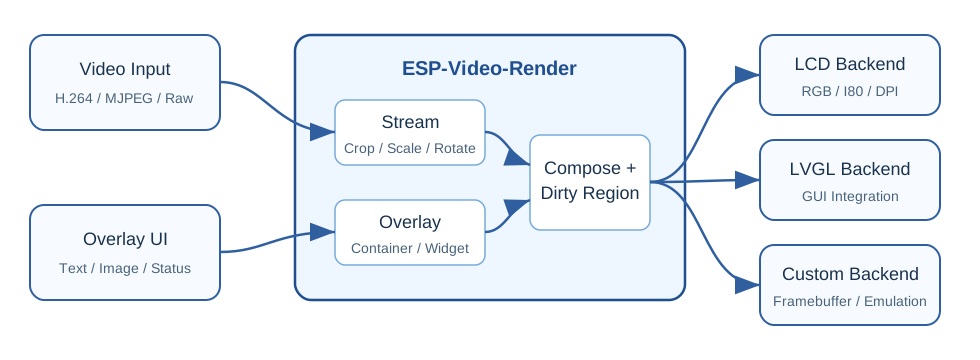
For a single video scenario, the Overlay can be directly superimposed on the video image; for multiple video scenarios, the component will first complete the processing of each stream, and then compose them into the final frame buffer according to the display area, transparency, and layer relationship.
Typical Application Scenarios
Local Video Player
For devices with screens, the application can read MP4, AVI, TS, or MJPEG test resources from the SD card, extract and decode them, and then display them with ESP-Video-Render. The Overlay can be used to display play status, progress, volume, file name, and FPS information.
Smart Display Terminal
Smart control centers, educational devices, desktop screens, visual intercoms, and other products often need to overlay status bars, button prompts, or alarm information on video images. ESP-Video-Render can put videos and lightweight UI in the same rendering path, reducing the workload of the application layer to handle multiple layers of images.
Camera Preview and Dual-Channel Image
Camera products may need single-channel preview, dual-channel side-by-side preview, or picture-in-picture layout. Different preview layouts can be quickly built through the display area, cropping, layer, and transparency control of multiple streams.
Robot Eyes and Expression Animation
Dual-eye or dual-screen products can use the dual-stream rendering API to synchronously output left and right eye animations. Compared with the application layer driving two displays separately, the component provides a clearer buffer and synchronization model, which is conducive to achieving stable expression display effects.
Desktop UI Verification
The Linux simulation backend can verify some rendering logic and UI layout without real hardware. For projects that need frequent debugging of the interface, this can help shorten the development and regression verification cycle.
Development Convenience
The most direct value of ESP-Video-Render to product development is to sink common video rendering problems to the component layer:
The application only needs to write video frames according to the stream, and configure display area, layer, and rotation properties.
Lightweight UI can be overlaid on the video through Overlay / Widget, avoiding the need to set up a separate drawing process for simple status display.
The same application logic can be migrated between LCD backend, LVGL backend, or simulation backend.
Dirty region and caching mechanism reduce the burden of manual optimization of local refresh.
Examples cover single stream, multi-stream, Overlay, video player, and dual-eye rendering, making it easy to quickly transform from existing projects.
Design Suggestions
If the product is mainly video and UI is auxiliary, consider using ESP-Video-Render to manage video display and lightweight UI overlay.
If the project is already using LVGL, consider enabling LVGL backend to integrate video area into the existing GUI framework.
If the screen is a continuously scanning LCD such as RGB / DPI, evaluate the risk of flickering or tearing based on the number of framebuffers; when mixing video and UI under a single framebuffer, it is recommended to adjust the Blender task or switch to dual framebuffer in conjunction with the component FAQ.
If the text widget is enabled, reserve FreeType related stack space; when text rendering is not needed, the Blender task stack usage can be reduced through configuration.
For high-resolution or multi-channel video scenarios, it is recommended to do end-to-end testing in combination with PSRAM, cache mode, asynchronous rendering, and actual FPS targets.
FAQ
Q: Is ESP-Video-Render a substitute for LVGL?
A: No. ESP-Video-Render mainly solves video image rendering, composition, and display output problems; LVGL is more suitable for a complete GUI. For video-priority products that only need a small amount of status UI, you can directly use ESP-Video-Render’s Overlay / Widget; if the project already has a complex LVGL interface, you can integrate video display through LVGL backend.
Q: When is a cached stream needed?
A: When the video input FPS does not match the render FPS, or when you want to reduce the wait between processing tasks and rendering tasks, you can consider enabling cached stream. The cost is more memory usage, so you need to evaluate in combination with resolution, frame size, and available PSRAM.
Q: Why might a single framebuffer RGB / DPI LCD flicker?
A: Under a single framebuffer, rendering writing and screen scanning may access the same buffer. If the video and UI are mixed into the same framebuffer by the Blender task in succession and then output to the panel, visible flickering or tearing may occur. Consider disabling the Blender task in this mode, or switch to dual framebuffer.
Q: Is it suitable for dual-screen products like robot eyes?
A: Yes. The component provides a dual-stream rendering API, which can be used for left and right eye animations, single-screen side-by-side output, or separate output for dual screens. The example examples/dual_eyes shows the typical usage process.