ESP32-Vaquita-DSPG User Guide
This user guide provides information on ESP32-Vaquita-DSPG.
The ESP32-Vaquita-DSPG development board, together with Alexa Voice Service (AVS) for AWS IoT, provides a turnkey solution to easily create Alexa built-in IoT devices, which features voice enablement and AWS IoT cloud connectivity.
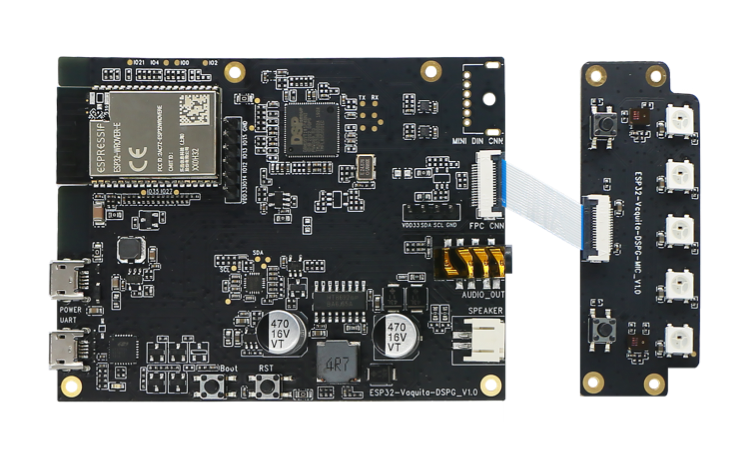
ESP32-Vaquita-DSPG
ESP32-Vaquita-DSPG
The document consists of the following major sections:
Getting started: Provides an overview of ESP32-Vaquita-DSPG and hardware/software setup instructions to get started.
Hardware reference: Provides more detailed information about the ESP32-Vaquita-DSPG’s hardware.
Related Documents: Gives links to related documentation.
1. Getting Started
This section describes how to get started with ESP32-Vaquita-DSPG. It begins with a few introductory sections about ESP32-Vaquita-DSPG, then Section Start Application Development provides instructions on how to do the initial hardware setup and then how to flash firmware into ESP32-Vaquita-DSPG.
1.1 Overview
The ESP32-Vaquita-DSPG development board offers an easy, secure and cost-effective way to develop voice-controlled IoT devices. This development board contains Espressif’s ESP32 wireless SoC, DSP Group’s DBMD5P audio SoC, and a two-mic array with 360-degree pickup, with which you can easily develop Alexa built-in IoT devices with seamless voice integration and cloud connectivity.
1.2 Contents and Packaging
1.2.1 Retail orders
If you order one or several samples, each ESP32-Vaquita-DSPG comes in an individual package which would contain:
ESP32-Vaquita-DSPG mainboard
ESP32-Vaquita-DSPG subboard
FPC cable
For retail orders, please go to .
1.2.2 Wholesale Orders
If you order in bulk, the baords come in large cardboard boxes.
For wholesale orders, please check Espressif Product Ordering Information (PDF).
1.3 Description of Components
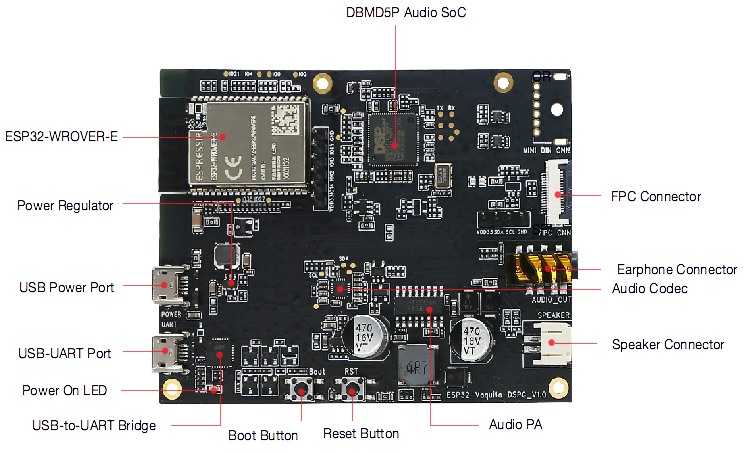
ESP32-Vaquita-DSPG - mainboard front
ESP32-Vaquita-DSPG Mainboard Front
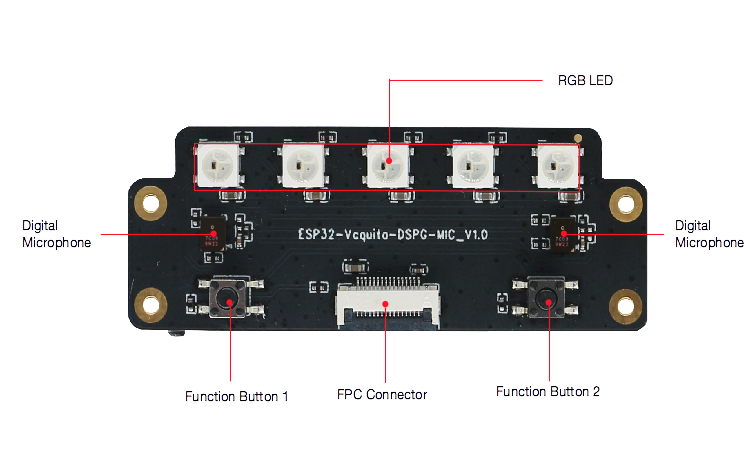
ESP32-Vaquita-DSPG - subboard front
ESP32-Vaquita-DSPG Subboard Front
Key Component |
Description |
|---|---|
ESP32-WROVER-E |
This ESP32 module contains the latest ESP32-D0WD-V3, a 128 Mbit SPI flash1 and a 64 Mbit PSRAM for flexible data storage, featuring Wi-Fi / BT connectivity and data processing capability. |
DBMD5P Audio SoC |
This SoC features superior far-field voice recognition fulfilled by its HDClear™ algorithms. |
Power Regulator |
5V-to-3.3V regulator. |
USB Power Port |
Supply power to the board. |
USB-UART Port |
A communication interface between a computer and the board. |
Power On LED |
Red LED indicates that the board is powered on. |
USB-to-UART Bridge |
Single USB-UART bridge chip provides transfer rates of up to 3 Mbps. |
Boot Button |
Download button. Holding down Boot and then pressing EN initiates Firmware Download mode for downloading firmware through the serial port. |
Reset Button |
Pressing this button resets the system. |
Audio PA |
Amplify audio signals to external speaker at maximum 8 W. |
Audio Codec |
Audio codec ES8311 communicates with ESP32 via the I2S bus, which converts digital signals to analog signals. |
Speaker Connector |
Connect an external speaker. |
Earphone Connector |
Connect an external earphone. |
FPC Connector |
Connect mainboard and subboard. |
Digital Microphone |
Two digital microphone arrays. |
RGB LED |
Five RGB LEDs. |
Function Button |
Two function buttons. |
Note
1:ESP32-Vaquita-DSPG boards delivered by Espressif before May 2020 are embedded with 64 Mbit flash; after that date with 128 Mbit flash.
1.4 Start Application Development
Before powering up your ESP32-Vaquita-DSPG, please make sure that it is in good condition with no obvious signs of damage.
1.4.1 Required Hardware
ESP32-Vaquita-DSPG
2 x USB 2.0 cable (Standard-A to Micro-B)
4-ohm speaker or earphones
Computer running Windows, Linux, or macOS
1.4.2 Hardware Setup
Connect ESP32-Vaquita-DSPG subboard to ESP32-Vaquita-DSPG mainboard through the FPC cable.
Connect a 4-ohm speaker to the Speaker Connector, or connect earphones to the Earphone Connector.
Plug in the USB cables to the PC and to both USB ports of ESP32-Vaquita-DSPG.
The Power On LED (Red) should turn on.
1.4.3 Software Setup
While this board can be used for variety of applications, one of the primary applications is to support “Alexa Voice Service (AVS) for AWS IoT” use cases. You can download Espressif’s AVS for AWS IoT SDK and follow the instructions.
2. Hardware Reference
2.1 Block Diagram
A block diagram below shows the components of ESP32-Vaquita-DSPG and their interconnections.
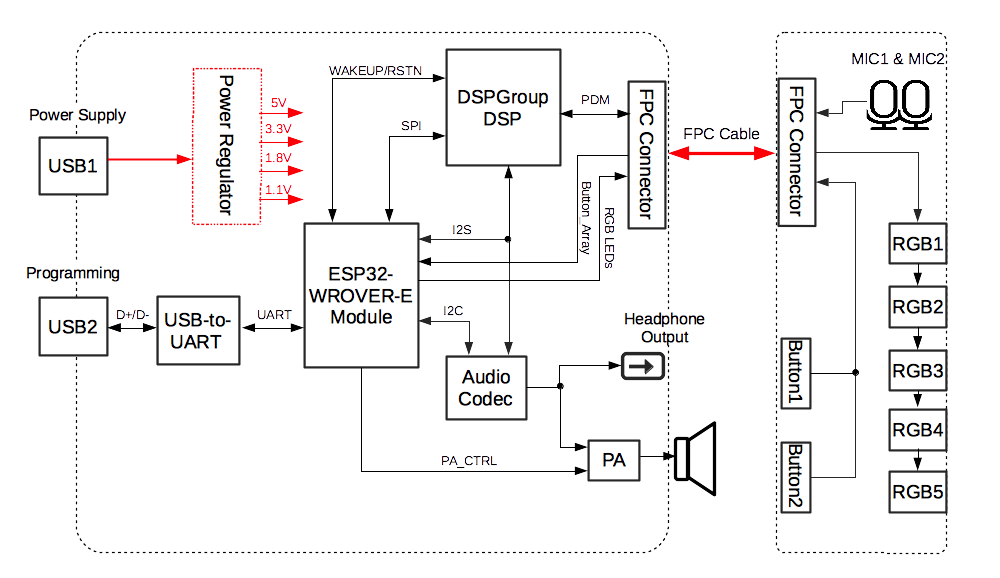
ESP32-Vaquita-DSPG
ESP32-Vaquita-DSPG Block Diagram