Project Configuration Guide
This guide is intended to describe three aspects of project configuration in ESP-IDF:
How the configuration can be edited (
idf.py menuconfigand configuration via plugins)The difference between default values and user-set values
How to use configuration values in C code and CMake
How to define new configuration options for the project
What is configuration report and how to understand it
Editing the Configuration
As mentioned in the Project Configuration, values currently assigned to the configuration options are stored in the sdkconfig file. This file should not be edited manually, because there can be relationships between the configuration options that could be broken by manual editing. Instead, the idf.py menuconfig command (or its alternatives depending on the specific IDE used) should be used.
If the user wants to redefine the default values of the configuration options set in Kconfig files, the sdkconfig.defaults file can be used. The values set there overwrite those from Kconfig files, but user can still change those via idf.py menuconfig. Those user-set values for the configuration options will be stored in the sdkconfig file, sdkconfig.defaults will remain unchanged.
There are several ways how to configure the project, depending on the IDE used. The most common way is to use the idf.py menuconfig command. This command opens a TUI (Text-based User Interface) where user can set the configuration options. The configuration is saved into the sdkconfig file. Alternatively, IDE plugins can be used as well.
Independently on the tool used, configuration values are loaded in the following order. By default, default values for the same config option are overridden by both default and user-set values from the later steps. User-set values can be overridden only by other user-set values in later steps. These steps are done automatically and are described here only in order to explain the behavior:
Kconfigdefault files are loaded, together with the relationships between them.If
sdkconfig.defaultsfile is found, user-set values are loaded from this file (see the note below whysdkconfig.defaultsstores user-set values).- If present,
sdkconfigfile is loaded. What happens next depends on whether thesdkconfigvalue is default or not: - If the
sdkconfigvalue is default and: sdkconfig.defaultshas already set given configuration option, thesdkconfig.defaultsvalue is used (values fromsdkconfig.defaultsare considered user-set). See the note below for more information.Otherwise, it is checked whether the
sdkconfigdefault value is the same as theKconfigdefault value. If not, an info statement is printed. In both cases, thesdkconfigdefault value is used by default. See the section Default Values Handling for more information.
- If the
If the value is not default, it is used automatically.
- If present,
When the configuration is saved, the values in the sdkconfig file are updated, as well as those in sdkconfig.h, sdkconfig.cmake and sdkconfig.json.
备注
Despite its name, the sdkconfig.defaults file does not contain the default values of the configuration options, but the values set by the user. The defaults in this context refers to the initial values for the given project rather than default values of the configuration options defined in Kconfig file.
Configuration with idf.py menuconfig
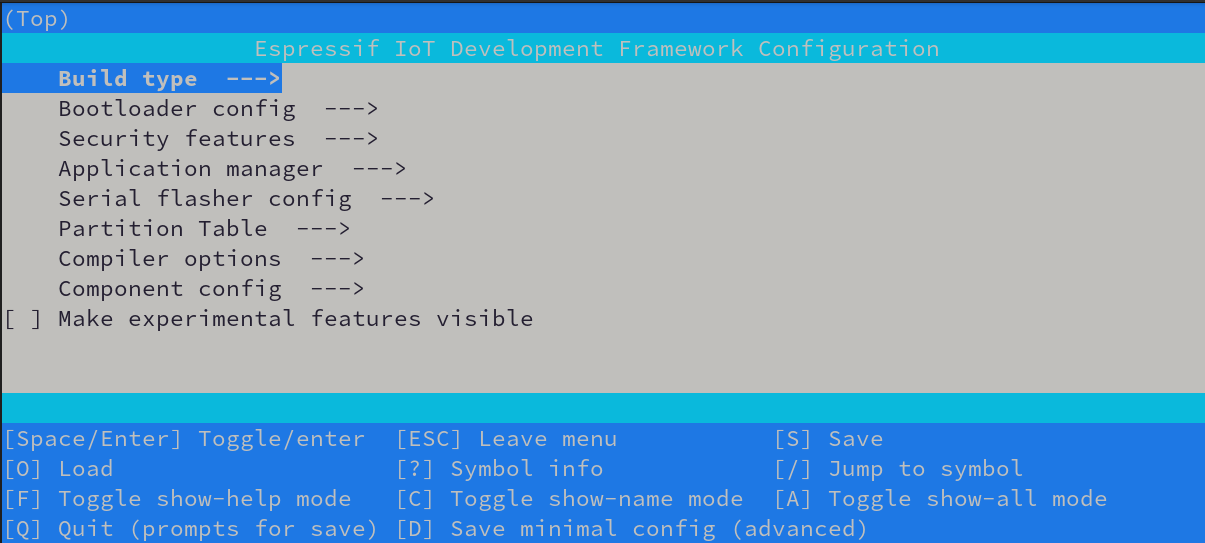
Using the idf.py menuconfig command in terminal or command line is the most system and IDE agnostic way of configuration. This command opens a TUI (Text-based User Interface) where user can set the configuration options. Navigation is realized by arrow keys, other hotkeys are described in the lower part of the window.
Configuration with ESP-IDF Plugin for Visual Studio Code
After installing the ESP-IDF plugin for Visual Studio Code, refer to the Project Configuration Editor section in the extension documentation.
Configuration with ESP-IDE
We also provide plugin for Eclipse IDE. To edit the project configuration, follow our documentation about SDK configuration
备注
If you are using another IDE/plugin, please refer to the documentation of the IDE/plugin or use command line command idf.py menuconfig.
Default Values Handling
Configuration options can have two types of values: default values and user-set values. Default values are defined in the Kconfig files and are automatically set by the configuration system (e.g. during the first build), while user-set values are those manually set by the user via configuration tools like idf.py menuconfig (or by sdkconfig.defaults file).
The user can change the value of any configuration option via e.g. the idf.py menuconfig tool. In that case, value is called user-set. If the user wants to remove their user-set value and let the configuration system determine the default value for given configuration option, they can use a shortcut R (restore) in the menuconfig window.
警告
Default values of config option are not "locked" on their current value. If the validity of the condition of current default value for given config option changes, the configuration system will automatically update the value for given config option.
Let's imagine following Kconfig file:
config DEPENDENT
    int "Dependent option"
    default 1 if CONDITION
    default 0 if !CONDITION

config CONDITION
    bool "Condition option"
    default y
As long as the DEPENDENT config option has a default value (i.e. the user did not set it manually), if the user sets the CONDITION option to n in the configuration tool, the DEPENDENT option will automatically change its value to 0. If the user sets the CONDITION option back to y, the DEPENDENT option will automatically change its value to 1.
Once the user manually sets the value of the DEPENDENT option, it will not change anymore, even if the CONDITION option is changed. The user can restore the default value of the DEPENDENT option by pressing R in the configuration tool.
When the configuration is saved, the values in the sdkconfig file are updated, as well as those in sdkconfig.h, sdkconfig.cmake and sdkconfig.json.
As mentioned in the beginning of this section, default values originate from Kconfig files. After successful configuration, they are subsequently written out to the sdkconfig file. This leads us to two "types" of default values:
Default value from
Kconfigfile (Kconfig default value): This is the default value set in the config option definition. It is used when there is notsdkconfigfile.Default value from
sdkconfigfile (sdkconfig default value): This is the default value set in thesdkconfigfile. When thesdkconfigfile is created, default values fromKconfigfiles are copied there. If thesdkconfigfile is already present and is only loaded, configuration system checks whether thesdkconfigdefault value matches theKconfigdefault value, but it is not automatically updated.
When loading the sdkconfig file (e.g. when running idf.py menuconfig), the configuration system checks whether the default value in the sdkconfig file matches the default value in the Kconfig files. Most of the time, Kconfig default values and sdkconfig default values are the same. However, there may be situations when those two differ; typically when switching between ESP-IDF or component versions where the Kconfig value was changed, or when somebody manually edited the sdkconfig file.
If the Kconfig default value is different from the sdkconfig default value, an info statement will notify the user about this fact. For the sake of build reproducibility, the sdkconfig default value is used. If the user wants to use the Kconfig default value, they can run idf.py refresh-config --policy=<POLICY> command, where <POLICY> can be:
sdkconfig: Use thesdkconfigdefault values. This is the default behavior.interactive: The user will be asked in every case whether they want to use theKconfigdefault value or keep thesdkconfigdefault value.kconfig: Use theKconfigdefault value.
How to Use Configuration Variables in C Code and CMake
When the configuration is being saved to sdkconfig file, it is also saved in several different formats, including sdkconfig.h and sdkconfig.cmake. The values in these files can be used in C code and CMake scripts.
Example of using configuration options in C code:
// Contents of sdkconfig.h file (generated automatically, it should NOT be changed manually)
//(...)
#define CONFIG_USE_WARP 1
#define CONFIG_WARP_SPEED 42
//(...)
// Contents of C code file
#include "sdkconfig.h"
(...)
#if CONFIG_USE_WARP
    set_warp_speed(CONFIG_WARP_SPEED);
#else
    set_warp_speed(0);
#endif
Example of using configuration options in CMake script:
# Contents of sdkconfig.cmake file (generated automatically, it should NOT be changed manually)
#(...)
set(CONFIG_USE_WARP 1)
set(CONFIG_WARP_SPEED 42)
#(...)
# Contents of CMakeLists.txt file
#(...)
if(CONFIG_USE_WARP)
    set(WARP_SPEED ${CONFIG_WARP_SPEED})
else()
    set(WARP_SPEED 0)
endif()
#(...)
Defining New Configuration Options for the Project
Some applications can get very complex and require a lot of configuration options. In such cases, it is useful to define new configuration options for the project. Similar to components, the application can have its own configuration options. These options are defined in the Kconfig or Kconfig.projbuild file in the main folder of the project. The process is the same as defining new configuration options for components, only with different location location of the Kconfig or Kconfig.projbuild file (main instead of the root folder).
Configuration Report
The configuration report is a semi-structured text designed to provide a unified overview of the project's configuration issues, if any. The report helps debug configuration-related issues by aggregating all messages, warnings, and errors related to the project's configuration. This report is automatically printed in the console whenever the project configuration is (re)built; typically during the first build of the project or when idf.py menuconfig command is run.
The configuration report consists of a header with general information (parser version, verbosity, status) and zero or more report areas. Each report area groups together messages related to a specific issue. For a more verbose output, set KCONFIG_REPORT_VERBOSITY environment variable to verbose before build or idf.py menuconfig command.
Example of a configuration report (actual output is colored):
Configuration report
--------------------
Parser Version: 1
Verbosity: default
Status: Finished with notifications

Multiple Symbol/Choice Definitions
----------------------------------

SYMBOL_NAME
    path/to/first/Kconfig_with_definition:line_number
    path/to/second/Kconfig_with_definition:line_number

ANOTHER_SYMBOL_NAME
    another/path/to/first/Kconfig_with_definition:line_number
    another/path/to/second/Kconfig_with_definition:line_number
How to Generate the Configuration Report in JSON Format
The configuration report can be generated in JSON format using the idf.py config-report command. This command will generate a JSON file with the project configuration report in the build/config directory with the name kconfig_parse_report.json.
idf.py config-report
警告
The JSON file structure is in the experimental stage and may change in the future.
The JSON file contains two main sections: header and areas:
header: contains the general information about the configuration report: report type, Kconfig parser version, verbosity, status, number of unique symbols, defaults policy.areas: contains the list of report areas. Each area contains errors, warnings and info messages related to the specific area (e.g. configuration options defined in multiple places etc.). The full list of areas is defined in the esp-idf-kconfig Documentation.
Example of a JSON file:
{
    "header": {
        "report_type": "kconfig",
        "parser_version": "1",
        "verbosity": "default",
        "status": "Finished with notifications",
        "number_of_unique_symbols": 100,
        "defaults_policy": "sdkconfig"
    },
    "areas": [
        {
            "title": "Multiple Symbol/Choice Definitions",
            "severity": "Info",
            "data": {
                "EXAMPLE_SYMBOL_NAME": [
                    "path/to/Kconfig:42",
                    "path/to/another/Kconfig:32"
                ]
            }
        }
    ]
}
备注
Detailed information about the configuration report can be found in the esp-idf-kconfig Documentation.