ESP TinyUF2
esp_tinyuf2 是一个扩展功能的 TinyUF2,针对支持 USB-OTG 功能 ESP 芯片开发。支持以下功能:
支持通过虚拟 USB 驱动器(U 盘)进行 OTA 升级
支持将 NVS 键值输出到虚拟 USB 驱动器中的 ini 文件
支持通过修改 ini 文件修改 NVS
UF2 是 Microsoft 开发的文件格式 PXT, 特别适合通过 MSC(存储类)烧录微控制器。 有关更友好的解释,请查看 博客.
在您的项目中支持 UF2 OTA/NVS
使用
idf.py add_dependency命令将组件添加到项目中.idf.py add-dependency "esp_tinyuf2"
定义您的分区表。 像其他 OTA 解决方案一样,您需要至少保留两个 OTA 应用程序分区. 请参考 Partition Tables 和示例 usb_uf2_ota.
# Partition Table Example
# Name,   Type, SubType, Offset,  Size, Flags
nvs,      data, nvs,     ,        0x4000,
otadata,  data, ota,     ,        0x2000,
phy_init, data, phy,     ,        0x1000,
ota_0,    app,  ota_0,   ,        1500K,
ota_1,    app,  ota_1,   ,        1500K,
使用
idf.py menuconfig配置组件(Top) → Component config → TinyUF2 Config
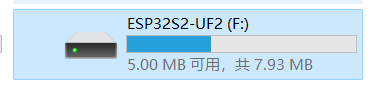
USB Virtual Disk size(MB): 虚拟 USB 驱动器在文件资源管理器中显示的大小,默认情况下为 8MBMax APP size(MB): 最大应用大小,默认情况下 4MBFlash cache size(KB): 缓存大小,用于缓存即将烧录的 bin 片段,默认情况下为 32KBUSB Device VID: Espressif VID (默认 0x303A)USB Device PID: Espressif test PID (默认 0x8000), 如需申请 PID 请参考 esp-usb-pid.USB Disk Name: 虚拟 USB 驱动器在文件资源管理器中显示的名称,ESP32Sx-UF2默认USB Device Manufacture: 制造商Espressif默认Product Name: 产品名称ESP TinyUF2默认Product ID: 产品 ID12345678默认Product URL:index文件将被添加到 U 盘, 用户可以单击进入网页,https://products.espressif.com/默认UF2 NVS ini file size:ini文件大小,用于保存 NVS 键值对
如下所示,安装
tinyuf2功能,有关更多详细信息,请参阅示例 usb_uf2_nvs 和 usb_uf2_ota/* install UF2 OTA */ tinyuf2_ota_config_t ota_config = DEFAULT_TINYUF2_OTA_CONFIG(); ota_config.complete_cb = uf2_update_complete_cb; /* disable auto restart, if false manual restart later */ ota_config.if_restart = false; /* install UF2 NVS */ tinyuf2_nvs_config_t nvs_config = DEFAULT_TINYUF2_NVS_CONFIG(); nvs_config.part_name = "nvs"; nvs_config.namespace_name = "myuf2"; nvs_config.modified_cb = uf2_nvs_modified_cb; esp_tinyuf2_install(&ota_config, &nvs_config);
运行
idf.py build flash进行初始下载, 之后可以使用idf.py uf2-ota生成新的uf2app bin将 UF2 格式 app bin 拖放到磁盘, 升级将自动进行
使用 UF2 USB Console
通过 menuconfig (Top) → Component config → TinyUF2 Config → Enable USB Console For log, 该日志将输出到 USB 串行端口(默认向 UART 输出).
编译 APP 为 UF2 格式
该组件添加了新的命令 idf.py uf2-ota, 可以用于将 app 编译为 UF2 格式. 编译完成后, 新的 UF2 文件 (${PROJECT_NAME}.uf2) 将被产生到 project 文件夹.
idf.py uf2-ota
将现有 bin 转换为 UF2 格式
将您现有的应用 bin 转换为UF2格式, 可以使用 uf2conv.py, 您需要指定 family id 为 ESP32S2, ESP32S3 或如下的 magic number. 并且还需使用 -b 指定地址, tinyuf2 将使用它作为偏移来写入 OTA 分区.
转换指令
using:
uf2conv.py your_firmware.bin -c -b 0x00 -f ESP32S3
or:
uf2conv.py your_firmware.bin -c -b 0x00 -f 0xc47e5767
注意
要连续使用 UF2 OTA 功能,必须在更新的应用中同样启用 tinyuf2.
API 参考
Header File
Functions
-
esp_err_t esp_tinyuf2_install(tinyuf2_ota_config_t *ota_config, tinyuf2_nvs_config_t *nvs_config)
Flashing app to specified partition through USB UF2 (Virtual USB Disk), and support operate NVS partition through USB UF2 CONFIG.ini file.
- 参数
ota_config – tinyuf2 configs described in tinyuf2_ota_config_t
nvs_config – tinyuf2 nvs configs described in tinyuf2_nvs_config_t
- 返回
ESP_ERR_INVALID_ARG invalid parameter, please check partitions
ESP_ERR_INVALID_STATE tinyuf2 already installed
ESP_OK Success
-
esp_err_t esp_tinyuf2_uninstall(void)
Uninstall tinyuf2, only reset USB to default state.
备注
not release memory due to tinyusb not support teardown
- 返回
esp_err_t
ESP_ERR_INVALID_STATE tinyuf2 not installed
ESP_OK Success
-
tinyuf2_state_t esp_tinyuf2_current_state(void)
Get tinyuf2 current state.
- 返回
tinyuf2_state_t
Structures
-
struct tinyuf2_ota_config_t
tinyuf2 configurations
Public Members
-
esp_partition_subtype_t subtype
Partition subtype. if ESP_PARTITION_SUBTYPE_ANY will use the next_update_partition by default.
-
const char *label
Partition label. Set this value if looking for partition with a specific name. if subtype==ESP_PARTITION_SUBTYPE_ANY, label default to NULL.
-
bool if_restart
if restart system to new app partition after UF2 flashing done
-
update_complete_cb_t complete_cb
user callback called after uf2 update complete
-
esp_partition_subtype_t subtype
-
struct tinyuf2_nvs_config_t
tinyuf2 nvs configurations
Public Members
-
const char *part_name
Partition name.
-
const char *namespace_name
Namespace name.
-
nvs_modified_cb_t modified_cb
user callback called after uf2 update complete
-
const char *part_name
Macros
-
DEFAULT_TINYUF2_OTA_CONFIG()
-
DEFAULT_TINYUF2_NVS_CONFIG()
Type Definitions
-
typedef void (*update_complete_cb_t)(void)
user callback called after uf2 update complete
-
typedef void (*nvs_modified_cb_t)(void)
user callback called after nvs modified