Multimedia Technology Wiki: Application Solution
Note
This document is automatically translated using AI. Please excuse any detailed errors. The official English version is still in progress.
ESP-WebRTC Solution
Overview
WebRTC is widely used for real-time, low-latency communication, initially designed for peer-to-peer (P2P) and now forms the basis for video conferencing, streaming media, and IoT applications. Compared to MQTT or WebSocket, WebRTC has better optimization for real-time media transmission and NAT traversal. ICE (Interactive Connectivity Establishment) is a key mechanism of WebRTC, which achieves reliable connections across NAT and firewalls through STUN and TURN servers. The ESP-WebRTC solution further simplifies the STUN/TURN configuration with its support for ICE.
Feature / Protocol |
WebRTC |
MQTT |
WebSocket |
|---|---|---|---|
Communication Mode |
Peer-to-peer (established via STUN/TURN/ICE) |
Proxy-based publish/subscribe |
Client-server |
Media Support |
✅ Audio, video, data |
❌ Messages only (binary/text) |
❌ Messages only (binary/text) |
Latency |
Ultra-low latency (possibly less than 100 ms) |
Low latency (depends on the proxy, about 10 to 100 ms) |
Low latency (about tens of milliseconds) |
Reliability |
Reliable + unreliable channels (SCTP) |
QoS levels (0,1,2) |
TCP reliable only |
NAT Traversal |
✅ Built-in STUN/TURN support |
❌ Direct TCP only |
❌ Direct TCP only |
Security |
DTLS/SRTP (mandatory encryption) |
TLS (optional, MQTTS) |
TLS (optional, WSS) |
Scalability |
SFU/MCU needed for multiple parties |
Good scalability with proxy |
Server clusters/load balancing |
Best Use Case |
Real-time calls, meetings, games, P2P file sharing |
IoT telemetry, device control, sensor data |
Chat, real-time updates, dashboards |
Application Field
WebRTC can achieve low-latency communication in embedded and IoT systems, while supporting media transmission, such as IP cameras and video conferencing, and can also transmit any type of data through the WebRTC data channel.
User Support
Protocol Layer User: For users who only focus on the connection layer, they can use the lightweight peer connection implementation provided by esp_peer. Its features include:
Complete ICE support (STUN + TURN) is available.
Quickly establish optimization, optimize startup time
Minimal dependencies, only requires
libsrtpLow resource consumption (approximately 60 KB/connection)
Low latency (approximately 260 ms between ESP32 and mobile phone)
Core protocol implemented from scratch, easier to expand
Detailed document esp_peer
Best practice reference peer_demo
Application Layer Users: Based on the protocol layer, application layer users can implement audio and video collection, rendering, and signaling processing based on the connection capabilities provided by ESP-WebRTC. This allows for rapid prototype construction, requiring only signal replacement. The main components include:
esp_capture: Capture encoded audio/video from hardware
av_render:Audio and video playback
Signaling: Supports AppRTC, WHIP, OpenAI
Solution and Demonstration
openai_demo: ESP32 as a client for OpenAI services.
doorbell_demo: Smart doorbell using AppRTC signaling.
doorbell_local: Local doorbell supporting pedestrian AI detection, no signaling server required.
video_call: Video calling through data channels.
whip_demo: Push ESP32 media stream to WHIP server.
serverless_mqtt: Connection establishment without a server.
livekit client: Allows connection to LiveKit cloud.
openAI video assistant: Enable image analysis through voice control.
Other Resources
Introduction to WebRTC - High Performance Browser Networking
WebRTC for the Curious - Deep understanding of WebRTC internals
ESP-Hosted-MCU Solution
Basic Functions
Overview
ESP-Hosted-MCU is an open-source solution that allows Espressif chipsets and modules to be used as communication slaves. This solution provides wireless connectivity (Wi-Fi and Bluetooth) for the host microprocessor or microcontroller, enabling it to communicate with other devices.
For the framework of ESP-Hosted host and slave functions, please refer to Introduction
Slave Selection Guide
For a comparison of communication interfaces and throughput, please refer to Decide the communication bus in between host and slave
Comparison of SDIO interface slave chip parameters
Model |
SRAM |
GPIO |
Feature |
|---|---|---|---|
ESP32 |
520 KB |
34 |
2.4 GHz Wi-Fi-and-Bluetooth |
ESP32-C5 |
384 KB |
22 |
2.4 and 5 GHz dual-band Wi-Fi 6, Bluetooth LE 5, Zigbee 3.0 and Thread 1.3 |
ESP32-C6 |
512 KB |
30 |
2.4 GHz Wi-Fi 4/Wi-Fi 6 and Bluetooth LE |
For more explanations, please refer to ESP-Hosted-MCU. The dependencies and related configurations of the master and slave can be viewed according to the communication interface used.
ESP-Hosted Loading Process
Component initialization: esp_hosted_init()
Add wifi remote channel: add_esp_wifi_remote_channels()
Initialize SDIO driver and create related tasks: bus_init_internal()
Initialize RPC related interfaces: rpc_core_init()
Call
esp_wifi_init()in the main application
Execute remote initialization: esp_wifi_remote_init()
Execute RPC related initialization: rpc_wifi_init()
Typical Example: The host completes network configuration through the slave.
Host Sending Process
Default Wi-Fi Configuration: WIFI_INIT_CONFIG_DEFAULT
Wi-Fi Initialization: rpc_wifi_init()
RPC Task Handling: rpc_tx_thread()
Retrieve the response return value: rpc_rsp_callback()
Register and receive Slave events (such as
WIFI_EVENT_STA_STARTevent): rpc_event_callback()
Slave Processing Flow
Receive and execute RPC commands: esp_rpc_command_dispatcher()
Configure Wi-Fi according to the passed parameters: req_wifi_init()
Handle Wi-Fi events and send them to the message return queue: event_handler_wifi()
Task processing and triggering event callbacks: pserial_task()
Send event to host: rpc_evt_handler()
Slave firmware upgrade
The host upgrades the slave firmware by calling
esp_hosted_slave_ota(): esp_hosted_slave_otaDuring initial development, it is recommended to reserve a UART download interface in the slave device for debugging and upgrading. Subsequent upgrades can be considered via Wi-Fi.
Related example reference: host_performs_slave_ota
Others
Hosted system call interface: g_hosted_osi_funcs
Hosted Task Creation: hosted_thread_create
SDIO Driver Initialization: hosted_sdio_init
Network Split Function
Overview
The Network Split function allows the host MCU and ESP32 slave to share an IP address and distribute traffic between them. When the host is in sleep mode, the slave can continue to handle selected network activities (such as MQTT, DNS).
Port-based data forwarding
Shared IP address
Support for specific port packet filtering
Support for specific packet wake-up, such as “wakeup-host” included in MQTT messages
Support for the host and slave to simultaneously call
esp_wifi_xx()and other related interfaces to complete network connection
For more information, please refer to Network Split Feature for ESP-Hosted MCU
Host Deep Sleep with Slave Maintaining MQTT Keep-Alive Function
Overview
This function allows the host MCU to enter a low-power state while maintaining the slave’s network connection, thereby improving the energy efficiency of battery-powered devices.
The slave maintains the network connection when the host enters deep sleep or power off
The slave can wake up the host through specific packets or execute specific commands
Seamless switching of network packets during sleep wake-up
Needs to be used in conjunction with the network split function
For more information, please refer to Host Power Save (ESP-Hosted MCU)
FAQ
Q: Why is the communication between the host and slave failing?
A: You can troubleshoot as follows:
Check if the versions of the
ESP-Hostedcomponent on the host and slave are consistentCheck if the configurations of the host and slave are consistent, such as communication interfaces (SDIO or SPI), communication rates, etc.
Check if the hardware connection is normal, such as IO pins, power supply, etc. For more information, refer to Hardware Guide
Q: Why can’t the configured CONFIG_ESP_WIFI_STATIC_RX_BUFFER_NUM take effect?
A: Starting from the esp_wifi_remote 0.8.0 version, the configuration item name has been changed to CONFIG_WIFI_RMT_STATIC_RX_BUFFER_NUM. Please configure it in (Top) > Component config > Wi-Fi Remote > Wi-Fi configuration. The old CONFIG_ESP_WIFI_STATIC_RX_BUFFER_NUM configuration item is no longer supported.
Q: Why is there a compilation failure?
A: Some structure definitions in ESP-IDF have changed, and the updated component definitions to adapt to the new version are not compatible with the old version of ESP-IDF. It is recommended to upgrade ESP-IDF to a compatible version, or use a matching component version.
Q: What does the following log mean: === ESP-Hosted Version Warning ===?
A: This warning indicates that the versions of the ESP-Hosted component used by the host (such as ESP32-P4) and the slave (such as ESP32-C6) are inconsistent. It is strongly recommended that the host and slave use the same version to avoid communication abnormalities due to version differences.
Q: What does the following log mean: Identified slave [esp32c6] != Expected [esp32] ?
A: This error indicates that the actual detected slave chip model (esp32-c6) does not match the model specified in the configuration (esp32). Please reselect the correct slave chip model in (Top) > Component config > Wi-Fi Remote > choose slave target.
Q: Why does ESP32-P4 + ESP32-C5 report insufficient memory after turning on Wi-Fi and BLE?
A: The internal memory of ESP32-C5 is only 384 KB, and the memory resources are relatively tight, which can easily lead to memory allocation failure. The following configuration can be used in the slave to further optimize memory usage:
CONFIG_ESP_SDIO_RX_Q_SIZE=10
CONFIG_ESP_WIFI_IRAM_OPT=n
CONFIG_ESP_WIFI_EXTRA_IRAM_OPT=n
CONFIG_ESP_WIFI_RX_IRAM_OPT=n
CONFIG_ESP_WIFI_SLP_IRAM_OPT=n
CONFIG_LWIP_IRAM_OPTIMIZATION=n
CONFIG_LWIP_EXTRA_IRAM_OPTIMIZATION=n
CONFIG_FREERTOS_PLACE_FUNCTIONS_INTO_FLASH=y
Q: How to speed up IP acquisition?
A: Both the Host and Slave can use the following configuration:
CONFIG_COMPILER_OPTIMIZATION_PERF=y
CONFIG_BOOTLOADER_LOG_LEVEL_NONE=y
CONFIG_LOG_DEFAULT_LEVEL_ERROR=y
CONFIG_BOOTLOADER_SKIP_VALIDATE_ALWAYS=y
CONFIG_ESPTOOLPY_FLASHMODE_QIO=y
CONFIG_ESPTOOLPY_FLASHFREQ_80M=y
CONFIG_LWIP_DHCP_RESTORE_LAST_IP=y
CONFIG_SPIRAM_MEMTEST=n
Use bootloader_hooks or bootloader_override to reset the slave in advance to reduce the waiting time of the host.
By default, hosted is initialized during the bootloader stage. For quick startup, you can shield esp_hosted_init(), and call
esp_hosted_init()before the application programesp_wifi_init().
Q: Relationship between ESP-IDF version and hosted/remote version
A: - ESP32-C6: It is recommended to use esp_hosted ≥ 2.4.2, esp_wifi_remote ≥ 1.0.0, ESP-IDF ≥ v5.3.2 - ESP32-C5: It is recommended to use esp_hosted ≥ 2.4.2, esp_wifi_remote ≥ 1.0.0, ESP-IDF ≥ v5.5
You can pull the component in the following way, or directly use the latest component. If the host has updated the component version and the version difference is significant, it is recommended to update the slave as well.
espressif/esp_hosted:
  version: ^2.4
  rules:
  - if: target in [esp32p4]
espressif/esp_wifi_remote:
  version: ^1.0
  rules:
  - if: target in [esp32p4]
Q: Precautions for Using Bluetooth
A: The communication through the esp_hosted component requires some modifications to support Bluetooth functionality, which is different from using chips with Bluetooth capabilities (such as ESP32C6).
Related Configuration
#
# BT config
# - ESP32 co-processor only supports BLE 4.2
#
CONFIG_BT_ENABLED=y
CONFIG_BT_CONTROLLER_DISABLED=y
CONFIG_BT_BLUEDROID_ENABLED=y
CONFIG_BT_BLE_50_FEATURES_SUPPORTED=y
CONFIG_BT_BLE_42_FEATURES_SUPPORTED=y

#
# ESP-Hosted and Wi-Fi Remote config
#
CONFIG_ESP_HOSTED_SDIO_HOST_INTERFACE=y
CONFIG_ESP_WIFI_REMOTE_ENABLED=y
CONFIG_SLAVE_IDF_TARGET_ESP32C6=y

#
# Bluetooth Support
#
CONFIG_ESP_HOSTED_ENABLE_BT_BLUEDROID=y
CONFIG_ESP_HOSTED_BLUEDROID_HCI_VHCI=y
Code Modification
#if CONFIG_IDF_TARGET_ESP32P4
#include "esp_hosted.h"
#include "esp_hosted_bluedroid.h"
#else
  #if CONFIG_BT_CONTROLLER_ENABLED || !CONFIG_BT_NIMBLE_ENABLED
  #include "esp_bt.h"
  #endif
#endif

esp_err_t esp_blufi_controller_init() {
#if CONFIG_IDF_TARGET_ESP32P4
  // init bt controller
  esp_err_t ret = esp_hosted_bt_controller_init();
  if (ESP_OK != ret) {
    ESP_LOGW("INFO", "failed to init bt controller, %s", esp_err_to_name(ret));
    return ret;
  }

    // enable bt controller
  ret = esp_hosted_bt_controller_enable();
  if (ESP_OK != ret) {
    ESP_LOGW("INFO", "failed to enable bt controller, ret: %s", esp_err_to_name(ret));
    return ret;
  }

  hosted_hci_bluedroid_open();

  /* get HCI driver operations */
  esp_bluedroid_hci_driver_operations_t operations = {
      .send = hosted_hci_bluedroid_send,
      .check_send_available = hosted_hci_bluedroid_check_send_available,
      .register_host_callback = hosted_hci_bluedroid_register_host_callback,
  };
  ret = esp_bluedroid_attach_hci_driver(&operations);
  if (ESP_OK != ret) {
    ESP_LOGW("INFO", "failed to attach hci driver, ret: %s", esp_err_to_name(ret));
  }
  return ret;
#endif
}

esp_err_t esp_blufi_controller_deinit() {
  esp_err_t ret = ESP_OK;
#if CONFIG_IDF_TARGET_ESP32P4
  ret = esp_hosted_bt_controller_disable();
  if (ret) {
      ESP_LOGW("INFO", "failed to disable bt controller, ret: %s", esp_err_to_name(ret));
      return ret;
  }

  ret = esp_hosted_bt_controller_deinit(true);
  if (ret) {
      ESP_LOGW("INFO", "failed to deinit bt controller, ret: %s", esp_err_to_name(ret));
      return ret;
  }
#endif
  return ret;
}
Q: Considerations for Using ESP32S3 as a Host
A: When the chip itself supports Wi-Fi and Bluetooth functions, you need to refer to Troubleshooting to complete the communication.
AI Agent Solution
Overview
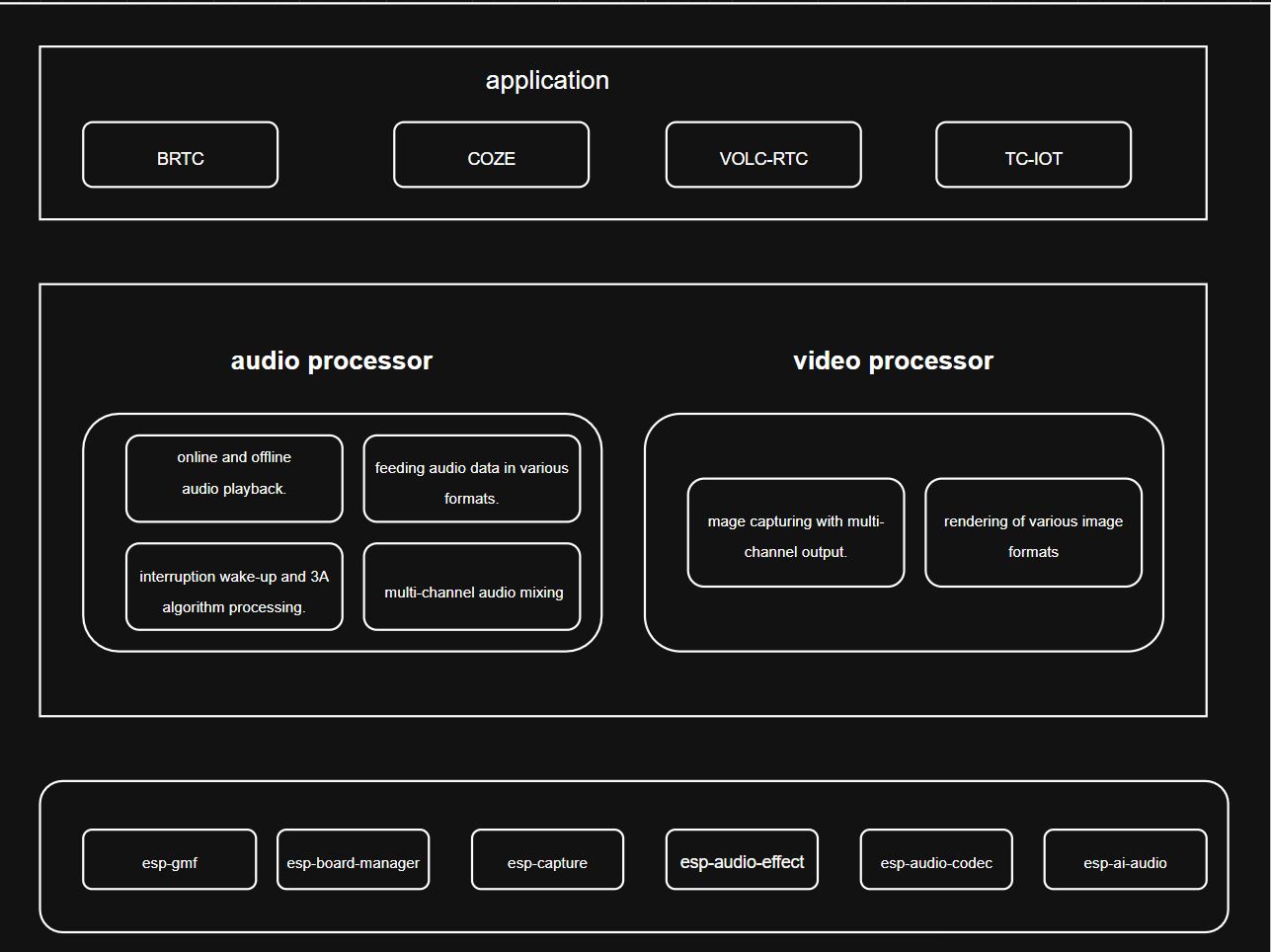
AI Agents have implemented audio and video interactive application code based on the ESP32 platform. This application is based on the ESP-GMF architecture and integrates AI Agent device-side development, providing developers with a complete audio and video interactive solution.
Application Architecture
The AI Agents application is based on the ESP-GMF architecture, mainly including the following two core modules:
Audio-processor Module is mainly responsible for audio data processing, including:
Playback
Supports local audio file playback
Supports network audio playback
Supports decoding of multiple audio formats
Can be used as a source for background music or prompt sounds
Feeder (Streaming Playback)
Play real-time streaming audio data (such as WebSocket, HTTP stream, memory buffer)
Commonly used in TTS, real-time voice distribution, online audio playback and other scenarios.
Can be combined with Mixer for mixed audio output
Recorder (Recording)
Audio collection function
Supports 3A algorithm processing (AEC, ANS, AGC)
Supports encoding output (PCM, AMR, OPUS, WAV, etc.)
Can be used for scenarios such as smart voice interaction, voice upload, etc.
Mixer (Mixing)
Mix the Playback and Feeder for output
Expandable for multiple input channels
Suitable for scenarios such as background music + real-time voice, overlay of prompt tones, etc.
Video-processor Module is mainly responsible for video data processing, including:
Video Capture
Video Codec
Video Rendering
Feature Characteristics
The table below lists the mainstream AI platforms supported by AI Agents application and the functionality support in each AI platform:
Platform |
Voice call |
Voice Interaction |
Visual processing |
Audio-video dialogue |
Example link |
|---|---|---|---|---|---|
Volcano RTC |
✓ |
✓ |
✓ |
✓ |
|
COZE |
✓ |
||||
BRTC |
✓ |
✓ |
✓ |
✓ |
|
Tencent Cloud RTC |
✓ |
||||
General |
✓ |
✓ |
✓ |
✓ |