Multimedia Technology Wiki: Component Description
Note
This document is automatically translated using AI. Please excuse any detailed errors. The official English version is still in progress.
ESP-New-JPEG Component
Note
For basic knowledge about JPEG, please refer to JPEG
Overview
ESP-New-JPEG is a lightweight JPEG encoding and decoding library launched by Espressif Systems. To improve efficiency, the JPEG encoder and decoder have been deeply optimized to reduce memory consumption and enhance processing performance. For the ESP32-S3 chip that supports SIMD instructions, these instructions are used to further improve processing speed. In addition, rotation, cropping, and scaling functions have been extended, which can be performed simultaneously during the encoding and decoding process, thereby simplifying user operations. For chips with smaller memory, a block mode has been introduced to support processing part of the image content multiple times, effectively reducing memory pressure.
ESP-New-JPEG supports JPEG encoding and decoding of the Baseline Profile. The rotation, cropping, scaling, and block mode functions can only take effect under specific configurations.
JPEG Encoder Function
The basic features supported by the encoder are as follows:
Supports decoding of any width and height
Supports the following pixel formats: RGB888, RGB565 (big-endian), RGB565 (little-endian), RGBA, YCbYCr, CbYCrY, YCbY2YCrY2, GRAY
When using the YCbY2YCrY2 format, only YUV420 and Gray subsampling are supported
Supports YUV444, YUV422, YUV420, Gray subsampling
Supports quality setting range: 1-100
The extended features are as follows:
Supports 0°, 90°, 180°, 270° clockwise rotation
Supports dual-task encoding
Supports block mode encoding
Dual-task encoding can be used on dual-core chips, fully utilizing the advantages of dual-core parallel encoding. The principle is that one core handles the main encoding task, and the other core is responsible for the entropy encoding part of the work. In most cases, enabling dual-core encoding can bring about a 1.5 times performance improvement. You can choose whether to enable dual-core decoding through menuconfig configuration, and adjust the core and priority of the entropy encoding task.
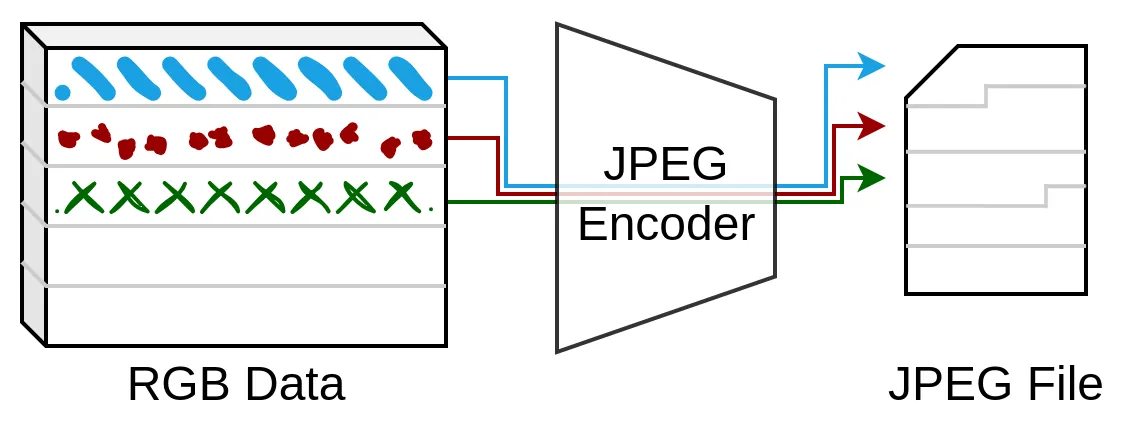
Block encoding refers to encoding the data of one image block at a time, and encoding the complete image after multiple processing. When subsampling YUV420, the height of each block is 16 rows and the width is the image width; under other subsampling formats, the height of each block is 8 rows and the width is the image width. Since the amount of data processed by block encoding each time is small, the image buffer can be placed in DRAM, thereby improving the encoding speed. The workflow of block encoding is shown in the following figure:
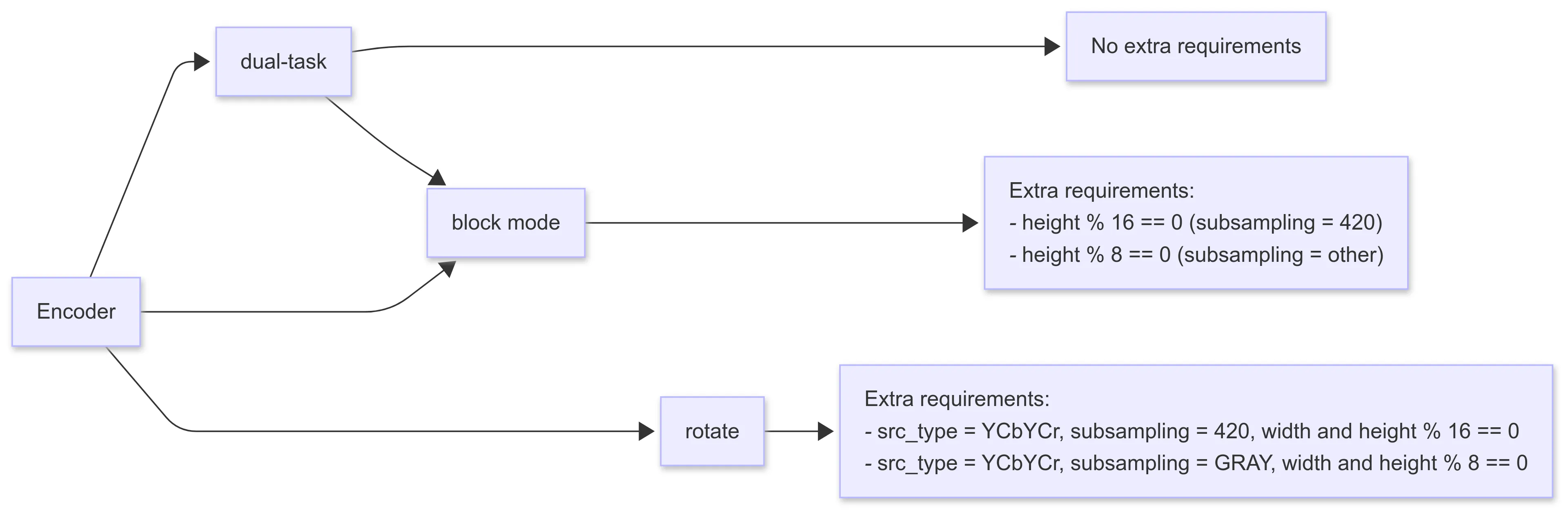
The configuration requirements for extended features are as follows:
JPEG Decoder Functionality
The basic features supported by the decoder are as follows:
Supports decoding of any width and height
Supports single-channel and three-channel decoding
Supports the following pixel format outputs: RGB888, RGB565 (big-endian), RGB565 (little-endian), CbYCrY
The extended features are as follows:
Supports scaling (maximum reduction ratio is 1/8)
Supports cropping (cropping from the upper left corner)
Supports 0°, 90°, 180°, 270° clockwise rotation
Supports block mode decoding
The process of scaling, cropping, and rotating is sequential, as shown in the diagram below. The decoded JPEG data stream is first scaled, then cropped, and finally rotated and output.
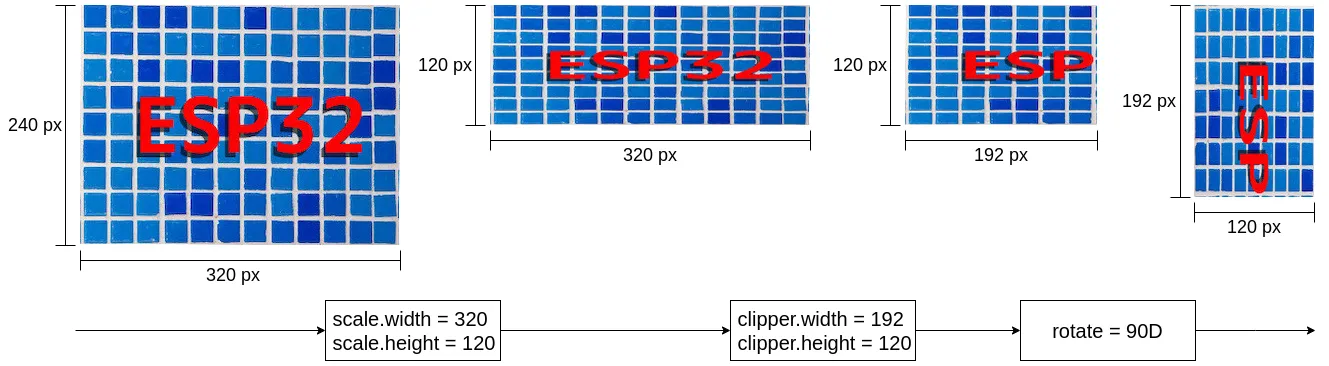
When using the zoom and crop functions, you need to configure the corresponding parameters in the jpeg_resolution_t structure. The component supports handling width or height separately. For example, when only cropping the width while keeping the height unchanged, you can set clipper.height = 0, at which point the height of the image will remain the original JPEG image height. The processing flow can be completed through the following detailed or simplified configuration.
// Detailed configuration
jpeg_dec_config_t config = DEFAULT_JPEG_DEC_CONFIG();
config.output_type = JPEG_PIXEL_FORMAT_RGB565_LE;
config.scale.width = 320;
config.scale.height = 120;
config.clipper.width = 192;
config.clipper.height = 120;
config.rotate = JPEG_ROTATE_90D;

// Simplified configuration
jpeg_dec_config_t config = DEFAULT_JPEG_DEC_CONFIG();
config.output_type = JPEG_PIXEL_FORMAT_RGB565_LE;
config.scale.width = 0;  // keep width unchanged by setting to 0
config.scale.height = 120;
config.clipper.width = 192;
config.clipper.height = 0;  // keep height unchanged by setting to 0
config.rotate = JPEG_ROTATE_90D;
Block decoding refers to decoding only one image block at a time, and the entire image is decoded after multiple processing. In YUV420 subsampling, the height of each block is 16 lines, and the width is the image width; for other subsampling formats, the height of each block is 8 lines, and the width is the image width. Since block decoding processes a small amount of data each time, it is more friendly to chips without PSRAM, and placing the output image buffer in DRAM can also improve the decoding speed. The operation of block decoding can be seen as the reverse process of block encoding.
The typical usage method of block decoding is as follows:
jpeg_dec_config_t config = DEFAULT_JPEG_DEC_CONFIG();
config.block_enable = true;

jpeg_dec_open();
jpeg_dec_parse_header();

int output_len = 0;
int process_count = 0;
jpeg_dec_get_outbuf_len(hd, &output_len);
jpeg_dec_get_process_count(hd, &process_count);

for (int block_cnt = 0; block_cnt < process_count; block_cnt++) {
  jpeg_dec_process();
}

jpeg_dec_close();
The configuration requirements for extended functions are as follows:
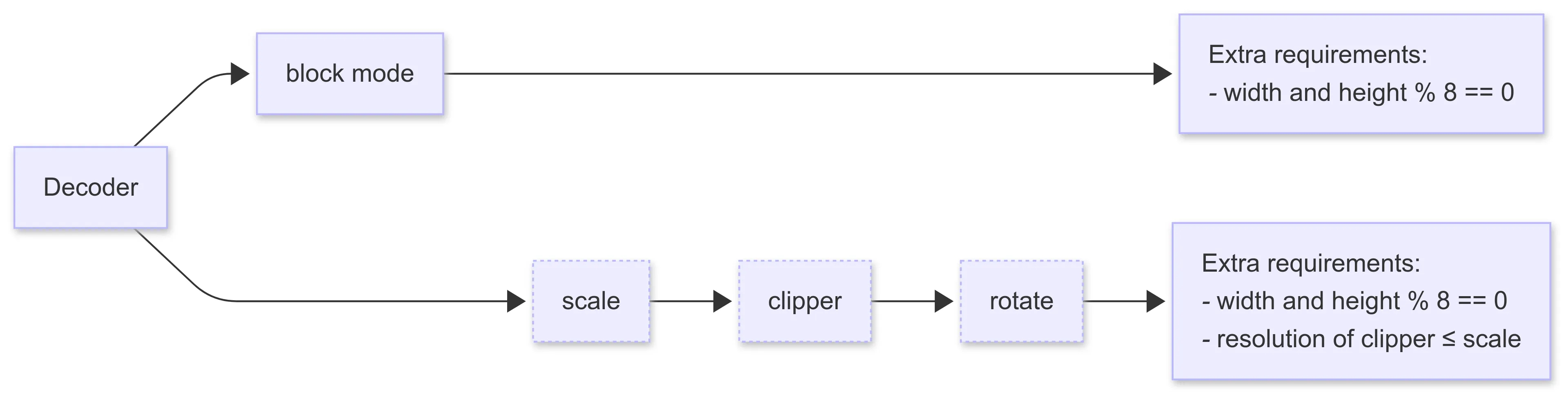
When block decoding is enabled, other extended functions cannot be used
The width and height in the configuration parameters of scaling, cropping, and rotating are required to be multiples of 8
When scaling and cropping are enabled at the same time, the size of the crop is required to be smaller than the size after scaling
Performance
ESP-New-JPEG has deeply optimized the JPEG encoding and decoding architecture:
Optimize data processing flow, improve the reuse efficiency of intermediate data, and reduce memory copy overhead.
Perform assembly-level optimization for Xtensa architecture chips; significantly improve computational performance on ESP32-S3 chips that support SIMD instructions.
Integrate various image operations such as cropping and rotating into the codec to improve the overall system efficiency.
For codec performance test data, please refer to Performance.
Usage Method
The ESP-New-JPEG component is hosted on Github. You can add this component to your project by entering the following command in your project.
idf.py add-dependency “espressif/esp_new_jpeg”
The test_app folder under the esp_new_jpeg directory contains a runnable test project, which demonstrates the related API call process. Before using the ESP-New-JPEG component, it is recommended to refer to and debug this test project to familiarize yourself with the API usage.
FAQ
Q: Does ESP-New-JPEG support decoding progressive JPEG?
A: No, ESP-New-JPEG only supports decoding baseline JPEG. You can use the following code to check whether the image is a progressive JPEG. Output 1 indicates progressive JPEG, and output 0 indicates baseline JPEG.
python
>>> from PIL import Image
>>> Image.open("file_name.jpg").info.get('progressive', 0)
Q: Why does the output image look misaligned?
A: This problem usually occurs when some columns appear on the left or right side of the image, and these columns appear on the other side of the image. If you are using ESP32-S3, the possible reason is that the output buffer of the decoder or the input buffer of the encoder is not aligned to 16 bytes. Please use the jpeg_calloc_align() function to allocate the buffer.
Q: How to preview the raw data of the image, such as viewing RGB888 data?
A: You can use yuvplayer. It supports viewing grayscale, RGB888, RGB565 (little-endian), UYVY, YUYV, YUV420P, etc.
Q: Why is ESP_NEW_JPEG decoding slower on ESP32-P4?
A: ESP_NEW_JPEG has not yet been optimized for ESP32-P4. However, ESP32-P4 is equipped with a hardware JPEG encoding and decoding module, and its hardware decoding performance is superior to software decoding. It is recommended to use the hardware JPEG module on ESP32-P4 to achieve better decoding performance. You can refer to JPEG Image Encoder and Decoder - ESP32-P4 for more information.
Q: Will ESP_NEW_JPEG be integrated with the hardware encoder/decoder into a single component, similar to the H264 component?
A: No plans at the moment.
Q: How to estimate decoding speed?
A: The decoding speed of a specific resolution image can be estimated through tested benchmark data. For example, if the resolution of the image to be tested is 480x512, and the known decoding speed of 640x480 is 13.24 fps, then the estimated decoding speed of 480x512 can be calculated as 13.24 * (480/640) * (512/480) = 10.59 fps.
Refer to the Performance for the tested data.
Q: What is the memory consumption of ESP_NEW_JPEG?
A: Currently, only the memory consumption of the decoder has been accounted for.
When the scale is not enabled, the memory consumption is constant, about 10 KB. Most of the fixed memory is allocated when
open()is called, and all memory is released whenclose()is called.When the scale is enabled, memory consumption increases with the increase in image width.
Q: How to understand the concept of stream processing in ESP_NEW_JPEG?
A: Basic usage of ESP_NEW_JPEG decoding interface: open() > parse_header() > process() > close()
If every image parameter is the same, opening and closing each time would waste resources. Therefore, a streaming processing example was designed: open once, loop parse_header > process, and close after finishing.
Related Links:
Component Registry: esp_new_jpeg component
GMF-AI-Audio Component
Overview
GMF-AI-Audio is a voice interaction component developed based on the GMF framework. By encapsulating ESP-SR, it provides a complete interaction logic from voice wake-up to command recognition. The component integrates functions such as Wake Word detection, Voice Activity Detection (VAD), voice command recognition, and Acoustic Echo Cancellation (AEC), enabling efficient and natural voice interaction experiences in smart speakers, smart home devices, etc.
Support Scenarios
Method |
Corresponding Scenario |
|---|---|
Immediately upload voice data after wake-up, stop uploading at the Wakeup End stage |
Implement VAD function in the cloud, RTC scenario |
Wait for VAD to trigger after wake-up and start uploading, stop uploading after VAD ends |
Traditional interaction method of smart hardware |
No wake-up, wait for VAD to trigger and start uploading, stop uploading after VAD ends |
New cloud processing logic |
Immediately upload voice data after pressing the button, stop after releasing |
Devices with limited computing power implement voice functions through interaction with the cloud |
Wait for VAD to trigger after pressing the button and start uploading, stop uploading after VAD ends |
Solve the problem of excessive data volume caused by relying solely on VAD |
Detect command words after wake-up |
Default usage logic |
No wake-up, wait for VAD to trigger and detect command words |
Can be applied to some vehicle systems |
Detect command words after pressing the button |
Toys |
Continuous command word recognition |
Home control |
ESP-H264 Component
Overview
ESP-H264 is a lightweight H.264 encoder and decoder component developed by Espressif Systems, offering both hardware and software implementations. The hardware encoder is designed specifically for the ESP32-P4 chip, capable of achieving 1080P@30fps. The software encoder is based on openh264, and the decoder is based on tinyH264. Both are optimized for memory and CPU usage, ensuring optimal performance on Espressif chips.
Function
Encoder Function
Hardware Encoder (ESP32-P4):
Supports Baseline Profile (maximum frame size 36864 macroblocks)
Supports width range [80, 1088] pixels, height range [80, 2048] pixels.
Supports quality-priority bitrate control
Supports RGB888, BGR565_BE, VUY, UYVY, YUV420(O_UYY_E_VYY) raw data formats
Supports dynamic adjustment of parameters such as bitrate, framerate, GOP, QP, etc.
Supports single-stream and dual-stream encoders
Supports block filter, ROI, and motion vector functions
Supports SPS and PPS encoding
Software Encoder:
Supports Baseline Profile (maximum frame size 36864 macroblocks)
Supports any resolution with width and height greater than 16 pixels
Supports quality-priority bitrate control
Supports YUYV and IYUV raw data formats
Supports dynamic adjustment of bitrate and framerate
Supports SPS and PPS encoding
Decoder Function
Supports Baseline Profile (maximum frame size 36864 macroblocks)
Supports various widths and heights
Supports Long-Term Reference (LTR) frames
Supports Memory Management Control Operation (MMCO)
Supports modification of reference image list
Supports multiple reference frames specified in the Sequence Parameter Set (SPS)
Supports IYUV output format
Performance
Encoding Performance: It is recommended to use a hardware encoder for ESP32-P4, while ESP32-S3 and other boards should use a software encoder.
Hardware Encoder (ESP32-P4 only):
Better performance and power consumption, supporting up to 1080P@30fps at maximum
Supports single-stream/dual-stream encoding
Supports dynamic adjustment of parameters such as bitrate, framerate, GOP, QP, etc.
Supports advanced features such as deblocking filter, ROI, motion vector, etc.
Software Encoder (All Platforms):
Limited performance consumption, but no resolution limit
Supports YUYV and IYUV formats, offering richer color formats
Supports all Espressif chip platforms, with more board options available
Based on the OpenH264 open source project
Platform |
Type |
Maximum Resolution |
Maximum Performance |
Remarks |
|---|---|---|---|---|
ESP32-S3 |
Software Encoder |
Any |
320×240@11fps |
|
ESP32-P4 |
Hardware Encoder |
≤1080P |
1920×1080@30fps |
Hardware Acceleration |
Decoding Performance: It is recommended to use software decoders for all boards.
Software Decoder (All Platforms):
Performance consumption is limited, but there is no resolution limit.
Supports IYUV output format
Supports advanced features such as long-term reference frames, memory management control, etc.
Based on the TinyH264 open source project
Platform |
Type |
Maximum Resolution |
Maximum Performance |
|---|---|---|---|
ESP32-S3 |
Software Decoder |
Any |
320×192@27fps |
ESP32-P4 |
Software Decoder |
Any |
1280×720@10fps |
Warning
Memory consumption strongly depends on the resolution and encoding data of the H.264 stream. It is recommended to adjust the memory allocation according to the actual application scenario.
Tip
Using a dual-task decoder can significantly improve decoding performance, especially in high-resolution video processing.
Component Link
Component Registry: esp_h264 component
Sample Projects: ESP H.264 Sample Projects
Usage Tips: ESP-H264 Usage Tips Document
ESP-Image-Effects Component
Overview
ESP-Image-Effects is an image processing engine developed by Espressif Systems, integrating basic functions such as rotation, color space conversion, scaling, and cropping. As one of the core components of Espressif’s audio and video development platform, the ESP-Image-Effects module has deeply restructured the underlying algorithms, combined with efficient memory management and hardware acceleration, achieving high performance, low power consumption, and low memory occupancy. In addition, each image processing function adopts a consistent API architecture design, reducing the learning cost for users and facilitating rapid development. This engine is widely used in the Internet of Things, smart cameras, industrial vision, and other fields.
Function
Image Color Conversion
Supports any input resolution
Supports bypass mode with the same input/output format
Supports BT.601/BT.709/BT.2020 color space standards
Supports fast color conversion algorithms for format and resolution
Comprehensive Format Support Matrix:
Input Format |
Supported Output Formats |
|---|---|
RGB/BGR565_LE/BE RGB/BGR888 |
RGB565_LE/BGR/RGB565_LE/BE RGB/BGR888 YUV_PLANAR/PACKET YUYV/UYVY O_UYY_E_VYY/I420 |
ARGB/BGR888 |
RGB565_LE/BGR/RGB565_LE/BE RGB/BGR888 YUV_PLANAR O_UYY_E_VYY/I420 |
YUV_PACKET/UYVY/YUYV |
RGB565_LE/BGR/RGB565_LE/BE RGB/BGR888 O_UYY_E_VYY/I420 |
O_UYY_E_VYY/I420 |
RGB565_LE/BGR/RGB565_LE/BE RGB/BGR888 O_UYY_E_VYY |
Image Rotation
Supports bypass mode
Supports any input resolution
Supports rotation in any angle clockwise
Supports ESP_IMG_PIXEL_FMT_Y/RGB565/BGR565/RGB888/BGR888/YUV_PACKET formats
Supports fast clockwise rotation algorithms for specific angles, formats, and resolutions.
Image Scaling
Supports bypass mode
Supports any input resolution
Supports up-sampling and down-sampling operations
Supports ESP_IMG_PIXEL_FMT_RGB565/BGR565/RGB888/BGR888/YUV_PACKET formats
Supports various filtering algorithms: optimized downsampling and bilinear interpolation
Image Cropping
Supports bypass mode
Supports any input resolution
Supports up-sampling and down-sampling operations
Supports flexible region selection
Supports ESP_IMG_PIXEL_FMT_Y/RGB565/BGR565/RGB888/BGR888/YUV_PACKET formats
Performance
The ESP-Image-Effects component has completed performance testing under 1080P. For specific performance data, please refer to the ESP32-P4 Performance Document. This component uses efficient memory management and hardware acceleration technology to achieve high performance, low power consumption, and low memory occupancy.
Related Links
Component Registry: esp_image_effects component
Example Project: ESP-Image-Effects Example Project
Component Release Document: Image Processing Release Document
Frequently Asked Questions: ESP-Image-Effects Official Document
ESP-Audio-Effects Component
Overview
ESP-Audio-Effects is a powerful and flexible audio processing library, designed to provide developers with efficient audio effect processing capabilities. This component is widely used in various smart audio devices, including smart speakers, headphones, audio playback devices, and voice interaction systems.
Function
Automatic Level Control: Automatically adjusts input gain to stabilize audio volume. Progressive adjustment ensures smooth transition. Dynamic correction of over-amplification to avoid clipping distortion.
Equalizer: Provides fine control over filter type, frequency, gain, and Q factor. Suitable for audio tuning and professional signal shaping.
Fade In/Out: Implements fade in and fade out effects, ensuring smooth transitions between tracks.
Speed and Pitch Processing: Supports real-time speed and pitch modification, achieving more dynamic playback effects.
Mixer: Merges multiple input streams into one output, with start/target weights and transition time configurable for each input.
Data Interleaver: Handles interleaving and de-interleaving of audio data buffers.
Sample Rate Conversion: Performs sample rate conversion between multiples of 4000 and 11025.
Channel Conversion: Remaps audio channel layout using weight array.
Bit Depth Conversion: Supports conversion between U8, S16, S24, and S32 bit depths.
Dynamic Range Control: Adjusts the dynamic range of the audio signal based on different playback environments and devices. The dynamic range represents the difference between the quietest and loudest parts of the audio signal.
Multi-band Dynamic Range Compression: The audio signal is divided into multiple frequency ranges through a bandpass filter, and dynamic range processing is performed independently for each range.
The sampling rate, number of channels, and bit depth supported by each module can be referred to in the README.
Data Layout
ESP-Audio-Effects supports both interleaved and deinterleaved audio formats:
Interleaved format: Use the
esp_ae_xxx_process()API to process this layout. For example:
L0 R0 L1 R1 L2 R2 ...Where L and R represent left and right channel samples respectively.
Deinterleaved format: Use the
esp_ae_xxx_deintlv_process()API. Each channel is stored in a separate buffer:
L1, L2, L3, ...  // Left channel
R1, R2, R3, ...  // Right channel
API Style
ESP-Audio-Effects provides a consistent and developer-friendly API:
Category |
Function |
Description |
|---|---|---|
Initialization |
|
Create an audio effect handle. |
Interleaved Processing |
|
Process interleaved audio data. |
Deinterleaved Processing |
|
Process deinterleaved audio data. |
Set Parameters |
|
Set component-specific parameters. |
Get Parameters |
|
Get current parameters. |
Release |
|
Release resources and destroy the handle. |
Related Links
Component registry: esp_audio_effects component
ESP-Audio-Codec Component
For an introduction and performance specifications of the ESP-Audio-Codec component, please refer to ESP-Audio-Codec.
Codec Comparison
The following table compares the features of the Codecs supported by ESP-Audio-Codec:
Codec |
Features |
Typical Bitrate Range (kbps) |
Applicable Scenarios |
|---|---|---|---|
AAC (Advanced Audio Coding) |
Lossy compression, better sound quality than MP3, more efficient at the same bitrate; widely supported. |
96 – 320 (stereo typically uses 128–256) |
Online music, video streaming (YouTube, Apple Music, radio). |
MP3 |
The most popular lossy compression format, excellent compatibility, but slightly less efficient than AAC/Opus. |
128 – 320 (as low as 64 can also be used) |
Music download, traditional players, car audio. |
AMR-NB / AMR-WB |
Optimized for voice, clear voice at low bitrates; NB (8kHz), WB (16kHz). |
AMR-NB: 4.75 – 12.2; AMR-WB: 6.6 – 23.85 |
Mobile communication (2G/3G phone calls), VoIP, voice messages. |
ADPCM |
Simple compression, low latency, limited sound quality; not very efficient. |
Common 16 – 64 |
Early voice storage, embedded devices, simple audio transmission sensitive to latency. |
G.711 (A-law / μ-law) |
Waveform coding, fixed at 64 kbps, sound quality close to telephone level; extremely low latency. |
Fixed at 64 |
Landline, VoIP (such as SIP), call centers. |
OPUS |
Low latency, high sound quality, supports narrowband to full band, strong adaptability; open source and free. |
6 – 510 (common voice 16–32, music 64–128) |
Real-time voice (VoIP, conference), music stream, game voice, WebRTC. |
Vorbis |
Open source lossy compression, good sound quality, better compression rate than MP3; gradually replaced by Opus. |
64 – 320 (commonly used 128–192) |
Open source streaming media (OGG container), some games and applications. |
FLAC |
Lossless compression, retains original sound quality, compression rate about 40–60%. |
700 – 1100 (CD quality, depends on content) |
High fidelity music storage, music download (Hi-Res music). |
ALAC |
Apple’s lossless compression, similar to FLAC, but limited ecosystem. |
700 – 1100 (similar to FLAC) |
Apple Music lossless audio, iTunes, iOS/macOS ecosystem. |
SBC |
Simple, low power consumption, default encoding for Bluetooth A2DP, average sound quality. |
192 – 320 (commonly used 256) |
Bluetooth headphones, Bluetooth speakers. |
LC3 |
Inherits from SBC, used for Bluetooth LE Audio; low power consumption, better sound quality than SBC, low latency. |
16 – 160 (commonly 96–128) |
Bluetooth LE Audio (TWS earbuds, hearing aids), IoT audio. |
Usage Method
Encoder Usage Example
For detailed usage, please refer to: audio_encoder_test.c. - If you need to use a custom encoder, please follow the steps below:
Implement the custom encoder interface, for the interface details, see: struct esp_audio_enc_ops_t.
Customize the audio encoder type in the enumeration
esp_audio_type_t, the definition range is betweenESP_AUDIO_TYPE_CUSTOMIZEDandESP_AUDIO_TYPE_CUSTOMIZED_MAX. For details, see: Enumeration esp_audio_type_t.If you want to override the default encoder, there is no need to customize the audio encoder type, you can directly use the existing encoder type.
Register a custom encoder, see: esp_audio_enc_register()
Decoder Usage Example
For detailed usage, please refer to: audio_decoder_test.c. - If you need to use a custom decoder, please follow the steps below:
Implement the custom decoder interface, for the interface details, see: struct esp_audio_dec_ops_t.
Customize the audio decoder type in the enumeration
esp_audio_type_t. The definition range is betweenESP_AUDIO_TYPE_CUSTOMIZEDandESP_AUDIO_TYPE_CUSTOMIZED_MAX. For more details, see: Enumeration esp_audio_type_t.If you want to override the default decoder, there is no need to customize the audio decoder type, you can directly use the existing decoder type.
Register a custom decoder, see: esp_audio_dec_register()
Simple Decoder Usage Example
For detailed usage, please refer to: simple_decoder_test.c. - If you need to use a custom simple decoder, please follow the steps below:
Implement a custom simple decoder interface, for the interface details, see: struct esp_audio_simple_dec_reg_info_t.
Customize the simple audio decoder type in the enumeration
esp_audio_simple_dec_type_t. The definition range is betweenESP_AUDIO_SIMPLE_DEC_TYPE_CUSTOMandESP_AUDIO_SIMPLE_DEC_TYPE_CUSTOM_MAX. For more details, see: Enumeration esp_audio_simple_dec_type_t.If you want to override the default decoder, there is no need to customize the audio decoder type, you can directly use the existing decoder type.
Register a custom simple decoder, see: esp_audio_simple_dec_register()
Related Links
Component Registry: esp_audio_codec component
ESP-Media-Protocols Component
Overview
The multimedia protocol is a collection of various communication protocols, widely used in scenarios such as streaming media transmission, device control, and device interconnection communication. Typical application methods are as follows:
Most security systems have network cameras with built-in RTSP servers, which compress the collected video and provide video streams using the RTP protocol. This allows access and streaming by monitoring platforms, NVRs, VLC players, etc. - GB28181 (full name: GB/T 28181-2016) is a national standard issued by the Chinese Ministry of Public Security. It defines the technical requirements for information transmission, exchange, and control of public safety video surveillance networking systems. It uses the SIP protocol to complete device registration, heartbeat, call and other signaling controls, uses SDP to describe media session information, and uses RTP and RTCP for real-time transmission and control of media data. - VoIP, video conferencing, visual intercom systems, based on the SIP protocol to complete call and voice, video communication functions; - Broadcasting system, live streaming platform, after the device collects the media stream, it pushes to the server based on the RTMP protocol, and multiple client devices pull and play from the server based on the RTMP protocol.
ESP-Media-Protocols is a multimedia protocol library launched by Espressif Systems, providing support for basic and mainstream multimedia protocols.
Protocol |
Layer |
Function |
Common Application Scenarios |
|---|---|---|---|
RTP/RTCP |
Transport Layer |
Real-time transmission of audio and video streams, providing quality information |
Low-latency transmission of media data from network cameras, real-time calls/conferences, RTCP provides transmission quality statistics |
RTSP |
Application Layer |
Supports being streamed as a server, supports streaming and pushing as a client |
Low-latency unidirectional transmission and playback control of network camera’s media data |
SIP |
Application Layer |
Session terminal, supports registration to SIP server, supports initiating and receiving sessions |
Low-latency bidirectional transmission of media data between intercoms and telephone terminals, realized through session management for intercom and conference functions. |
RTMP |
Application Layer |
Supports being streamed and receiving pushes as a server, supports streaming and pushing as a client |
Live streaming and backend distribution (device streaming to live server/platform), live access |
MRM |
/ |
Multi-device master-slave synchronized music playback |
Synchronized multi-room audio playback (smart speakers, synchronized multi-device home theater) |
UPnP |
/ |
Device interconnection, media and service sharing |
Device discovery and media sharing within the home (Mobile/PC discovers TV/NAS and casts or plays screen) |
Performance Data
Protocol |
Real-time |
Data Stream |
Control Stream |
Device Discovery |
TLS Encryption |
Complexity |
|---|---|---|---|---|---|---|
RTSP |
High |
Yes |
Yes |
Manual |
No |
Medium |
SIP |
High |
Yes |
Yes |
Manual |
Yes |
Medium |
RTMP |
Medium |
Yes |
Basic |
Manual |
Yes |
Medium |
MRM |
High |
Yes |
Yes |
Automatic |
No |
Low |
UPnP |
Low |
Yes |
Yes |
Automatic |
No |
Medium |
Real-time
Low latency: Data for control or command transmission, latency about 20 ms.
Low latency: Audio, video or other media stream transmission, latency about 300 ms.
Medium latency: Live stream based on RTMP, latency about 2 seconds.
Security
TLS (optional)
MD5 Digest Authentication (SIP mandatory)
Scalability
Customizable protocol header and body
Supports subscription and notification, can register services
Concurrency
Supports multiple client connections (RTMP)
Compatibility
SIP supports linphone, Asterisk FreePBX, Freeswitch, Kamailio
RTSP supports ffmpeg, vlc, live555, mediamtx
RTMP supports ffmpeg, vlc
UPnP supports NetEase Cloud Music
Media Support
Please refer to the README
Memory Consumption Data
Please refer to the README
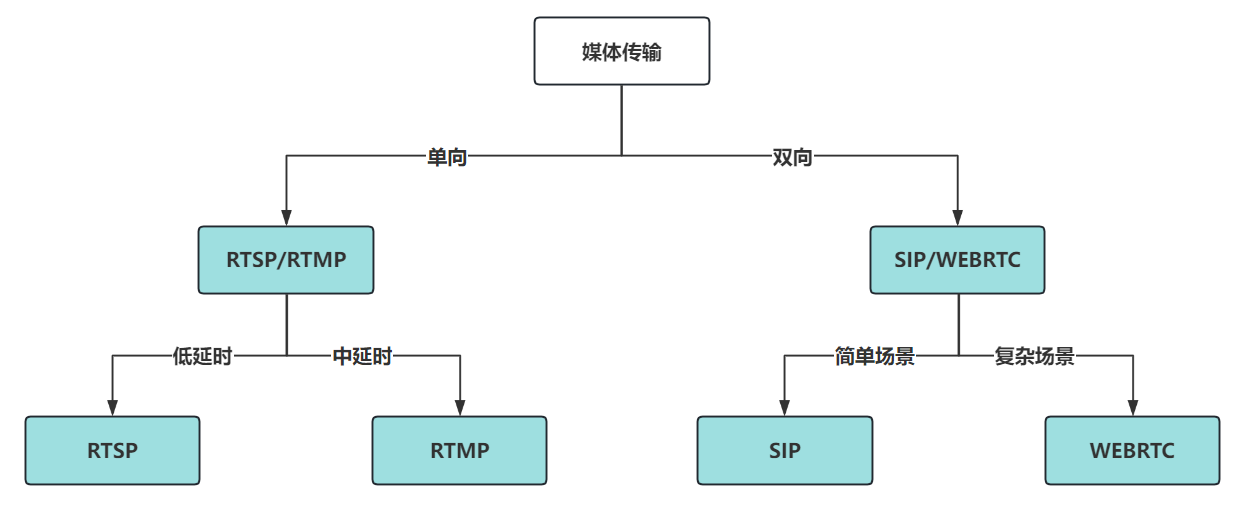
You can easily identify the protocol to use through the following flowchart:
Usage Method
The ESP-Media-Protocols component is hosted on Github. You can add this component to your project by entering the following command in your project.
idf.py add-dependency "espressif/esp_media_protocols^0.5.1"
Before using the ESP-Media-Protocols component, it is recommended to refer to and debug the following example projects first, in order to familiarize yourself with the usage of the API and the specific application of the protocol stack.
FAQ
Q: Does ESP-Media-Protocols support all protocols and features?
A: ESP-Media-Protocols currently supports the basic protocols and features widely used in the embedded field. Some unsupported protocols such as SRTP, HLS, etc., can be found and used under other components or repositories. The supported protocol specifications will be continuously iterated and expanded, and we will also update and consider expansion according to customer needs. In the future, we plan to support some new protocols with strong features.
Q: Some protocol features overlap, how to choose when using?
A: According to the application scenario, specifically analyze the functional requirements, latency requirements, and network environment. For example, if the real-time requirement is high and real-time control (pause, fast forward, rewind, positioning) is needed, RTSP is usually used; if the real-time requirement is high and real-time interaction is needed, SIP can be used to create a session; if it is a large-scale live broadcast in the browser, with high requirements for stability and compatibility, and no high real-time requirements, RTMP can be considered.
For more related questions, please refer to the Issues section in the following protocol directory:
ESP-MIDI Component
Overview
ESP-MIDI is a MIDI (Musical Instrument Digital Interface) software library launched by Espressif Systems, providing efficient MIDI file parsing and real-time audio synthesis capabilities. ESP-MIDI supports SoundFont sound libraries and custom audio libraries, capable of outputting high-fidelity, distortion-free audio effects. Combining the characteristics of small MIDI file size and rich sound library resources, ESP-MIDI achieves a balance of excellent sound quality and high performance, providing developers with a comprehensive MIDI processing solution.
The related information is as follows:
Component Registry: esp-midi component
Example Project: ESP-MIDI Example Project
FAQ
Q: How to load SoundFont files?
A: ESP-MIDI supports full SoundFont 2 (SF2) file parsing and playback. You can load SF2 files through the tone library loading interface, or use a user-defined sound library.
Q: Does ESP-MIDI support real-time MIDI input?
A: Yes, ESP-MIDI supports real-time MIDI event encoding and decoding, including various MIDI event types such as note on/off, program change, control change, pitch bend, channel pressure, and more.
Q: How to control the playback speed?
A: ESP-MIDI supports setting and changing the BPM (Beats Per Minute) and speed, including dynamic adjustments. You can set and modify the playback speed through the API.
Q: How is audio output integrated?
A: ESP-MIDI provides a callback-based audio output interface, which can be flexibly integrated with different audio backends, such as ESP-ADF, ESP-Audio-Codec, etc.
ESP-Muxer Component
Overview
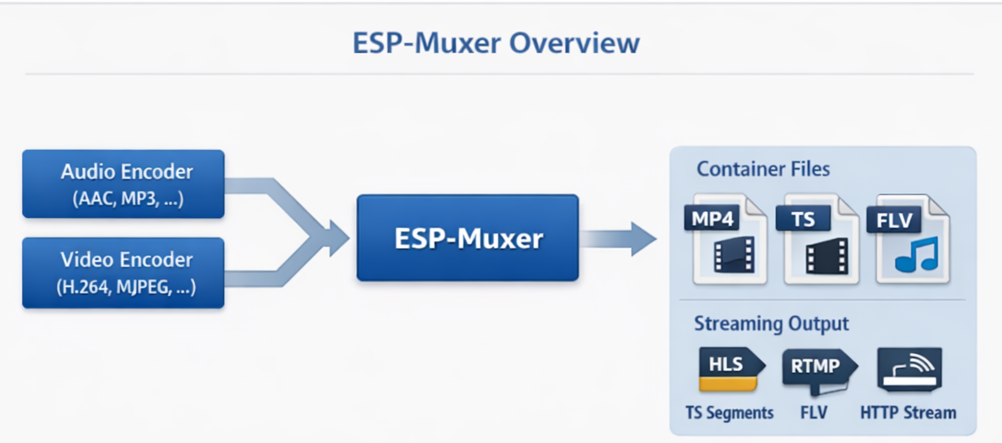
ESP-Muxer is an embedded audio and video multiplexing component launched by Espressif, used for multiplexing (mux, multiplexing) encoded audio and video frames (such as AAC, MP3, H.264, MJPEG) into a data stream or file in a standard media container format. It is not responsible for the encoding or decoding of audio and video, but only for the temporal organization and encapsulation of the input encoded frames.
In its design, ESP-Muxer supports two types of output modes: it can be used for local file recording with optional slicing and naming rules, and it can also perform streaming output through a callback mechanism. This allows the same set of multiplexing logic to meet the needs of local storage and flexibly apply to network transmission scenarios.
In the media processing pipeline, the ESP-Muxer is located after the encoder and before storage or network transmission, used to convert the encoded stream into a playable file or streamable data format.
Main Features and Capabilities
Core Functionality
Audio-Video Multiplexing: Combining one or more audio and video tracks (provided the container format supports it) into a single output.
Multiple Container Formats: Supports container formats such as MP4, TS, FLV, WAV, CAF, and OGG. You can choose based on recording, streaming, or compatibility requirements.
Direct File Writing: The multiplexed data can be directly written into the file system (such as an SD card), supporting optional file slicing (for example, slicing by duration) and custom file naming (for example, naming by slice number or time).
Stream Callback Output: The output data can be sent to the data callback function, instead of (or not just) writing to a file. This method is suitable for real-time streaming scenarios: the multiplexer generates container data, and the user code pushes it to the network or other receivers.
Custom Write Path: Supports the integration of a custom file writer (open / write / seek / close). This allows data to be written to non-standard storage media (such as custom Flash partitions, RAM buffers, or different file systems), while still using the same reuse logic.
Containers Suitable for Streaming: Some containers (such as TS, FLV) structurally support incremental output, making them more suitable for streaming. MP4 and WAV rely on headers and metadata related to the total length, and are generally not recommended for streaming output, but are very suitable for file recording scenarios.
Supported Container and Encoding Formats
Refer to the ESP-Muxer README for details on supported container and codec formats.
Typical Application Scenarios
Personal / Embedded Video Recorder (PVR): Camera + Microphone → Encoding → Multiplexing → Output to MP4/TS files on SD card, supports slicing by time or size.
HLS Segment Generation: Generates TS (or other format) segments for use by HLS servers or pipelines for live or on-demand broadcasting.
HTTP FLV and other real-time stream sources: Repurposed as FLV (or TS) and pushed to HTTP FLV services or other real-time stream access endpoints.
Voice/Audio Recording: Multiplexes the encoded audio (AAC, MP3, etc.) into WAV, CAF, or OGG files for easy playback and portability.
Custom Storage or Hybrid Architecture: Use a custom file writer to write multiplexed data to non-standard media, while maintaining a unified multiplexing processing logic.
Improve storage write speed
When writing multiplexed data to storage media (especially SD cards), the write speed usually limits the supported bitrate or the number of streams that can be recorded simultaneously. ESP-Muxer provides optimization methods in the following aspects:
Used for aligning written RAM cache: Many file systems and storage drivers perform better when performing aligned and large block writes, while encoded audio and video data are often small and unaligned packets. ESP-Muxer can use an internal RAM cache to aggregate data first, then write in larger and aligned blocks. The cache size is configurable (0–64 KB). A larger cache usually means higher throughput, but it will take up more RAM.
File Slicing: Splitting files by duration (or size) can prevent individual files from becoming too large, reduce the impact of prolonged continuous writing, and aid in retrieval and management (for example, rotating and deleting old slices).
Custom Writer: If the storage medium has special requirements (such as wear leveling, custom block size, or additional buffering mechanisms), a custom file writer (open / write / seek / close) can be provided. The container data generated by the multiplexer remains unchanged, only the underlying writing method is different. This mechanism does not replace RAM caching, but replaces the default file I/O; you can still enable RAM caching before the custom writer to enhance throughput performance.
Related Links
ESP-BOARD-MANAGER Component
Overview
ESP_BOARD_MANAGER is a board-level management component developed by Espressif, focusing on the initialization of development board devices. It uses YAML files to describe the configuration of peripheral devices, and can automatically generate configuration code, simplifying the process of adding new boards. It provides a unified device management interface, not only improving the reusability of device initialization code, but also simplifying the adaptation of applications to various development boards.
Core Concepts
YAML Configuration: Information about the board’s pins, levels, driver parameters, etc., are all defined only in the YAML file, avoiding the need to write initialization code directly.
Code Generation: The build system will automatically generate C language initialization code, Kconfig menus, and CMake dependencies based on the YAML configuration.
Layered Architecture:
Board: Overall description of the development board.
Device: Device implementation, such as LCD, Codec, Button, depends on one or more peripherals.
Peripherals: Implementation of peripherals, such as I2C, SPI, GPIO, I2S.
Related Links
For instructions on how to use the components, as well as information on board, device, and peripheral support, please refer to the technical documentation. - Github Repository - Quick Start - Common Questions