ESP-Media-Service Component
Introduction to ESP-Media-Service
ESP-Media-Service is a unified media service layer provided by Espressif on top of esp_service. It turns capabilities such as capture, playback, RTSP, RTMP, encapsulation, and decapsulation into reusable services: product firmware only needs to create once, configure once, link once, and then for each application, each scene switch, only control is done, no longer moving audio and video frames by itself.
Based on this design, the following conveniences can be provided during application development:
The service is built once on the device, and doorbell preview, local playback, streaming, and recording can all reuse the same set of Capture / Player / RTSP / RTMP.
Applications and MCP Agent only issue
start/stop/linkcontrols; heavy data always flows between services throughesp_media_service_link, not through MCP.You can create a new media service that can connect to various sinks without first mastering the details of the GMF / ADF pipeline.
When the hardware has not arrived, you can use Dummy source / Dummy receiver for pre-development, and replace it with a real camera, speaker, or screen when mass production.
Unified Media Model
Traditional embedded multimedia applications can easily become “each product writes its own pipeline”: copy frames in the capture callback, connect to RTSP by yourself, and rewrite decoding and rendering in the player. When changing a board, adding a stream, or letting the Agent automatically group applications, these glue codes are hard to reuse.
ESP-Media-Service collects this into a unified model:
Source (SRC) generates media frames, such as Capture, Extractor, RTSP/RTMP pull stream, Dummy source.
Receiver (SINK) consumes media frames, such as Player, RTSP/RTMP push stream, Muxer, Dummy receiver.
Source and receiver integrated (SRC_SINK) both consume and generate, such as ChatGPT, OpenAI, AI detection, etc., which produce and consume data.
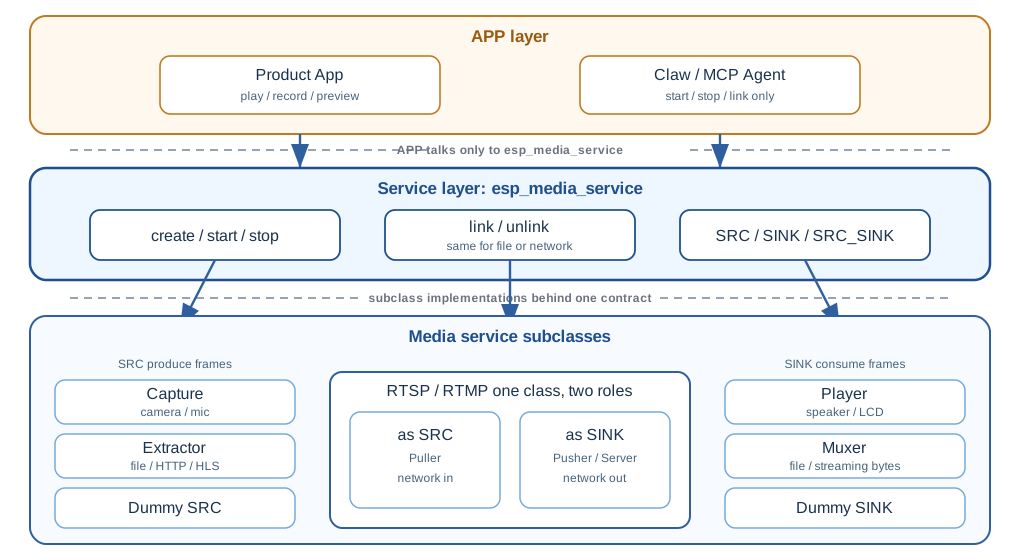
Applications only interact through the esp_media_service layer: create, configure, link, start / stop. Accessing local files (Extractor / Muxer / Player URL) and accessing the network (RTSP / RTMP) are the same set of interfaces for APP. RTSP, RTMP are also subclasses: when pulling streams as SRC, when pushing or Server as SINK, APP does not need to change a set of APIs.
Simple Design
Divided into three layers from top to bottom, separated by dividing lines:
APP layer: Product application or MCP Agent. Only interfaces with
esp_media_service, does not directly operate GMF, codec, or protocol state machine.Service layer (
esp_media_service): Unifies lifecycle, role, stream, provider, andlink. File source and network source look the same to APP.Subclass implementation: Capture, Extractor, Player, Muxer, Dummy, and RTSP, RTMP that can also be SRC/SINK.
A service instance manages a set of streams; a stream contains a set of tracks (audio, video, etc.). By default, using ESP_MEDIA_DEFAULT_STREAM (stream 0) can complete most single-channel products.
The internal order during linking is transparent to the application: verify role → sink makes request → source accepts request → source provides provider → sink saves provider. Then sink reads frames, source writes frames. Protocols like RTMP that require audio and video interlacing can request a global cache during linking, which is automatically adapted by the source side.
How to build a service pipeline
Regardless of whether it is finally connected to the player, RTSP or file, the steps on the product side are the same:
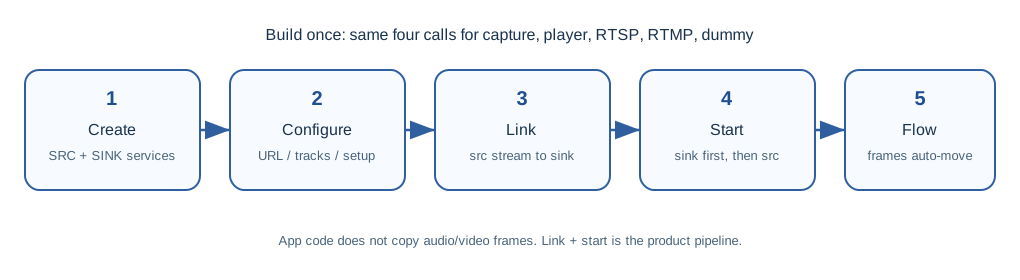
Typical control code only has linking and starting, media frames will not appear in the application loop:
esp_media_stream_id_t stream = ESP_MEDIA_DEFAULT_STREAM;

esp_media_service_link(src_service, stream, sink_service, stream);

esp_service_start(sink_service);  /* Start the consumer first */
esp_service_start(src_service);
Agreement:
Decide to start the sink first, then start the source according to actual needs, to avoid frame loss, or to output images immediately.
When stopping, notify each other’s mechanism to achieve no order dependence and no deadlock (generally, the producer has a longer resource life).
Agent / application only changes “who connects to whom, whether it is running”; frames always go through the device’s internal link.
Build once, reuse everywhere
After registering common services into esp_service_manager in the firmware, different product forms are just changing links, not rewriting the media stack:
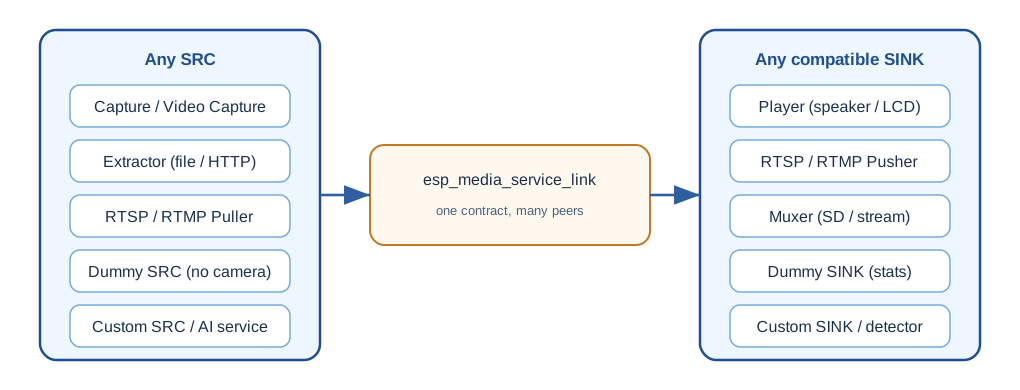
For example, the same Capture route:
Link to Player: Local preview or intercom playback.
Link to RTSP Server / Pusher: Mobile or NVR pull stream.
Link to RTMP Pusher: Push to live broadcast platform.
Link to Muxer: Write SD card MP4 / TS / FLV.
Link to Dummy SINK: First verify frame rate and data volume.
The same set of Players can also receive Extractor (local/HTTP file), RTSP pull stream, RTMP pull stream or Capture. This is “service is built once, every APP uses it”: APP differences are in scene arrangement, not in the details of underlying encoding and decoding.
List of existing services
Collection services
esp_capture_service: General capture SRC, encapsulatesesp_capture, not bound to specific board-level peripherals. Suitable for custom camera sources, overlay layers, etc.esp_audio_capture_service: Board-level recording encapsulation, discovers ADC throughesp_board_manager; can enable AEC / VAD / WakeNet and other AI front ends.esp_video_capture_service: Board-level audio and video recording, discovers the camera and reuses audio capture; supports multiple streams, audio and video synchronization, storage muxer.
Typical convenience: Declarative setup (source + track + optional muxer) applied once; runtime can start/stop stream/track, one-shot capture, manual or automatic recording. Downstream uses esp_media_service_link to take frames, no need to write capture callbacks manually.
Playback Service
esp_player_service: Media SINK. One instance corresponds to a playback exit on a board, which can have multiple streams (movies, BGM, TTS).Board-level products use
esp_audio_player_serviceoresp_video_player_service, automatically connecting to DAC / LCD.
Choose one of three inputs for each route: URL (file / HTTP / HLS), application feed frame, or zero-copy media link. When cascading with any SRC, the application should not write_frame again. Also provides mixing, priority preemption, playlist, and audio-video synchronization.
RTSP Service
esp_rtsp_service is a high-level encapsulation of esp_rtsp, with one instance playing one role:
Server: Provides basic audio and video frames linked in to remote clients (such as VLC / ffplay). Currently, one instance serves one pull stream end.
Pusher (SINK): Pushes linked frames to the RTSP server.
Puller (SRC): Pulls RTSP URL, then links to Player or Dummy.
The application does not handle the session state machine and RTP packaging. SINK / SERVER reads track and codec information from the upstream provider when starting.
RTMP Service
esp_rtmp_service covers RTMP / RTMPS:
Pusher (SINK): Pushes to live broadcast server (such as self-built or platform receiving address).
Puller (SRC): Pulls stream from live URL and hands it over to Player and other sinks.
Server: Local stream reception and forwarding; this role does not have
esp_media_service_linkdata path.
SINK / SRC transports basic audio and video frames, not FLV file bytes. Do not send Muxer’s encapsulated bytes into RTMP; recording and pushing should share the same upstream SRC. Interleaved audio and video will request global cache when linking.
Other Linkable Services
esp_muxer_service: Encapsulates encoded frames into containers, writes files, outputs streaming bytes, or does both.esp_extractor_service: Extracts basic frames from file / HTTP / HLS / memory buffer as SRC to any sink.esp_media_dummy_service: Source or receiver when there is no hardware, see next section.
Use Dummy for Pre-development When There is No Hardware
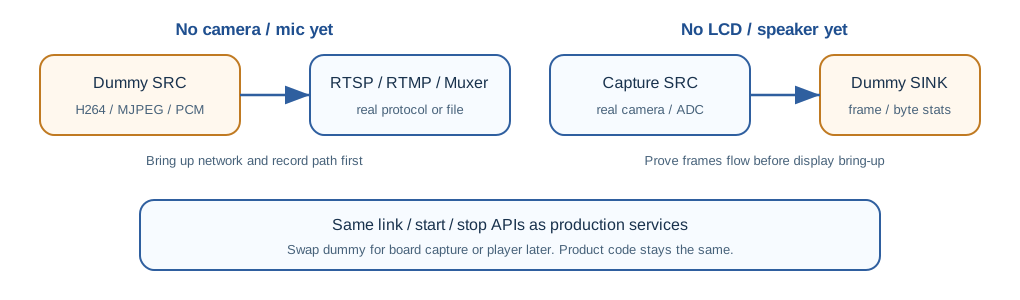
Real cameras, microphones, LCDs are often ready later than protocols and product logic. Dummy service fills the gap with the same set of link APIs:
Enable method (Kconfig):
CONFIG_ESP_MEDIA_DUMMY_SERVICE_SRC_SUPPORT: Virtual source, output test pattern.CONFIG_ESP_MEDIA_DUMMY_SERVICE_SINK_SUPPORT: Virtual receiver, consumes frames and counts.
Common uses:
Dummy SRC: Replaces camera / microphone, first clears encoding, packaging, RTSP/RTMP push stream and Agent orchestration.
Dummy SINK: Replaces display / speaker, uses
esp_media_dummy_service_get_stats()to confirm whether frames and bytes are flowing.After the board is in place, only replace the SRC/SINK instances, the link code remains unchanged.
Pattern encoding/decoding (based on the current implementation of the component):
Audio: PCM, AAC, OPUS, MP3
Video: H.264, MJPEG, RGB565, RGB888, YUV420
When adding a track in add_track(), you usually only need to fill in the codec; raw PCM / raw video requires complete track metadata.
Arranging Applications for MCP Agent
esp_service can expose the JSON tools of registered services to MCP (HTTP / SSE / WebSocket / UART / STDIO / SDIO). Therefore, the Agent can build applications on existing services, rather than rewriting the media stack on the device.
Media layer agreement:
esp_media_service_link/unlinkis resolved according to the service name, bindingesp_media_service_mcp_register(mgr)once.Dummy sink also has
start/stop/get_stats, which is convenient for PC-side link verification.Capture, RTSP, RTMP, board-level Player, etc. each provide setup / URL / recording and other control tools.
Media frames will not pass through MCP. The Agent only controls; heavy data walks on the C language link.
The significance of this to the product is: mass-produced firmware presets Capture + Player + RTSP + Dummy, the on-site or production line Agent only needs to “link capture to rtsp and start” to get a preview stream; change the link to muxer to become a recorder. The control surface can be scripted, and the data surface still maintains embedded performance.
How to Design a Service
New product features (such as AI detection, OSD overlay, custom network sink) do not need to fully understand GMF element, codec table and thread model first. Implementing according to the media contract can be docked with existing Capture / Player / RTSP:
Embed
esp_media_service_tas the first member of the structure.Declare roles:
SRC/SINK/SRC_SINK.The source implements
get_provider()(it is recommended to useesp_media_track_mngr_tto queue write frames by default); the receiver implementsset_provider()and loopsacquire_frame/release_frame.Optionally implement
get_request/set_request, allowing the other party to automatically adapt when linking (for example, RTMP’s global cache).The life cycle still goes through
esp_service_start/stop.
The default writing method on the source side is indicated:
esp_media_track_mngr_cfg_t cfg = { .max_track_num = 2 };
esp_media_track_mngr_create(&cfg, &svc->mngr);
esp_media_track_mngr_add_track(svc->mngr, &audio_track);
esp_media_track_mngr_add_track(svc->mngr, &video_track);
esp_media_track_mngr_get_provider(svc->mngr, &svc->provider);
/* In the production task, esp_media_track_write_frame(); get_provider returns this provider */
The effect of doing this is one-time development, automatic adaptation to various sinks: as long as the other party is also esp_media_service, your detection service can first link Dummy for verification, then link Player for preview, and then link RTSP for mobile viewing, without having to write a set of frame callbacks for each outlet.
Typical Product Scenarios
Smart Doorbell / Peephole
Capture serves both local preview and remote viewing: one link to Player (door screen), one link to RTSP Server. Link to Muxer to write short videos when an event is triggered. Use Dummy SRC to adjust mobile streaming before the hardware arrives.
Camera Live Streaming and Recording
Same Capture SRC: RTMP Pusher pushes to live streaming platform, Muxer records on SD card in slices. Do not feed Muxer output back to RTMP. Agent can switch links according to “preview only / record only / watch while recording”.
Visual Intercom / Indoor Screen
RTSP or RTMP Puller as SRC, link to Video Player. TTS or prompt sound goes through another stream of Player, using mixing and priority to avoid interrupting door video.
Local Media and Internet Radio
Extractor opens file:// or HTTP/HLS, link to Audio/Video Player. Share the same playback service instance with Capture preview, just switch SRC.
Screenless Production Testing and CI
Capture or protocol SRC link to Dummy SINK, read get_stats to determine whether frames are output. Suitable for production line, night regression and Agent automatic verification, no need to connect LCD.
Custom AI Media Node
Make a SRC_SINK service: take frames from Capture for detection, then write out the overlaid frames. The downstream is still standard Player / RTSP. Media framework details are left in Capture and Player, AI service only faces track / provider.
Agent On-site Group Application
The device comes with all services from the factory. The installer or Agent executes via UART/Wi-Fi MCP: discover service name → link capture to rtsp → start. Change the link when switching projects, no need to re-burn the media core.
Design Suggestions
Board-level products should prioritize using
esp_audio_capture_service/esp_video_capture_serviceand audio/video Player subclasses, letting Board Manager connect peripherals.Custom sources, overlays, and board-level unbound collections should then sink to
esp_capture_service.Single-stream preview can use the default stream; BGM + movie, main stream + sub-stream should use multiple streams.
For RGB/DPI preview, high-resolution streaming, multiple sinks consuming at the same time, combine PSRAM, cache mode and actual FPS for end-to-end testing.
When enabling text or complex UI, the preview path should go through Video Player / Video Render, do not disassemble frames and draw in the application.
MCP is only used for orchestration; do not attempt to stuff video frames into tool calls.
FAQ
Q: Does the application still need to copy audio and video frames by itself?
A: Not necessary in the linking scenario. After esp_media_service_link, the frame is written by the source and read by the receiver. The URL / feed path of the Player is another two types of input, which are mutually exclusive with link.
Q: Can Dummy and real Capture be mixed?
A: Yes. For example, Dummy SRC links RTSP to adjust the protocol first; or real Capture links Dummy SINK to look at statistics first. When replacing, keep the same role and stream ID, the link code can remain unchanged.
Q: Why can’t RTMP Server link?
A: This role is responsible for local streaming and forwarding, without esp_media_service data path. For push/pull streaming, please use SINK/SRC role, and link to Capture or Player.
Q: Does the parent Player have MCP?
A: esp_player_service itself does not provide MCP. The product-side tools are in esp_audio_player_service / esp_video_player_service (corresponding to Kconfig). Media link/unlink is still in esp_media_service MCP.
Component Links
Media Service: esp_media_service
Capture: esp_capture_service
Player: esp_player_service
RTSP: esp_rtsp_service
RTMP: esp_rtmp_service
Issue Feedback: ESP-ADF GitHub issues