Commands
This document groups the V4L2 ioctl request codes implemented in esp_video by function and describes their parameters and usage examples. For device nodes, the Capture/M2M data path, and the typical call sequence in an application, see ESP Video Application Development Guide. For initialization APIs, see API Reference.
Important
The examples focus on how to use the interfaces and do not cover complete error handling. Product code must check the return value of
ioctl.The component implements only the V4L2 features within the hardware capabilities of the current chip. By default, only the standard commands listed in the table below are implemented; some commands are available only on certain devices, or are controlled by a compile-time macro. For example,
VIDIOC_SUBSCRIBE_EVENT/VIDIOC_DQEVENT/VIDIOC_S_EVENT_CALLBACKare available only when the MIPI-CSI driver supports events (ESP_VIDEO_CSI_DRIVER_HAS_EVENT). If the MIPI-CSI driver in the current ESP-IDF does not include error events, the application should not call these commands.Capture devices use
V4L2_BUF_TYPE_VIDEO_CAPTURE. M2M codec devices (JPEG encode/dev/video10, H.264 encode/dev/video11, and JPEG decode/dev/video12) must request buffers and callSTREAMON/STREAMOFFseparately forV4L2_BUF_TYPE_VIDEO_OUTPUT(input) andV4L2_BUF_TYPE_VIDEO_CAPTURE(output).Pixel formats are distinguished by byte order: YUV422 uses
V4L2_PIX_FMT_YUYV/V4L2_PIX_FMT_UYVY; RGB565 usesV4L2_PIX_FMT_RGB565(little-endian)/V4L2_PIX_FMT_RGB565X(big-endian).V4L2_PIX_FMT_YUV422Pis no longer used. The JPEG decoder also supportsV4L2_PIX_FMT_BGR565. DVP can convert sensor output to RGB565 only when the output format is YUV422 YUYV. The conversion result is big-endianV4L2_PIX_FMT_RGB565X, not little-endianV4L2_PIX_FMT_RGB565. This conversion is not supported when the sensor outputs UYVY.
ioctl Call Sequence
The typical sequence on the application side matches the flow described in the Application Programming section of ESP Video Application Development Guide: open the device -> query capabilities and formats -> request and queue buffers -> STREAMON -> loop DQBUF/QBUF -> STREAMOFF -> close the device. An ioctl is dispatched to the corresponding sub-device. The following example queries and sets the camera sensor format:
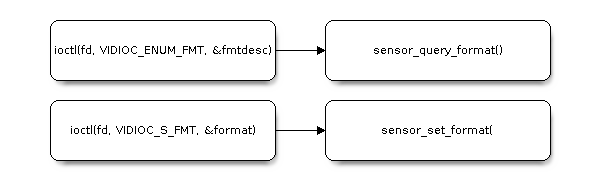
ioctl Call Sequence
The implemented commands are first presented in an overview. Their parameters and examples are then organized according to function. Vendor-extended ioctls for timeout, sensor format, events, and similar features are described later under Extended Commands. Control IDs are listed at the end in Control ID Overview.
V4L2 Commands
The request codes implemented at present are as follows. By default, only the standard commands listed in the table below are implemented.
Command |
Scope |
|---|---|
|
All video devices |
|
Capture and M2M; the format must be set while streaming is stopped |
|
Capture devices such as CSI/DVP/SPI |
|
All streaming devices; |
|
All streaming devices; M2M must start and stop OUTPUT and CAPTURE separately |
|
Controls such as the sensor, ISP, JPEG, and H.264 |
|
MIPI-CSI cropping |
|
Capture frame interval; an H.264 device can use this command to configure or query the frame rate (it can also be set after streaming has started) |
|
Camera sensor output format: set/get/enumerate |
|
Auto-Focus motor (the motor controller must be enabled) |
|
Increase or decrease the device reference count |
|
|
|
MIPI-CSI only, and only when the driver supports events |
|
Must be called after streaming has started and before streaming is stopped |
The table above lists both standard commands and vendor-extended commands. The standard commands are described below in the order of query, format, buffer, data stream, and control. Each subsection gives, in order, the request code, the parameter structure, the field description, and an example. Vendor-extended commands are described later under Extended Commands.
Query Device Capabilities
Command Description:
Command (request code):
VIDIOC_QUERYCAPCommand parameter:
struct v4l2_capability
Main parameter fields:
Parameter |
Type |
Purpose |
|---|---|---|
driver |
__u8[16] |
Driver name |
card |
__u8[32] |
Hardware card name |
bus_info |
__u8[32] |
Bus information |
version |
__u32 |
Driver version |
capabilities |
__u32 |
Capability bitmask |
device_caps |
__u32 |
Device capability bitmask |
Usage Example:
void example_querycap(void)
{
    int fd = open("/dev/video0", O_RDWR);

    struct v4l2_capability cap = {0};

    ioctl(fd, VIDIOC_QUERYCAP, &cap);

    printf("driver: %s, card: %s, bus: %s\n", (char *)cap.driver, (char *)cap.card, (char *)cap.bus_info);
    printf("version: %d.%d.%d\n", (uint16_t)(cap.version >> 16),
           (uint8_t)(cap.version >> 8),
           (uint8_t)cap.version);
    printf("capabilities: 0x%x\n", cap.capabilities);
    printf("device_caps: 0x%x\n", cap.device_caps);

    close(fd);
}
Enumerate Pixel Formats
Command Description:
Command (request code):
VIDIOC_ENUM_FMTCommand parameter:
struct v4l2_fmtdesc
Main parameter fields:
Parameter |
Type |
Purpose |
|---|---|---|
index |
__u32 |
Format index, starting from 0 and incrementing |
type |
__u32 |
Buffer type |
description |
__u8[32] |
Format description |
pixelformat |
__u32 |
Four-character pixel code |
Usage Example:
void example_enum_fmt(void)
{
    int fd = open("/dev/video0", O_RDWR);

    struct v4l2_fmtdesc fmtdesc = {0};

    fmtdesc.type = V4L2_BUF_TYPE_VIDEO_CAPTURE;

    for (fmtdesc.index = 0; ; ++fmtdesc.index) {
        if (ioctl(fd, VIDIOC_ENUM_FMT, &fmtdesc) < 0) {
            break;
        }

        printf("Format: %s, pixelformat: 0x%x\n", (char *)fmtdesc.description, fmtdesc.pixelformat);
    }

    close(fd);
}
Set/Get Data Format
Command Description:
Command (request code):
VIDIOC_S_FMT/VIDIOC_G_FMTCommand parameter:
struct v4l2_format
Main parameter fields (taking type == V4L2_BUF_TYPE_VIDEO_CAPTURE as an example):
Parameter |
Type |
Purpose |
|---|---|---|
type |
__u32 |
Buffer type |
fmt |
union |
Format information; only the pix field is supported |
pix (struct v4l2_pix_format) Field Description:
Parameter |
Type |
Purpose |
|---|---|---|
width |
__u32 |
Image width |
height |
__u32 |
Image height |
pixelformat |
__u32 |
Pixel format |
sizeimage |
__u32 |
Image size |
ycbcr_enc |
__u32 |
Y’CbCr encoding |
quantization |
__u32 |
Quantization |
Usage Example (set/get/try format):
void example_set_get_try_fmt(void)
{
    int fd = open("/dev/video0", O_RDWR);

    struct v4l2_format fmt = {0};

    // Set the format
    fmt.type = V4L2_BUF_TYPE_VIDEO_CAPTURE;
    fmt.fmt.pix.width = 320;
    fmt.fmt.pix.height = 240;
    fmt.fmt.pix.pixelformat = V4L2_PIX_FMT_RGB565;
    fmt.fmt.pix.field = V4L2_FIELD_NONE;

    ioctl(fd, VIDIOC_S_FMT, &fmt);

    /* The format must be changed at runtime while streaming is stopped */

    // Get the current format
    memset(&fmt, 0, sizeof(fmt));
    fmt.type = V4L2_BUF_TYPE_VIDEO_CAPTURE;

    ioctl(fd, VIDIOC_G_FMT, &fmt);

    printf("Current: %ux%u, fmt=0x%x\n", fmt.fmt.pix.width, fmt.fmt.pix.height, fmt.fmt.pix.pixelformat);

    close(fd);
}
Enumerate Supported Resolutions
Command Description:
Command (request code):
VIDIOC_ENUM_FRAMESIZESCommand parameter:
struct v4l2_frmsizeenum
Main parameter fields:
Parameter |
Type |
Purpose |
|---|---|---|
index |
__u32 |
Resolution index, starting from 0 and incrementing |
pixel_format |
__u32 |
Target pixel format |
type |
__u32 |
Fixed/stepwise/custom |
discrete/stepwise |
union |
Resolution information |
discrete (struct v4l2_frmsize_discrete) Field Description:
Parameter |
Type |
Purpose |
|---|---|---|
width |
__u32 |
Width |
height |
__u32 |
Height |
stepwise (struct v4l2_frmsize_stepwise) Field Description:
Parameter |
Type |
Purpose |
|---|---|---|
min_width |
__u32 |
Minimum width |
max_width |
__u32 |
Maximum width |
step_width |
__u32 |
Width step |
min_height |
__u32 |
Minimum height |
max_height |
__u32 |
Maximum height |
step_height |
__u32 |
Height step |
Usage Example:
void example_enum_framesizes(void)
{
    int fd = open("/dev/video0", O_RDWR);

    struct v4l2_frmsizeenum fsize = {0};
    fsize.pixel_format = V4L2_PIX_FMT_RGB565;

    for (fsize.index = 0; ; fsize.index++) {
        if (ioctl(fd, VIDIOC_ENUM_FRAMESIZES, &fsize) < 0) {
            break;
        }

        if (fsize.type == V4L2_FRMSIZE_TYPE_DISCRETE) {
            printf("Discrete: %ux%u\n", fsize.discrete.width, fsize.discrete.height);
        } else if (fsize.type == V4L2_FRMSIZE_TYPE_STEPWISE) {
            printf("Stepwise: %ux%u~%ux%u, step: %ux%u\n", fsize.stepwise.min_width, fsize.stepwise.min_height, fsize.stepwise.max_width, fsize.stepwise.max_height, fsize.stepwise.step_width, fsize.stepwise.step_height);
        }
    }

    close(fd);
}
Enumerate Frame Rates
Command Description:
Command (request code):
VIDIOC_ENUM_FRAMEINTERVALSCommand parameter:
struct v4l2_frmivalenum
Main parameter fields:
Parameter |
Type |
Purpose |
|---|---|---|
index |
__u32 |
Frame rate index, starting from 0 and incrementing |
pixel_format |
__u32 |
Target pixel format |
width |
__u32 |
Width |
height |
__u32 |
Height |
type |
__u32 |
Discrete/stepwise/continuous |
discrete/stepwise |
union |
Frames per second information |
discrete (struct v4l2_fract) Field Description:
Parameter |
Type |
Purpose |
|---|---|---|
numerator |
__u32 |
Numerator |
denominator |
__u32 |
Denominator |
stepwise (struct v4l2_frmival_stepwise) Field Description:
Parameter |
Type |
Purpose |
|---|---|---|
min |
struct v4l2_fract |
Minimum frame rate |
max |
struct v4l2_fract |
Maximum frame rate |
step |
struct v4l2_fract |
Frames per second step |
Usage Example:
void example_enum_frameintervals(void)
{
    int fd = open("/dev/video0", O_RDWR);

    struct v4l2_frmivalenum ival = {0};
    ival.pixel_format = V4L2_PIX_FMT_RGB565;
    ival.width = 640;
    ival.height = 480;

    for (ival.index = 0; ; ival.index++) {
        if (ioctl(fd, VIDIOC_ENUM_FRAMEINTERVALS, &ival) < 0) {
            break;
        }

        if (ival.type == V4L2_FRMIVAL_TYPE_DISCRETE) {
            printf("Discrete interval: %u/%u\n", ival.discrete.numerator, ival.discrete.denominator);
        } else if (ival.type == V4L2_FRMIVAL_TYPE_STEPWISE) {
            printf("Stepwise interval: %u/%u~%u/%u, step: %u/%u\n", ival.stepwise.min.numerator, ival.stepwise.min.denominator, ival.stepwise.max.numerator, ival.stepwise.max.denominator, ival.stepwise.step.numerator, ival.stepwise.step.denominator);
        }
    }

    close(fd);
}
Request/Release Buffers
Command (request code):
VIDIOC_REQBUFSCommand parameter:
struct v4l2_requestbuffers
Field Description:
Field |
Type |
Purpose |
|---|---|---|
count |
__u32 |
Number of buffers to request or release |
type |
__u32 |
Buffer type |
memory |
__u32 |
Buffer memory type |
Usage Example:
void example_reqbufs(void)
{
    int fd = open("/dev/video0", O_RDWR);

    struct v4l2_requestbuffers req = {0};
    req.count = 3;
    req.type = V4L2_BUF_TYPE_VIDEO_CAPTURE;
    req.memory = V4L2_MEMORY_MMAP;

    ioctl(fd, VIDIOC_REQBUFS, &req);

    /* count=0 releases the video buffers that have been requested */
    req.count = 0;
    ioctl(fd, VIDIOC_REQBUFS, &req);

    close(fd);
}
Note
The supported memory types are V4L2_MEMORY_MMAP and V4L2_MEMORY_USERPTR. An M2M device must call VIDIOC_REQBUFS separately for V4L2_BUF_TYPE_VIDEO_OUTPUT and V4L2_BUF_TYPE_VIDEO_CAPTURE.
Query Buffer Properties
Command (request code):
VIDIOC_QUERYBUFCommand parameter:
struct v4l2_buffer
Field Description:
Field |
Type |
Purpose |
|---|---|---|
index |
__u32 |
Buffer index (0 ~ count-1) |
type |
__u32 |
Buffer type |
bytesused |
__u32 |
Length of the valid data |
memory |
__u32 |
Memory type |
m.offset/m.userptr |
union |
Buffer address (offset or userptr) |
length |
__u32 |
Total buffer length |
Usage Example:
void example_querybuf(void)
{
    int fd = open("/dev/video0", O_RDWR);

    struct v4l2_buffer buf = {0};
    buf.index = 0;
    buf.type = V4L2_BUF_TYPE_VIDEO_CAPTURE;
    buf.memory = V4L2_MEMORY_MMAP;

    ioctl(fd, VIDIOC_QUERYBUF, &buf);

    printf("Buffer length: %u\n", buf.length);
    printf("Buffer offset: %u\n", buf.m.offset);

    close(fd);
}
Enqueue Buffer
Command (request code):
VIDIOC_QBUFCommand parameter:
struct v4l2_buffer
The structure fields are the same as for VIDIOC_QUERYBUF.
Usage Example:
void example_qbuf(void)
{
    int fd = open("/dev/video0", O_RDWR);

    struct v4l2_buffer buf = {0};
    buf.index = 0;
    buf.type = V4L2_BUF_TYPE_VIDEO_CAPTURE;
    buf.memory = V4L2_MEMORY_MMAP;

    ioctl(fd, VIDIOC_QBUF, &buf);

    close(fd);
}
Dequeue Buffer
Command (request code):
VIDIOC_DQBUFCommand parameter:
struct v4l2_buffer
The structure fields are the same as for VIDIOC_QUERYBUF.
Usage Example:
void example_dqbuf(void)
{
    int fd = open("/dev/video0", O_RDWR);

    struct v4l2_buffer buf = {0};
    buf.index = 0;
    buf.type = V4L2_BUF_TYPE_VIDEO_CAPTURE;
    buf.memory = V4L2_MEMORY_MMAP;

    ioctl(fd, VIDIOC_DQBUF, &buf);

    close(fd);
}
Start/Stop the Data Stream
Command (request code):
VIDIOC_STREAMON/VIDIOC_STREAMOFFCommand parameter:
int *
Description:
STREAMON: start streaming and begin processing the buffer queueSTREAMOFF: stop streaming; the device discards buffers in the queue that have not been processed yet
An M2M codec device must call this command separately for OUTPUT and CAPTURE. After streaming stops, USB UVC reclaims the buffers in the queue.
Usage Example:
void example_streamon_streamoff(void)
{
    int fd = open("/dev/video0", O_RDWR);

    int type = V4L2_BUF_TYPE_VIDEO_CAPTURE;
    ioctl(fd, VIDIOC_STREAMON, &type);

    type = V4L2_BUF_TYPE_VIDEO_CAPTURE;
    ioctl(fd, VIDIOC_STREAMOFF, &type);

    close(fd);
}
Query Extended Controls
Command (request code):
VIDIOC_QUERY_EXT_CTRLCommand parameter:
struct v4l2_query_ext_ctrl
Field Description:
Field |
Type |
Purpose |
|---|---|---|
id |
__u32 |
Control ID |
type |
__u32 |
Control type |
name |
__u8[32] |
Control name |
minimum |
__s64 |
Minimum value |
maximum |
__s64 |
Maximum value |
step |
__u64 |
Step |
default_value |
__s64 |
Default value |
elem_size |
__u32 |
Element size |
elems |
__u32 |
Number of elements |
nr_of_dims |
__u32 |
Number of dimensions |
dims |
__u32[4] |
Dimensions |
Usage Example:
void example_query_ext_ctrl(void)
{
    int fd = open("/dev/video0", O_RDWR);

    struct v4l2_query_ext_ctrl qctrl = {0};
    qctrl.id = V4L2_CID_BRIGHTNESS;
    ioctl(fd, VIDIOC_QUERY_EXT_CTRL, &qctrl);

    printf("Control: %s, type: %u, minimum: %lld, maximum: %lld, step: %lld, default_value: %lld\n", qctrl.name, qctrl.type, qctrl.minimum, qctrl.maximum, qctrl.step, qctrl.default_value);

    close(fd);
}
Note
qctrl.id = V4L2_CID_BRIGHTNESS | V4L2_CTRL_FLAG_NEXT_CTRL can be used to enumerate the following controls iteratively, starting from the specified ID.
Set/Get Extended Controls
Command (request code):
VIDIOC_S_EXT_CTRLS/VIDIOC_G_EXT_CTRLSCommand parameter:
struct v4l2_ext_controls
Field Description:
Field |
Type |
Purpose |
|---|---|---|
ctrl_class/which |
union |
Control class/control type |
count |
__u32 |
Number of controls |
controls |
struct v4l2_ext_control * |
Control array |
controls (struct v4l2_ext_control) Field Description:
Field |
Type |
Purpose |
|---|---|---|
id |
__u32 |
Control ID |
size |
__u32 |
Element size |
value/value64/… |
union |
32-bit integer, 64-bit integer, data pointer, etc. |
Usage Example:
void example_set_get_ext_ctrl(void)
{
    int fd = open("/dev/video0", O_RDWR);

    struct v4l2_ext_controls ctrls = {0};
    struct v4l2_ext_control control = {0};

    ctrls.ctrl_class = V4L2_CTRL_CLASS_USER;
    ctrls.count = 1;
    ctrls.controls = &control;
    control.id = V4L2_CID_BRIGHTNESS;
    control.value = 128;
    control.size = sizeof(int);
    ioctl(fd, VIDIOC_S_EXT_CTRLS, &ctrls);

    memset(&ctrls, 0, sizeof(struct v4l2_ext_controls));
    memset(&control, 0, sizeof(struct v4l2_ext_control));
    ctrls.ctrl_class = V4L2_CTRL_CLASS_USER;
    ctrls.count = 1;
    ctrls.controls = &control;
    control.id = V4L2_CID_BRIGHTNESS;
    control.size = sizeof(int);
    ioctl(fd, VIDIOC_G_EXT_CTRLS, &ctrls);
    printf("Brightness: %d\n", control.value);

    close(fd);
}
VIDIOC_S_EXT_CTRLS can set one control or multiple controls at a time. The exposure time of the camera sensor is used as an example below:
static void config_exposure_time(int cam_fd, int32_t exposure)
{
    struct v4l2_query_ext_ctrl qctrl;
    struct v4l2_ext_controls controls;
    struct v4l2_ext_control control[1];

    qctrl.id = V4L2_CID_EXPOSURE_ABSOLUTE;
    /* Query the value range of this control */
    ioctl(cam_fd, VIDIOC_QUERY_EXT_CTRL, &qctrl);
    ESP_LOGW(TAG, "EXP min: %d, EXP max:  %d, step:%d", (int)qctrl.minimum, (int)qctrl.maximum, (int)qctrl.step);

    controls.ctrl_class = V4L2_CID_CAMERA_CLASS;
    controls.count      = 1;
    controls.controls   = control;
    control[0].id       = V4L2_CID_EXPOSURE_ABSOLUTE;
    control[0].value    = exposure / 100;
    if (ioctl(cam_fd, VIDIOC_S_EXT_CTRLS, &controls) != 0) {
        ESP_LOGE(TAG, "failed to set exposure time");
    } else {
        ESP_LOGW(TAG, "set exposure");
    }
}
Note
Through V4L2_CTRL_CLASS_ESP_CAM_IOCTL, the ioctl of esp_cam_sensor can be called directly (only the p_u8 and size fields of v4l2_ext_control are supported). The H.264 encoder supports setting controls such as the I-frame interval, bitrate, and QP after streaming has started.
Set/Get Selection Region
Command (request code):
VIDIOC_S_SELECTION/VIDIOC_G_SELECTIONCommand parameter:
struct v4l2_selectionApplicable scope: image cropping on the MIPI-CSI video device
Field Description:
Field |
Type |
Purpose |
|---|---|---|
type |
__u32 |
Buffer type |
target |
__u32 |
Selection region target |
r |
struct v4l2_rect |
Selection region |
r (struct v4l2_rect) Field Description:
Field |
Type |
Purpose |
|---|---|---|
left |
__s32 |
Left boundary |
top |
__s32 |
Top boundary |
width |
__u32 |
Width |
height |
__u32 |
Height |
Usage Example:
void example_set_get_selection(void)
{
    int fd = open("/dev/video0", O_RDWR);

    struct v4l2_selection selection = {0};
    selection.type = V4L2_BUF_TYPE_VIDEO_CAPTURE;
    selection.target = V4L2_SEL_TGT_CROP;
    selection.r.left = 0;
    selection.r.top = 0;
    selection.r.width = 640;
    selection.r.height = 480;
    ioctl(fd, VIDIOC_S_SELECTION, &selection);

    memset(&selection, 0, sizeof(struct v4l2_selection));
    selection.type = V4L2_BUF_TYPE_VIDEO_CAPTURE;
    selection.target = V4L2_SEL_TGT_CROP;
    ioctl(fd, VIDIOC_G_SELECTION, &selection);
    printf("Selection: left: %d, top: %d, width: %d, height: %d\n", selection.r.left, selection.r.top, selection.r.width, selection.r.height);

    close(fd);
}
Set/Get Stream Parameters
Command (request code):
VIDIOC_S_PARM/VIDIOC_G_PARMCommand parameter:
struct v4l2_streamparmApplicable scope: the frame interval of a capture device. An H.264 encoder can use
timeperframeto configure or query the frame rate, and can change encoding parameters after streaming has started
Field Description:
Field |
Type |
Purpose |
|---|---|---|
type |
__u32 |
Stream type |
v4l2_captureparm/v4l2_outputparm |
union |
Capture parameters |
capture (struct v4l2_captureparm) Field Description:
Field |
Type |
Purpose |
|---|---|---|
capability |
__u32 |
Capture capability |
timeperframe |
struct v4l2_fract |
Time interval per frame |
Usage Example:
void example_set_get_parm(void)
{
    int fd = open("/dev/video0", O_RDWR);

    struct v4l2_streamparm sparm = {0};
    sparm.type = V4L2_BUF_TYPE_VIDEO_CAPTURE;
    sparm.parm.capture.capability = V4L2_CAP_TIMEPERFRAME;
    sparm.parm.capture.timeperframe.numerator = 1;
    sparm.parm.capture.timeperframe.denominator = 30;
    ioctl(fd, VIDIOC_S_PARM, &sparm);

    memset(&sparm, 0, sizeof(struct v4l2_streamparm));
    sparm.type = V4L2_BUF_TYPE_VIDEO_CAPTURE;
    ioctl(fd, VIDIOC_G_PARM, &sparm);
    printf("Time per frame: %d/%d\n", sparm.parm.capture.timeperframe.numerator, sparm.parm.capture.timeperframe.denominator);

    close(fd);
}
Extended Commands
The following request codes are provided by esp_video in addition to standard V4L2. They are used for timeout, sensor/motor format, reference count, MIPI-CSI events, and device restart.
Set/Get Buffer Dequeue Timeout
Command (request code):
VIDIOC_S_DQBUF_TIMEOUT/VIDIOC_G_DQBUF_TIMEOUTCommand parameter:
struct timeval
Field Description:
Field |
Type |
Purpose |
|---|---|---|
tv_sec |
__s32 |
Seconds |
tv_usec |
__s32 |
Microseconds |
Usage Example:
void example_set_get_dqbuf_timeout(void)
{
    int fd = open("/dev/video0", O_RDWR);

    struct timeval timeout = {0};
    timeout.tv_sec = 1;
    timeout.tv_usec = 0;

    ioctl(fd, VIDIOC_S_DQBUF_TIMEOUT, &timeout);

    memset(&timeout, 0, sizeof(struct timeval));
    ioctl(fd, VIDIOC_G_DQBUF_TIMEOUT, &timeout);
    printf("DQBUF timeout: %d/%d\n", timeout.tv_sec, timeout.tv_usec);

    close(fd);
}
Set/Get/Enumerate Camera Sensor Output Format
Command (request code):
VIDIOC_S_SENSOR_FMT/VIDIOC_G_SENSOR_FMT/VIDIOC_ENUM_SENSOR_FMTVIDIOC_S_SENSOR_FMT/VIDIOC_G_SENSOR_FMTparameter:esp_cam_sensor_format_tVIDIOC_ENUM_SENSOR_FMTparameter:struct v4l2_sensor_format_enum
See the header file for the field description of esp_cam_sensor_format_t.
Main fields of struct v4l2_sensor_format_enum:
Field |
Type |
Purpose |
|---|---|---|
index |
uint32_t |
Format index filled in by the application. Enumeration starts at 0 and increments |
format |
esp_cam_sensor_format_t |
Sensor format returned by the driver. Pointer fields in it point to static driver data and can be used by a later |
Recommended flow: first use VIDIOC_ENUM_SENSOR_FMT to enumerate and select a sensor format, then call the standard
VIDIOC_ENUM_FMT/VIDIOC_ENUM_FRAMESIZES/VIDIOC_ENUM_FRAMEINTERVALS
to query the V4L2 output formats supported by the device in the current sensor mode, and finally call VIDIOC_S_FMT to set the format before capturing images.
VIDIOC_S_SENSOR_FMT must be called before any buffer is requested. If VIDIOC_REQBUFS has already been called with count>0, this command fails (errno is EBUSY). In this case, call VIDIOC_REQBUFS with count=0 to release the buffers, and then set the sensor format.
Usage Example:
void example_enum_set_sensor_format(void)
{
    int fd = open("/dev/video0", O_RDWR);
    struct v4l2_sensor_format_enum sensor_enum = {0};
    struct v4l2_fmtdesc fmtdesc = {
        .type = V4L2_BUF_TYPE_VIDEO_CAPTURE,
    };
    struct v4l2_format format = {
        .type = V4L2_BUF_TYPE_VIDEO_CAPTURE,
    };

    /* 1. Enumerate sensor formats */
    for (sensor_enum.index = 0;
         ioctl(fd, VIDIOC_ENUM_SENSOR_FMT, &sensor_enum) == 0;
         sensor_enum.index++) {
        printf("[%u] %s %ux%u @%ufps\n",
               sensor_enum.index,
               sensor_enum.format.name,
               sensor_enum.format.width,
               sensor_enum.format.height,
               sensor_enum.format.fps);
    }

    /* 2. Select and configure the sensor format (index 0 is used here as an example) */
    sensor_enum.index = 0;
    ioctl(fd, VIDIOC_ENUM_SENSOR_FMT, &sensor_enum);
    ioctl(fd, VIDIOC_S_SENSOR_FMT, &sensor_enum.format);

    /* 3. Enumerate the V4L2 output formats supported by the device in the current mode */
    uint32_t selected_pixelformat = 0;
    for (fmtdesc.index = 0; ioctl(fd, VIDIOC_ENUM_FMT, &fmtdesc) == 0; fmtdesc.index++) {
        printf("V4L2 format[%u]: " V4L2_FMT_STR "\n",
               fmtdesc.index, V4L2_FMT_STR_ARG(fmtdesc.pixelformat));
        if (fmtdesc.index == 0) {
            selected_pixelformat = fmtdesc.pixelformat;
        }
    }

    /* 4. After configuring the V4L2 format, use REQBUFS/STREAMON to capture frames */
    ioctl(fd, VIDIOC_G_FMT, &format);
    format.fmt.pix.pixelformat = selected_pixelformat;
    ioctl(fd, VIDIOC_S_FMT, &format);

    close(fd);
}
Set/Get Auto-Focus Motor Format
Command (request code):
VIDIOC_S_MOTOR_FMT/VIDIOC_G_MOTOR_FMTCommand parameter:
esp_cam_motor_format_tApplicable scope: the camera motor controller is enabled (
CONFIG_ESP_VIDEO_ENABLE_CAMERA_MOTOR_CONTROLLER)
Main Fields:
Field |
Type |
Purpose |
|---|---|---|
name |
const char * |
Format name |
mode |
esp_cam_motor_mode_t |
Control mode (DIRECT/LSC/DLC) |
step_period |
struct |
Step period and the number of codes per step |
init_position |
int |
Initial position corresponding to this format |
Usage Example:
void example_set_get_motor_format(void)
{
    int fd = open("/dev/video0", O_RDWR);
    esp_cam_motor_format_t format = {0};

    ioctl(fd, VIDIOC_G_MOTOR_FMT, &format);
    printf("Motor format: %s\n", format.name);

    ioctl(fd, VIDIOC_S_MOTOR_FMT, &format);

    close(fd);
}
Set Device Reference Count
Command (request code):
VIDIOC_SET_OWNERCommand parameter:
int *
Description: a non-zero argument increases the device reference count, and 0 decreases the reference count. This keeps the device alive when the same video device is opened and closed more than once.
Usage Example:
void example_set_owner(void)
{
    int fd = open("/dev/video0", O_RDWR);
    int owner = 1;

    ioctl(fd, VIDIOC_SET_OWNER, &owner);

    owner = 0;
    ioctl(fd, VIDIOC_SET_OWNER, &owner);

    close(fd);
}
Subscribe to/Unsubscribe from Events
Command (request code):
VIDIOC_SUBSCRIBE_EVENT/VIDIOC_UNSUBSCRIBE_EVENTCommand parameter:
struct v4l2_event_subscriptionApplicable scope: MIPI-CSI only. It depends on
ESP_VIDEO_CSI_DRIVER_HAS_EVENT. If ESP-IDF does not provide MIPI-CSI error events, these commands are unavailable.
Field Description:
Field |
Type |
Purpose |
|---|---|---|
type |
__u32 |
Event type. The application may subscribe to |
id |
__u32 |
Event ID (currently unused) |
flags |
__u32 |
Subscription flags |
Event types supported at present:
Type |
Description |
|---|---|
|
MIPI-CSI host error. The payload is |
|
After unsubscription, the driver delivers this event to the task waiting on |
|
For internal use. When the event callback returns true, the hardware interrupt is disabled and this event is delivered. The application should not subscribe to it |
host_err_mask bit definitions:
ESP_MIPI_CSI_HOST_ERR_PHY: PHY errorESP_MIPI_CSI_HOST_ERR_PACKET: packet errorESP_MIPI_CSI_HOST_ERR_FRAME: frame boundary or sequence-number errorESP_MIPI_CSI_HOST_ERR_CRC: CRC errorESP_MIPI_CSI_HOST_ERR_DATA_ID: unrecognized data type
Usage Example:
void example_subscribe_event(int fd)
{
    struct v4l2_event_subscription sub = {
        .type = V4L2_EVENT_ESP_MIPI_CSI_ERROR,
    };

    ioctl(fd, VIDIOC_SUBSCRIBE_EVENT, &sub);

    /* Unsubscribe from all events */
    sub.type = V4L2_EVENT_ALL;
    ioctl(fd, VIDIOC_UNSUBSCRIBE_EVENT, &sub);
}
Dequeue an Event
Command (request code):
VIDIOC_DQEVENTCommand parameter:
struct v4l2_eventApplicable scope: the same as
VIDIOC_SUBSCRIBE_EVENT. It is usually called in a loop from a separate task.
Main Fields:
Field |
Type |
Purpose |
|---|---|---|
type |
__u32 |
Event type |
timestamp |
struct timespec |
Timestamp |
sequence |
__u32 |
Sequence number |
u.data |
__u8[] |
Event payload. For a CSI error, parse it as |
Usage Example:
void example_dqevent(int fd)
{
    struct v4l2_event event;

    if (ioctl(fd, VIDIOC_DQEVENT, &event) < 0) {
        return;
    }

    if (event.type == V4L2_EVENT_ESP_MIPI_CSI_ERROR) {
        v4l2_event_esp_mipi_csi_error_t *err =
            (v4l2_event_esp_mipi_csi_error_t *)&event.u.data;
        printf("CSI error mask: 0x%x\n", (unsigned)err->host_err_mask);
    }
}
For a complete event-tracking example, see esp_video/examples/common_components/example_video_common/example_video_event.c.
Set Event Callback
Command (request code):
VIDIOC_S_EVENT_CALLBACKCommand parameter:
struct v4l2_event_callbackApplicable scope: the same as the MIPI-CSI event commands
Field Description:
Field |
Type |
Purpose |
|---|---|---|
callback_func |
|
Callback in interrupt context. When it returns true, the hardware interrupt is disabled and |
user_data |
void * |
Callback user data |
Attention
The callback must reside in IRAM and must not call functions that may block (such as malloc, free, or printf). Otherwise the system may crash.
Usage Example:
static bool IRAM_ATTR example_csi_isr(void *user_data, uint32_t err_mask)
{
    (void)user_data;
    (void)err_mask;
    return false; /* Do not disable the hardware interrupt */
}

void example_set_event_callback(int fd)
{
    struct v4l2_event_callback cb = {
        .callback_func = example_csi_isr,
        .user_data = NULL,
    };

    ioctl(fd, VIDIOC_S_EVENT_CALLBACK, &cb);
}
Restart the Video Device
Command (request code):
VIDIOC_RESTARTCommand parameter:
struct v4l2_restart_configApplicable scope: it must be called after streaming has started and before streaming is stopped, in order to recover after a hardware exception.
Field Description:
Field |
Type |
Purpose |
|---|---|---|
type |
int |
|
restart_sensor |
bool |
Whether to restart the camera sensor at the same time |
Usage Example:
void example_restart(int fd)
{
    struct v4l2_restart_config config = {
        .type = V4L2_BUF_TYPE_VIDEO_CAPTURE,
        .restart_sensor = true,
    };

    ioctl(fd, VIDIOC_RESTART, &config);
}
Control ID Overview
The following are the main control IDs currently implemented. Use them together with VIDIOC_QUERY_EXT_CTRL/VIDIOC_S_EXT_CTRLS described above. To learn whether a specific device supports an item, query it with VIDIOC_QUERY_EXT_CTRL.
ID |
Class |
Description |
|---|---|---|
|
USER |
Vertical/horizontal mirror |
|
USER |
Pixel gain |
|
USER |
Exposure; the unit depends on the sensor |
|
CAMERA |
Exposure, in units of 100 us |
|
IMAGE_PROC |
Test pattern |
|
JPEG |
JPEG compression quality |
|
JPEG |
JPEG chroma subsampling |
|
CODEC |
H.264 I-frame interval |
|
CODEC |
H.264 bitrate (bit/s) |
|
CODEC |
H.264 quantization parameter range |
|
USER |
Red/blue hue gain |
|
USER |
ISP brightness/contrast/saturation/hue |
|
USER |
ISP Bayer Noise Reduction Filter |
|
USER |
ISP Color Correction Matrix |
|
USER |
ISP sharpening |
|
USER |
ISP Gamma correction; EXT can be configured separately for each channel |
|
USER |
ISP demosaic |
|
USER |
ISP AWB (Auto White Balance)/AE (Auto Exposure)/AF (Auto-Focus)/Histogram windows and statistics |
|
USER |
ISP Lens Shading Correction |
|
USER |
ISP Black Level Correction |
|
USER |
Bypass the ISP when both the input and the output are RAW8 |
|
CAMERA |
Sensor statistics |
|
CAMERA |
Camera sensor AE target level |
|
CAMERA |
Exposure and gain group parameters |
|
CAMERA |
Auto-Focus motor start time |