Get Started
Important
Before using ESP-Video-Components, please read the Disclaimer and follow the terms and precautions therein.
Overview
ESP-Video-Components is Espressif’s official development and application framework for camera systems. It mainly includes the following components:
esp_cam_sensor: This component provides sensor drivers for three camera interfaces: MIPI, DVP, and SPI.
esp_ipa: This component provides an image processing algorithm library. Usually, for camera sensors that output data in RAW format, real-time control of algorithms such as AE and AWB is required to obtain clearer images.
esp_sccb_intf: This component provides the driver for the camera control bus.
esp_video: This component relies on the esp_cam_sensor, esp_ipa, and esp_h264 components to implement an API compatible with the Linux V4L2 standard. Adding this component to a project enables quick implementation of the desired visual features.
The chips supported by ESP-Video-Components vary by camera sensor interface:
SoC |
MIPI-CSI |
DVP |
USB |
SPI |
|---|---|---|---|---|
ESP32-P4 |
supported |
supported |
supported |
supported |
ESP32-S31 |
supported |
supported |
supported |
|
ESP32-S3 |
supported |
supported |
supported |
|
ESP32-C3 |
supported |
|||
ESP32-C5 |
supported |
|||
ESP32-C6 |
supported |
|||
ESP32-C61 |
supported |
System Architecture
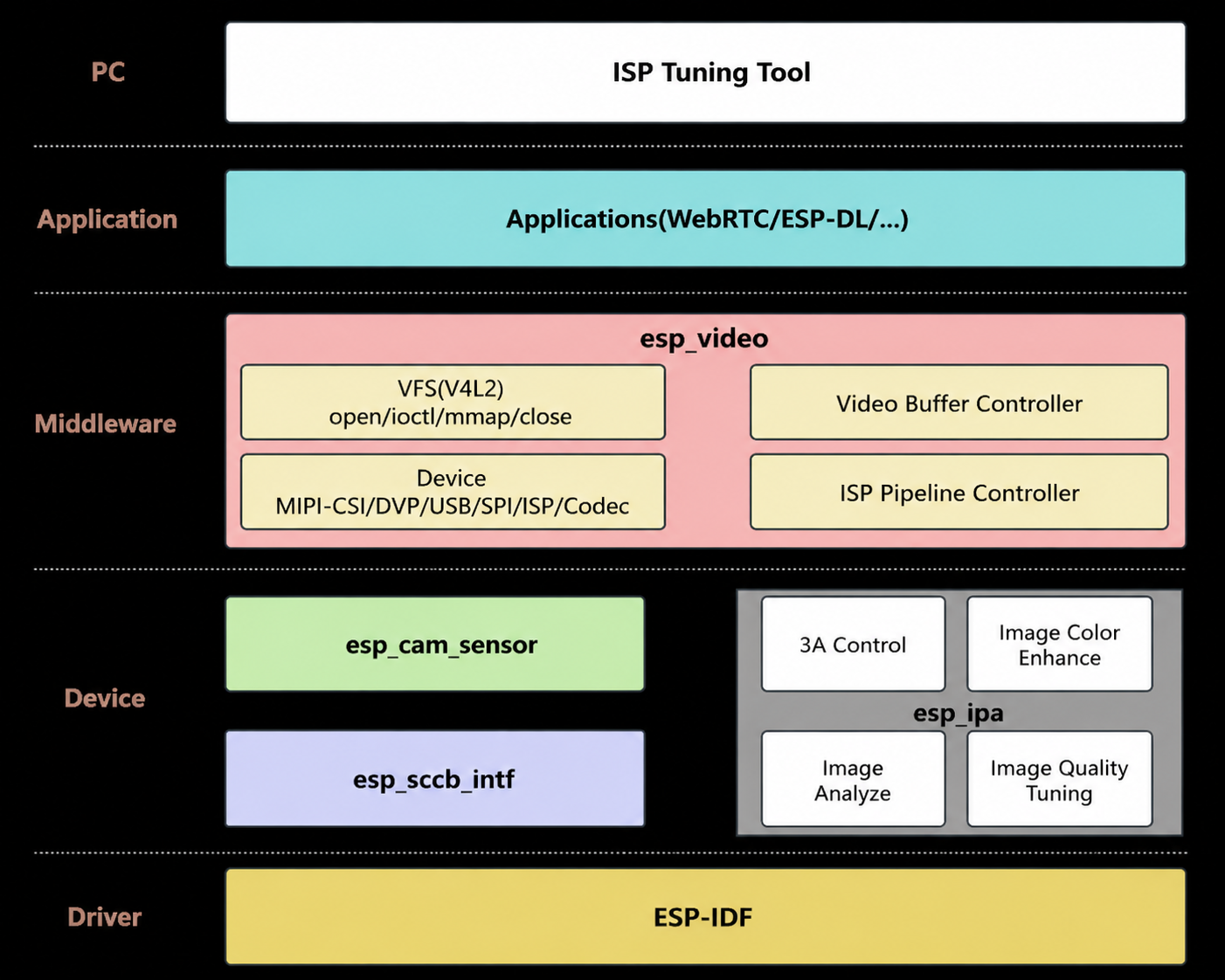
esp_video System Framework
The system is organized into five layers: PC-side tuning and analysis tools, application layer, application framework layer, device layer, and kernel layer.
PC-side tuning and analysis tools are used for previewing images, analyzing image quality, tuning image system parameters online, and calibrating image processing unit parameters.
The application layer primarily uses various APIs provided by esp_video for application development.
esp_video is the application framework layer. It not only manages the various devices and libraries in the device layer, but also provides efficient and user-friendly APIs to applications. As middleware for the entire system, it provides a unified interface to upper layers and a unified standard to lower-layer components to facilitate compatible control of various devices.
The device layer includes the underlying implementation of camera sensor devices and image processing control algorithm libraries, and provides calling interfaces to upper layers.
The kernel layer consists of the operating system and device driver code provided by ESP-IDF.
Development Board Overview
The following development boards feature camera interfaces and can be used for testing. You may also refer to the camera interfaces of these boards for hardware design.
ESP32-S31 can be evaluated with the ESP32-S31-Korvo board for DVP/SPI cameras and JPEG hardware encode/decode. This SoC does not support MIPI-CSI, ISP, or H.264 hardware encoding.
Build Your First Project
Install ESP-IDF
Please refer to the Get Started chapter of the ESP-IDF Programming Guide to set up your development environment. If this is your first time using ESP-IDF, it is recommended that you familiarize yourself with the basic development workflow using the hello_world example first.
Run Examples
The esp-video-components repository contains commonly used examples. Run the command git clone --recursive https://github.com/espressif/esp-video-components.git to obtain the source code, then refer to the README in the capture_stream example to compile and run it.
Note
If you are unable to obtain the latest components from GitHub, you can use jihulab as a backup source.
Add Components to a Custom Project
You can add the esp_video component by executing the command idf.py add-dependency esp_video in the root directory of the project. When you need to modify the source code of a component, refer to the main/idf_component.yml file of the capture_stream example and specify the local component path using the override_path directive.
For more information on component management and usage, please refer to Component Management and Usage.