MicroPython APIs
ESP-VISION is built on the MicroPython ESP32 port and directly retains its language, standard-library, hardware-control, networking, filesystem, and runtime APIs. These APIs can be used together with sensor, image, display, espdl, and the other ESP-VISION modules in the same script; ESP-VISION does not wrap or rename them.
Documentation Baseline
ESP-VISION pins MicroPython v1.28.0. Use the MicroPython v1.28.0 documentation as the authoritative API reference, especially the MicroPython libraries and ESP32 quick reference. MicroPython implements a resource-oriented subset of CPython, so CPython documentation must not be treated as an exact description of module contents or behavior.
Language and Built-in APIs
ESP-VISION retains the MicroPython language and built-in types, functions, exceptions, iteration protocol, context managers, classes, and asynchronous syntax. See MicroPython language and implementation and builtins for details.
Use exceptions and context managers to keep long-running vision applications recoverable and to close files deterministically:
try:
    with open("/sdcard/result.txt", "w") as output:
        output.write("capture complete\n")
except OSError as error:
    print("storage error:", error)
Standard and Micro Libraries
Common inherited modules include array, asyncio, binascii, cmath, collections, errno, gc, gzip, hashlib, heapq, io, json, marshal, math, os, platform, random, re, select, socket, struct, sys, time, weakref, zlib, and _thread. ESP-VISION board manifests also freeze MicroPython’s asyncio package into the firmware.
Refer to the MicroPython library index for each module’s classes and functions. A documented upstream module may still be omitted or reduced by the selected firmware configuration.
JSON and Time Example
import json, time

result = {
    "timestamp_ms": time.ticks_ms(),
    "objects": 3,
    "confidence": 0.91,
}
payload = json.dumps(result)
print(payload)
time.ticks_ms() is suitable for measuring intervals and generating local runtime timestamps; use time.ticks_diff() when subtracting tick values so wraparound is handled correctly. json is useful for serializing inference results before storage or network transmission.
Hardware and ESP32 APIs
The inherited machine module provides MCU control and peripheral classes including Pin, Signal, ADC, ADCBlock, PWM, I2C, SoftI2C, SPI, SoftSPI, UART, Timer, RTC, WDT, SDCard, and, where supported, DAC, I2S, and I2CTarget. Pin assignments and peripheral conflicts remain board-specific, so consult the board schematic before combining these APIs with camera, display, storage, or codec hardware.
The inherited esp and esp32 modules expose ESP32-port-specific system and peripheral functions. Availability of individual classes such as esp32.PCNT, esp32.RMT, and other SoC-specific blocks depends on the selected chip and ESP-IDF version.
GPIO and PWM Example
from machine import Pin, PWM

led = Pin(LED_GPIO, Pin.OUT)
led.value(1)

pwm = PWM(Pin(PWM_GPIO), freq=1000, duty_u16=32768)
pwm.duty_u16(49152)
pwm.deinit()
Replace LED_GPIO and PWM_GPIO with pins that are free on the selected board. Check the schematic and board configuration first because camera, display, storage, USB, and codec peripherals may already reserve GPIOs.
Networking APIs
The inherited network, socket, and select modules provide network-interface management and TCP/UDP communication. network.WLAN is enabled in the current product board configurations, but successful use still requires compatible networking hardware and firmware configuration.
The current board profiles disable bluetooth and espnow. SSL/TLS, cryptolib, WebSocket, WebREPL, and socket-event support depend on the ESP-IDF version used to build the firmware; see Chip and Board Support for the maintained support summary.
Connect to Wi-Fi
import network, time

wlan = network.WLAN(network.STA_IF)
wlan.active(True)
wlan.connect("ssid", "password")

for _ in range(100):
    if wlan.isconnected():
        break
    time.sleep_ms(100)

if not wlan.isconnected():
    raise OSError("Wi-Fi connection failed")
print("address:", wlan.ifconfig()[0])
Wi-Fi requires compatible hardware and board configuration. Production code should apply a timeout, avoid printing credentials, and handle reconnects rather than waiting indefinitely.
Filesystem and Runtime APIs
ESP-VISION retains MicroPython virtual-filesystem and stream behavior, including os, io, vfs, and the built-in open() function. Board startup code mounts product storage such as /flash and /sdcard when the corresponding partition and hardware are available.
Runtime services remain available through micropython, gc, sys, time, and _thread. ESP-VISION enables MicroPython threading with a GIL; vision objects and hardware resources should still be treated as shared resources unless an API explicitly documents concurrent use.
List Storage and Check Memory
import gc, os

print("flash:", os.listdir("/flash"))
if "sdcard" in os.listdir("/"):
    print("sdcard:", os.listdir("/sdcard"))

gc.collect()
print("free heap:", gc.mem_free())
Check for optional mount points before using them. gc.collect() can be useful before loading a large model or allocating a frame history, but repeatedly forcing collection in every frame loop may reduce throughput.
Structuring a Complex Application
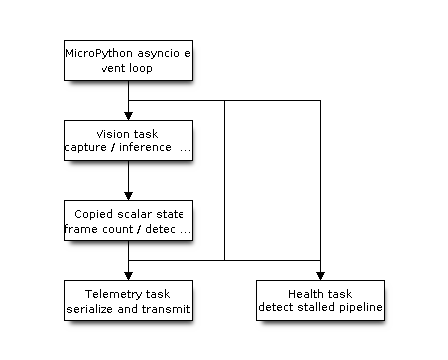
For developers familiar with ESP-IDF, an asyncio task is a cooperatively scheduled Python coroutine, not a FreeRTOS task. Multiple coroutines share one Python execution context and switch only when they await. This is the preferred structure for control logic, network I/O, status reporting, and time-based work because it avoids concurrent access to camera, model, display, and frame-buffer objects.
The following structure assigns exclusive ownership of the vision pipeline to one coroutine while telemetry and health-monitoring coroutines consume only copied scalar results:
import asyncio
import espdl
import json
import sensor
import time

MODEL = "/sdcard/espdet_pico_224_224_face.espdl"

state = {
    "frames": 0,
    "detections": 0,
    "last_frame_ms": time.ticks_ms(),
}
state_lock = asyncio.Lock()

async def vision_task(detector):
    while True:
        img = sensor.snapshot()
        results = detector.detect(img)
        for x, y, w, h, score, category in results:
            img.draw_rectangle(x, y, w, h, color=(255, 0, 0))
        img.flush()

        async with state_lock:
            state["frames"] += 1
            state["detections"] = len(results)
            state["last_frame_ms"] = time.ticks_ms()

        # Let ready control and network tasks run between frames.
        await asyncio.sleep_ms(0)

async def telemetry_task():
    while True:
        await asyncio.sleep_ms(1000)
        async with state_lock:
            payload = json.dumps({
                "frames": state["frames"],
                "detections": state["detections"],
            })
        print("telemetry:", payload)
        # Replace print() with non-blocking socket transmission.

async def health_task():
    while True:
        await asyncio.sleep_ms(500)
        async with state_lock:
            age = time.ticks_diff(
                time.ticks_ms(), state["last_frame_ms"]
            )
        if age > 3000:
            print("warning: vision pipeline stalled")

async def main():
    sensor.reset()
    sensor.set_pixformat(sensor.RGB565)
    sensor.set_framesize(sensor.QVGA)
    sensor.skip_frames(time=1000)
    detector = espdl.ESPDet(MODEL, score=0.5, nms=0.7)

    vision = asyncio.create_task(vision_task(detector))
    telemetry = asyncio.create_task(telemetry_task())
    health = asyncio.create_task(health_task())
    try:
        await asyncio.gather(vision, telemetry, health)
    finally:
        vision.cancel()
        telemetry.cancel()
        health.cancel()
        detector.deinit()

asyncio.run(main())
Calls such as sensor.snapshot(), inference, image processing, and img.flush() are synchronous. While one of these calls is running, other coroutines cannot run; the explicit await asyncio.sleep_ms(0) provides a scheduling point between frames. If a network operation can block, use an asyncio stream or non-blocking socket rather than a long blocking call.
Threads and Native Tasks
The inherited _thread.start_new_thread() API creates another FreeRTOS task, but it is not equivalent to xTaskCreatePinnedToCore() as an application interface. Python does not expose task priority or core affinity here; MicroPython threads are pinned to MP_TASK_COREID and share the interpreter through the GIL. _thread.stack_size() can configure the stack allocated for subsequently created threads.
Use _thread only when a blocking operation cannot be integrated with asyncio, protect shared Python data with _thread.allocate_lock(), and keep camera, display, codec, model, and frame-buffer ownership in one thread unless an API explicitly documents thread safety. An IRQ or another thread can notify the event loop with asyncio.ThreadSafeFlag without directly manipulating vision objects.
For deterministic latency, explicit FreeRTOS priorities or core affinity, ISR-to-task notification, or continuous work that must proceed while Python holds the GIL, implement the worker as an ESP-IDF C/C++ component and expose a narrow Python API. In ESP-IDF terms, use asyncio tasks for application state machines, _thread for exceptional blocking integration, and native tasks for real-time services.
Check Availability on a Firmware
Standard MicroPython API availability is controlled by overlay/micropython/ports/esp32/mpconfigport.h, the selected board’s mpconfigboard.h and mpconfigboard.cmake, ESP-IDF version checks, and SoC capability macros. Because availability is not determined solely by the chip, the definitive check is the exact firmware:
help("modules")
import machine
help(machine)
Use hasattr() or a guarded import when an application must run across multiple ESP-VISION boards. To remove or add inherited APIs in a product firmware, follow Customize Firmware Features.
See also
Runnable examples that use only standard MicroPython APIs: example/00-HelloWorld/helloworld.py (first script), example/06-Peripherals/00-Storage/sdcard.py (filesystem), and example/06-Peripherals/02-WiFi/webrepl.py (Wi-Fi and WebREPL).