证明
概述
证明是通过密码学保护的令牌,向外部参与方安全地提供设备信息的过程。它使物联网设备,尤其是没有用户界面或部署在远程位置的设备,能够提供证明信息,从而安全地向网络和物联网平台表明自己的身份。
因此,设备使用证明服务,向远程依赖方传达有关其凭据和运行状态的证据。收集到的信息按实体证明令牌 (EAT) 格式组织。
为确保安全,EAT 受到密码学保护。远程依赖方随后可以验证 EAT 的真实性,并根据其内容决定是否与该设备交互。
备注
可以使用选项 启用或禁用证明功能(默认启用)。
证明签名密钥(由 标识)仅由 TEE 持有。TEE 生成该密钥时,会为其标记
SEC_STORAGE_FLAG_TEE_ONLY标志,REE 无法通过安全服务接口对其进行任何访问:不能使用该密钥进行签名,也不能重新生成或清除它。这确保证明证据只能在 TEE 内部完成签名。此外,即使密钥尚不存在,保留的密钥 ID 也会被视为 TEE 所有,从而防止 REE 在 TEE 配置该密钥之前,用自己的密钥抢先占用该 ID。如果密钥作为 NVS 镜像的一部分预先配置(见 安全存储),则 必须 使用 esp_tee_sec_stg_keygen.py 工具的
--tee-only标志来生成该密钥。
证明流程
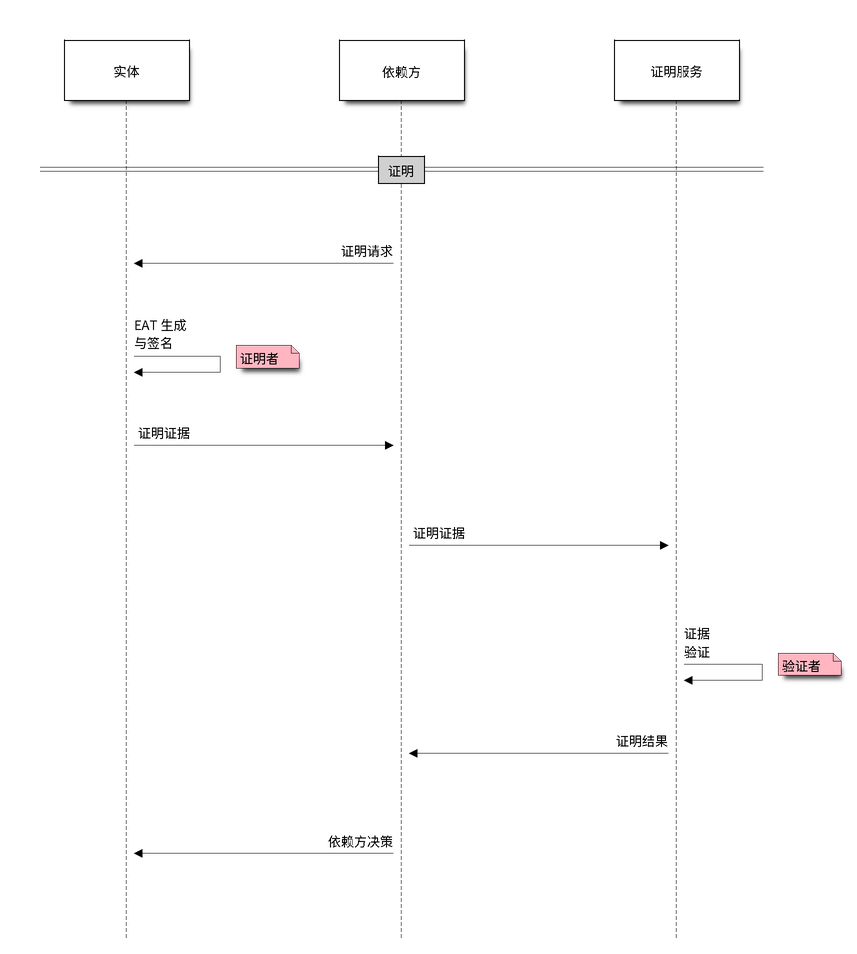
ESP-TEE 证明流程
依赖方向设备 REE 发送证明请求 (AR),其中包含某种质询或 nonce(通常是随机数)。
设备 REE 通过安全服务调用接口,将该请求转发给设备 TEE 的证明服务。
TEE 收集 EAT 声明表中列出的全部相关声明信息,组装实体证明令牌 (EAT),即证明证据。然后对声明数据生成签名,并将其附加到令牌中。
证据经设备 REE 和依赖方传回远程证明服务(验证者)。在某些情况下,依赖方自身可以充当证明服务。
证明服务评估收到的证据,验证成功后,将 EAT 声明数据与可用的参考值进行比较。
依赖方根据证明结果及其预定义策略判断设备是否可信,并将该判断告知设备。
实体证明令牌
实体证明令牌 (EAT) 是一小段包含声明并经过密码学签名的数据。密码学签名保障了令牌的安全性,因此传输令牌的方式本身不必提供任何安全保护。
向设备发送证明请求后,设备会按下方给出的预定义 JSON 格式生成 EAT。该令牌包含设备上硬件和软件实体的全部必要信息。此处使用 TEE 安全存储中的 ECDSA 密钥对为 EAT 签名,所用槽 ID 由证明请求指定。EAT 中包含 压缩 ECDSA 公钥,以及签名的 R 和 S 分量。

ESP-TEE:证明证据
EAT:头部
声明 |
描述 |
注释 |
|---|---|---|
魔数 |
标识 EAT 的起始 |
|
加密算法 |
如果 EAT 已加密,则指定加密算法的详细信息 |
|
签名算法 |
如果 EAT 已签名,则指定签名算法的详细信息 |
目前仅支持 |
密钥 ID |
标识设备用于加密和签名的密钥 |
TEE 安全存储密钥 ID(字符串) |
EAT:声明表
声明 |
描述 |
注释 |
|---|---|---|
认证质询 |
调用方提供的质询数据,用于防止重放攻击。通常是密码学 nonce(随机值),或包含 nonce 的数据的哈希。使用数据哈希时,调用方必须把 nonce 纳入被哈希的数据,以确保重放保护。 |
|
客户端 ID |
依赖方标识 |
|
芯片 ID |
SoC 芯片标识符 |
|
UEID |
通用实体标识符,出厂时烧录在 eFuse 中 |
设备 MAC 地址,以及 eFuse 中的可选唯一 ID |
设备 ID |
设备标识(应唯一) |
设备 MAC 地址的 SHA256 摘要 |
设备版本 |
来自 eFuse 的 SoC 硬件版本 |
|
实例 ID |
实例标识 |
当前会话所用安全存储槽的公钥哈希 (SHA256) |
认证参考 |
PSA 认证 ID |
|
设备状态 |
开发/生产模式 |
|
软件度量 |
当前活动固件组件的详细信息,例如应用版本、ESP-IDF 版本、摘要等。设备中的每个固件在 EAT 中都有一条此类型的记录。 |
EAT:软件度量
键 |
描述 |
注释 |
|---|---|---|
版本 |
实体镜像版本 |
不适用于引导加载程序 |
ESP-IDF 版本 |
不适用于引导加载程序 |
|
安全版本 |
用于固件防回滚 |
仅适用于 REE 应用程序 |
摘要:类型 |
目前仅支持 |
|
摘要:计算值 |
||
摘要:校验 |
计算出的摘要是否与固件镜像中嵌入的摘要一致 |
|
安全启动签名验证状态 |
||
安全填充状态 |
详情请参阅 安全填充。 |
|
摘要:代码哈希 |
仅针对镜像段计算的 SHA256,不包含打包元数据(镜像头、应用程序描述符、校验和以及附加摘要) |
仅适用于 TEE;与主机端工具 esp_tee/scripts/esp_tee_code_hash/esp_tee_code_hash.py 一致 |
摘要:代码哈希版本 |
代码哈希所采用定义的版本 |
仅适用于 TEE; |
JSON 格式的 EAT 示例
{
  "header": {
    "magic": "44fef7cc",
    "encr_alg": "",
    "sign_alg": "ecdsa_secp256r1_sha256",
    "key_id": "tee_att_key0"
  },
  "eat": {
    "auth_challenge":"dcb9b53143ad6b081dad1a05c7ebda4e314d388762215799cf24ed52e9387678",
    "client_id": 262974944,
    "chip_id": 13,
    "device_ver": 1,
    "ueid": {
      "mac": "d885ac67c978",
      "optional_id": "94fa4d7e305682714d48e7bbd710c961"
    },
    "device_id": "e8cddb2a7f9a5a7c61735d6dda26e4bd153c6d772a9be6f26bd321dfe25e0ac8",
    "instance_id": "1adba85e0df997fd961f25a9e312430cef162b5c69466cd5b172f1e65ac7360c",
    "psa_cert_ref": "0716053550477-10100",
    "device_status": 255,
    "sw_claims": {
      "tee": {
        "type": 1,
        "ver": "1.2.0~v6.2.0",
        "idf_ver": "v6.2-dev-3162-g9aa4f93857d",
        "secure_ver": 0,
        "secure_ver_efuse": 0,
        "part_chip_rev": {
          "min": 0,
          "max": 99
        },
        "part_digest": {
          "type": 0,
          "calc_digest": "f732e7f285b7de7ac3167a867711eddbf17a2a05513d35e41cd1ebf2e0958b2e",
          "digest_validated": true,
          "sign_verified": true,
          "secure_padding": true,
          "calc_code_hash": "33e9d223e4f861e9f7a9f5209ee27cd4f69894bcfcd76bd96bb90c98795a24cd",
          "code_hash_ver": 1
        }
      },
      "app": {
        "type": 2,
        "ver": "v0.1.0",
        "idf_ver": "v6.2-dev-3162-g9aa4f93857d",
        "secure_ver": 0,
        "secure_ver_efuse": 0,
        "part_chip_rev": {
          "min": 0,
          "max": 99
        },
        "part_digest": {
          "type": 0,
          "calc_digest": "21e114fd30b9234c501525990dfab71d00348c531bb64224feff9deb32e66f9f",
          "digest_validated": true,
          "sign_verified": true,
          "secure_padding": true
        }
      },
      "bootloader": {
        "type": 0,
        "ver": "",
        "idf_ver": "",
        "secure_ver": -1,
        "secure_ver_efuse": -1,
        "part_chip_rev": {
          "min": 0,
          "max": 99
        },
        "part_digest": {
          "type": 0,
          "calc_digest": "516148649a7f670b894391ded9d64a0e8604c5cec9a1eeb0014d2549cdaa4725",
          "digest_validated": true,
          "sign_verified": true
        }
      }
    }
  },
  "public_key": {
    "compressed": "02a45c6c94c4be7722bd2513f4ccbc4daa369747e6e96e0f9f7a2eba055dee6d46"
  },
  "sign": {
    "r": "37bcc8ed9c15a4712c18fe20b257992e5d9ec273b6261675f247667b4575495b",
    "s": "28ce15da73880f7d5ee303948769b197077208f1f242aaee448e9ed23f9085fa"
  }
}
应用示例
tee_attestation 示例演示如何生成实体证明令牌,其中包含所有活动固件组件(引导加载程序、TEE 和 REE 应用程序)的验证详情。
API 参考
Header File
This header file can be included with:
#include "psa/initial_attestation.h"
This header file is a part of the API provided by the
mbedtlscomponent. To declare that your component depends onmbedtls, add the following to your CMakeLists.txt:REQUIRES mbedtls
or
PRIV_REQUIRES mbedtls
Functions
-
psa_status_t psa_initial_attest_get_token(const uint8_t *auth_challenge, size_t challenge_size, uint8_t *token_buf, size_t token_buf_size, size_t *token_size)
Generate an entity attestation token.
Generates an attestation token containing device identity and security claims, signed and encoded in the JSON format.
- 参数:
auth_challenge -- Pointer to a buffer containing the challenge data from the verifier
challenge_size -- Size of the challenge in bytes. Must be 32, 48, or 64 bytes
token_buf -- Pointer to a buffer where the attestation token will be written
token_buf_size -- Size of the token buffer in bytes
token_size -- On success, will be set to the actual size of the generated token
- 返回:
psa_status_t PSA_SUCCESS on success, PSA_ERROR_INVALID_ARGUMENT if parameters are invalid, PSA_ERROR_BUFFER_TOO_SMALL if token_buf is too small, PSA_ERROR_NOT_SUPPORTED if the requested challenge size is not supported, or another error code on failure
-
psa_status_t psa_initial_attest_get_token_size(size_t challenge_size, size_t *token_size)
Get the size of the attestation token that would be generated.
This can be used to allocate an appropriately sized buffer before calling psa_initial_attest_get_token().
- 参数:
challenge_size -- Size of the challenge in bytes. Must be 32, 48, or 64 bytes
token_size -- On success, will be set to the size of the token that would be generated
- 返回:
psa_status_t PSA_SUCCESS on success, PSA_ERROR_INVALID_ARGUMENT if challenge_size is invalid, PSA_ERROR_NOT_SUPPORTED if the requested challenge size is not supported, or another error code on failure
Macros
-
PSA_INITIAL_ATTEST_API_VERSION_MAJOR
Major version of this implementation of the Attestation API
-
PSA_INITIAL_ATTEST_API_VERSION_MINOR
Minor version of this implementation of the Attestation API
-
PSA_INITIAL_ATTEST_MAX_TOKEN_SIZE
Maximum size of an attestation token in bytes
-
PSA_INITIAL_ATTEST_CHALLENGE_SIZE_32
-
PSA_INITIAL_ATTEST_CHALLENGE_SIZE_48
-
PSA_INITIAL_ATTEST_CHALLENGE_SIZE_64
-
PSA_INITIAL_ATTEST_CHALLENGE_SIZE_MAX
Maximum supported challenge size