Camera Sensor Driver Development
Overview
The camera sensor data flow is as follows:
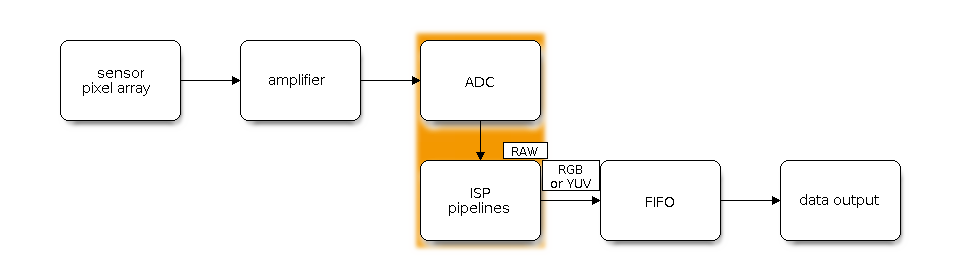
Camera Sensor Data Flow
Based on the output data format, camera sensors fall into two categories:
RAW sensors: these sensors can only output data in RAW format.
YUV sensors: compared with RAW sensors, this type integrates ISP pipelines and can output data in YUV or RGB formats directly.
Driver Architecture
The main code structure for each sensor driver includes:
├── cfg
│   ├── sc2336_default.json    # IPA (Image Processing Algorithms) parameter configuration file
├── include
│   └── sc2336_types.h
│   └── sc2336.h
├── private_include
│   └── sc2336_regs.h
│   └── sc2336_settings.h     # Initialization settings for the sensor driver
└── Kconfig.sc2336
└── sc2336.c                  # Sensor driver implementation
Attention
For a YUV sensor, a
JSONfile for configuring IPA parameters is not required.To add a custom sensor driver, see Prepare a Sensor Driver.
For the camera tuning support policy, see Support Policy.
Feature Overview
The esp_cam_sensor driver provides the following features:
Device Discovery — includes detecting the sensor device ID and how to release resources when finished.
Parameter Control — includes querying supported parameter information, and setting and querying parameter values.
I/O Control — includes starting and stopping the device data stream, enabling test mode, and soft reset.
Format Management — describes how to enumerate supported formats, and how to set and query formats.
Get Name — describes how to query the current device name during use.
Generate XCLK Clock Signal — lists how to generate XCLK clock signal on the SoC.
Kconfig Options — lists supported Kconfig options that can affect the driver.
Attention
The interfaces in the esp_cam_sensor component are primarily developed and maintained by low-level camera driver developers. Application developers can directly use the esp-video APIs and avoid calling interfaces in the esp_cam_sensor component.
Device Discovery
If the sensor is properly connected to the SoC and the driver is functioning, the driver will automatically detect the sensor ID and return esp_cam_sensor_device_t to represent the device. You must obtain this device descriptor before calling any other esp_cam_sensor_ APIs.
Probe a Specific Device via a Sensor-Specific API
Using OV2710 as an example, include the ov2710.h header in your application code, then call the ov2710_detect() function to check whether the OV2710 sensor is connected on that bus. For a related example, see detect.
Probe All Devices on a Specified SCCB Bus
The esp_cam_sensor component provides an array to let you probe all camera sensors connected to a specified SCCB bus. Use esp_cam_sensor_detect_get_array() to obtain the start and end pointers of the array, ensuring compatibility with different device detection methods. For a related example, see example_sensor_init.
esp_cam_sensor_detect_fn_t *array_start = NULL;
esp_cam_sensor_detect_fn_t *array_end = NULL;
esp_cam_sensor_detect_get_array(&array_start, &array_end);
for (esp_cam_sensor_detect_fn_t *p = array_start; p < array_end; ++p) {
    esp_cam_sensor_config_t cfg = {0};
    esp_cam_sensor_device_t *sensor_dev;

    cfg.sccb_handle = create_sccb_device(sccb_mark, p->port, &sccb_config, p->sccb_addr);
    if (!cfg.sccb_handle) {
        return ESP_FAIL;
    }

    cfg.reset_pin = reset_pin;
    cfg.pwdn_pin = pwdn_pin;
    sensor_dev = (*(p->detect))((void *)&cfg);
    if (!sensor_dev) {
        destroy_sccb_device(cfg.sccb_handle, sccb_mark, &sccb_config);
        continue;
    }
    break;
}
Delete Device
If the camera device is no longer needed, call esp_cam_sensor_del_dev() to release resources.
Parameter Control
You can query and set parameters of the camera sensor using the following functions:
esp_cam_sensor_query_para_desc()is used to query a parameter’s type and range.esp_cam_sensor_get_para_value()is used to query the current value of a parameter.esp_cam_sensor_set_para_value()is used to set a parameter’s value.
I/O Control
Input/output control of the camera sensor is done by calling esp_cam_sensor_ioctl().
Format Management
Camera sensor format information includes: output interface, output data format, and output frame rate. All information determined by the initialization register list is described by the esp_cam_sensor_format_t structure. By setting and querying this structure, the receiver can correctly initialize, receive, and process image data sent by the camera.
esp_cam_sensor_query_format()is used to query supported formats.esp_cam_sensor_get_format()is used to query the active format.esp_cam_sensor_set_format()is used to set the active format.
Get Name
Call esp_cam_sensor_get_name() to query the current sensor’s name.
Generate XCLK Clock Signal
Proper initialization of a camera sensor requires power, a clock signal, the correct RST level, and the correct PWDN level. The clock signal can be provided by an external crystal oscillator or by the SoC host.
Espressif SoCs can generate this clock signal using peripherals such as LEDC, ESP_CLOCK, and LCD_CAM. For convenience, these peripherals are wrapped as functions named esp_cam_sensor_xclk_. For examples of using XCLK, see xclk_generator.
Attention
Different peripherals support different clock sources. For example, on some chips, the LEDC peripheral only supports an 80 MHz clock source; 80 MHz is not divisible by 24 MHz, so it cannot generate a 24 MHz XCLK. If you are unsure whether a peripheral can generate the specified clock frequency, contact your FAE.
Kconfig Options
Each sensor has a configuration file; for OV2710, it is sensors/ov2710/Kconfig.ov2710. This file lets you configure the default format to load, whether to enable auto-detection, and more.
In addition, there are some common configuration options:
CONFIG_CAMERA_SENSOR_MOTOR_DETECT_METHODselects the device detection method for camera sensors and auto-focus motors, supporting the following two modes:CONFIG_CAMERA_SENSOR_MOTOR_DETECT_METHOD_DYNAMIC_LINK(default): Uses theesp_cam_sensor_detect_fnlinker section to automatically include all available sensor detection functions and their configuration data in the current firmware. Even if the application code does not explicitly reference these functions, the linker retains them, enabling auto-detection of all enabled sensors. However, the firmware size is relatively larger.CONFIG_CAMERA_SENSOR_MOTOR_DETECT_METHOD_STATIC_STORE: Stores only the sensor detection functions and their configuration data actually referenced by the application as a C array in flash. Unreferenced detection functions and data can be excluded from the final firmware by the linker, reducing binary size.
CONFIG_CAMERA_XCLK_USE_LEDCconfigures the XCLK generator to use the LEDC peripheral.CONFIG_CAMERA_XCLK_USE_ESP_CLOCK_ROUTERconfigures the XCLK generator to use the ESP_CLOCK peripheral.
API Reference
Header File
Functions
-
esp_err_t esp_cam_sensor_query_para_desc(esp_cam_sensor_device_t *dev, esp_cam_sensor_param_desc_t *qdesc)
Query the supported data types of extended control parameters.
- Parameters:
dev – [in] Camera sensor device handle that was created by
sensor_detect.qdesc – [out] The pointer to hold the extended control parameters.
- Returns:
ESP_OK: Success
ESP_ERR_INVALID_ARG: Error in the passed arguments.
ESP_ERR_NOT_SUPPORTED: The sensor driver does not support this operation.
-
esp_err_t esp_cam_sensor_get_para_value(esp_cam_sensor_device_t *dev, uint32_t id, void *arg, size_t size)
Get the current value of the control parameter.
- Parameters:
dev – [in] Camera sensor device handle that was created by
sensor_detect.id – [in] Camera sensor parameter ID.
arg – [out] Camera sensor parameter setting data pointer.
size – [in] Camera sensor parameter setting data size.
- Returns:
ESP_OK: Success
ESP_ERR_INVALID_ARG: Error in the passed arguments.
ESP_ERR_NOT_SUPPORTED: The sensor driver does not support this operation.
-
esp_err_t esp_cam_sensor_set_para_value(esp_cam_sensor_device_t *dev, uint32_t id, const void *arg, size_t size)
Set the value of the control parameter.
- Parameters:
dev – [in] Camera sensor device handle that was created by
sensor_detect.id – [in] Camera sensor parameter ID.
arg – [in] Camera sensor parameter setting data pointer.
size – [in] Camera sensor parameter setting data size.
- Returns:
ESP_OK: Success
ESP_ERR_INVALID_ARG: Error in the passed arguments.
ESP_ERR_NOT_SUPPORTED: The sensor driver does not support this operation.
-
esp_err_t esp_cam_sensor_get_capability(esp_cam_sensor_device_t *dev, esp_cam_sensor_capability_t *caps)
Get the camera sensor’s capabilities, see esp_cam_sensor_capability_t.
- Parameters:
dev – [in] Camera sensor device handle that was created by
sensor_detect.caps – [out] The pointer to hold the description of device caps.
- Returns:
ESP_OK: Success
ESP_ERR_INVALID_ARG: Error in the passed arguments.
ESP_ERR_NOT_SUPPORTED: The sensor driver does not support this operation.
-
esp_err_t esp_cam_sensor_query_format(esp_cam_sensor_device_t *dev, esp_cam_sensor_format_array_t *format_array)
Get driver information supported by the camera driver.
- Parameters:
dev – [in] Camera sensor device handle that was created by
sensor_detect.format_array – [out] The pointer to hold the description of the currently supported output format.
- Returns:
ESP_OK: Success
ESP_ERR_INVALID_ARG: Error in the passed arguments.
ESP_ERR_NOT_SUPPORTED: The sensor driver does not support this operation.
-
esp_err_t esp_cam_sensor_set_format(esp_cam_sensor_device_t *dev, const esp_cam_sensor_format_t *format)
Set the output format of the camera sensor.
Note
If format is NULL, the camera sensor will load the default configuration based on the configured interface. See MIPI_IF_FORMAT_INDEX_DEFAULT and DVP_IF_FORMAT_INDEX_DEFAULT.
Note
Query the currently supported output formats by calling esp_cam_sensor_query_format.
- Parameters:
dev – [in] Camera sensor device handle that was created by
sensor_detect.format – [in] The pointer to hold the description of the currently supported output format.
- Returns:
ESP_OK: Success
ESP_ERR_INVALID_ARG: Error in the passed arguments.
ESP_ERR_NOT_SUPPORTED: The sensor driver does not support this operation.
ESP_CAM_SENSOR_ERR_FAILED_SET_FORMAT: An error occurred while writing data over the SCCB bus
-
esp_err_t esp_cam_sensor_get_format(esp_cam_sensor_device_t *dev, esp_cam_sensor_format_t *format)
Get the current camera sensor output format.
- Parameters:
dev – [in] Camera sensor device handle that was created by
sensor_detect.format – [out] The pointer to hold the description of the current output format.
- Returns:
ESP_OK: Success
ESP_FAIL: The sensor driver has not been configured the output format yet.
ESP_ERR_INVALID_ARG: Error in the passed arguments.
ESP_ERR_NOT_SUPPORTED: The sensor driver does not support this operation.
-
esp_err_t esp_cam_sensor_ioctl(esp_cam_sensor_device_t *dev, uint32_t cmd, void *arg)
Perform an ioctl request on the camera sensor.
- Parameters:
dev – [in] Camera sensor device handle that was created by
sensor_detect.cmd – [in] The ioctl command, see esp_cam_sensor.h, for example ESP_CAM_SENSOR_IOC_S_STREAM.
arg – [in] The argument accompanying the ioctl command.
- Returns:
ESP_OK: Success
ESP_ERR_INVALID_ARG: Error in the passed arguments.
ESP_ERR_NOT_SUPPORTED: The sensor driver does not support this cmd or arg.
-
const char *esp_cam_sensor_get_name(esp_cam_sensor_device_t *dev)
Get the module name of the current camera device.
- Parameters:
dev – [in] Camera sensor device handle that was created by
sensor_detect.- Returns:
Camera module name on success, or “NULL”
-
esp_err_t esp_cam_sensor_del_dev(esp_cam_sensor_device_t *dev)
Delete camera device.
- Parameters:
dev – [in] Camera sensor device handle that was created by
sensor_detect.- Returns:
ESP_OK: If Camera sensor is successfully deleted.
Header File
Functions
-
esp_err_t esp_cam_sensor_xclk_allocate(esp_cam_sensor_xclk_source_t source, esp_cam_sensor_xclk_handle_t *ret_handle)
Allocate an XCLK generator context for the given source.
- Parameters:
source – [in] Peripheral source used to generate XCLK.
ret_handle – [out] Pointer to receive the allocated XCLK control handle.
- Returns:
ESP_OK: Success
ESP_ERR_NO_MEM: Not enough memory to allocate the XCLK context
ESP_ERR_INVALID_ARG: ret_handle is NULL or source is not supported
-
esp_err_t esp_cam_sensor_xclk_start(esp_cam_sensor_xclk_handle_t xclk_handle, const esp_cam_sensor_xclk_config_t *config)
Configure the clock source and start XCLK output.
- Parameters:
xclk_handle – [in] XCLK control handle returned by esp_cam_sensor_xclk_allocate().
config – [in] Configuration for the backend selected at allocate time (LEDC or clock router).
- Returns:
ESP_OK: Success
ESP_ERR_INVALID_ARG: Invalid handle, NULL config, or invalid fields in config
ESP_ERR_NOT_SUPPORTED: The backend does not implement start
ESP_FAIL or other codes: Returned by LEDC or esp_clock_output, depending on the XCLK source
-
esp_err_t esp_cam_sensor_xclk_stop(esp_cam_sensor_xclk_handle_t xclk_handle)
Stop XCLK output.
- Parameters:
xclk_handle – [in] XCLK control handle returned by esp_cam_sensor_xclk_allocate().
- Returns:
ESP_OK: Success
ESP_ERR_INVALID_ARG: Invalid handle
ESP_ERR_NOT_SUPPORTED: The backend does not implement stop
-
esp_err_t esp_cam_sensor_xclk_free(esp_cam_sensor_xclk_handle_t xclk_handle)
Free the XCLK generator context.
- Parameters:
xclk_handle – [in] XCLK control handle returned by esp_cam_sensor_xclk_allocate().
- Returns:
ESP_OK: Success
ESP_ERR_INVALID_ARG: Invalid handle
ESP_ERR_NOT_SUPPORTED: The backend does not implement free
Structures
-
struct esp_cam_sensor_xclk_config
Camera sensor xclk controller configurations.
Public Members
-
ledc_timer_t timer
The timer source of channel.
-
ledc_clk_cfg_t clk_cfg
LEDC source clock from ledc_clk_cfg_t.
-
ledc_channel_t channel
LEDC channel used for XCLK (0-7)
-
uint32_t xclk_freq_hz
XCLK output frequency (Hz)
-
gpio_num_t xclk_pin
the XCLK output gpio_num, if you want to use gpio16, xclk_pin = 16
GPIO number to be mapped soc_root_clk signal source.
-
struct esp_cam_sensor_xclk_config::[anonymous]::[anonymous] ledc_cfg
LEDC configuration for XCLK.
-
struct esp_cam_sensor_xclk_config::[anonymous]::[anonymous] esp_clock_router_cfg
ESP Clock Router configuration for XCLK.
-
ledc_timer_t timer
Type Definitions
-
typedef void *esp_cam_sensor_xclk_handle_t
xclk generator handle type
-
typedef struct esp_cam_sensor_xclk_config esp_cam_sensor_xclk_config_t
Camera sensor xclk controller configurations.