相机传感器驱动开发
概述
相机传感器的数据流如下所示:
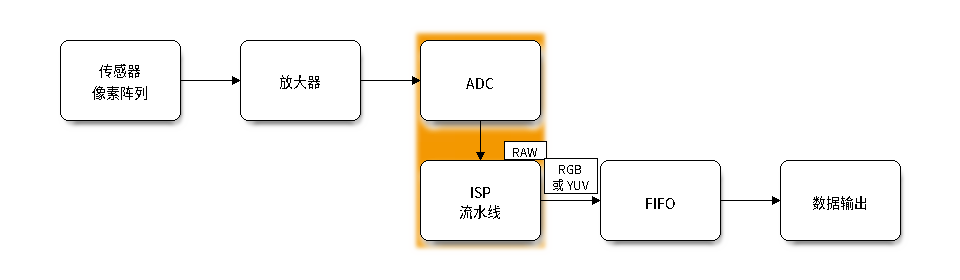
相机传感器的数据流
按照相机传感器输出数据的格式,将相机传感器分为两种:
RAW 传感器,这类传感器只能输出 RAW 格式的数据。
YUV 传感器,相比 RAW 传感器,该类型的传感器内部集成了 ISP 流水线,可以直接输出 YUV 或者 RGB 格式的数据。
驱动架构
每个传感器的驱动程序主要代码结构包括:
├── cfg
│   ├── sc2336_default.json    # IPA(Image Processing Algorithms,图像处理算法)参数配置文件
├── include
│   └── sc2336_types.h
│   └── sc2336.h
├── private_include
│   └── sc2336_regs.h
│   └── sc2336_settings.h      # 传感器驱动程序的初始化配置
└── Kconfig.sc2336
└── sc2336.c                   # 传感器驱动程序的实现
功能概览
esp_cam_sensor 驱动程序提供以下功能:
设备发现 — 包括探测传感器设备的 ID 信息,以及如何在完成工作后回收资源。
参数控制 — 包括查询设备支持的参数信息,以及设置和查询参数值。
IO 控制 — 包括控制设备数据流的开始与结束,启用测试模式,以及软重启等功能。
格式控制 — 描述了如何枚举该传感器支持的格式,以及设置和查询格式。
查询名称 — 描述了在使用中查询当前设备的名称。
生成 XCLK 时钟信号 — 列出了如何在芯片上生成 XCLK 时钟信号。
Kconfig 选项 — 列出了支持的 Kconfig 选项,这些选项可以对驱动程序产生不同影响。
注意
esp_cam_sensor 组件中的接口主要由相机驱动的底层开发人员进行开发和维护,应用开发人员可以直接使用 esp-video 的 API 接口,避免调用 esp_cam_sensor 组件中的接口。
设备发现
若传感器已正确连接到芯片上,并且驱动程序正常,驱动程序将自动检测传感器的 ID 信息,并返回 esp_cam_sensor_device_t 来表示该设备。在调用任何其他 esp_cam_sensor_ API 之前必须先获取该设备的描述符。
通过传感器专用接口探测指定设备
以 OV2710 为例,在应用代码中包含 ov2710.h 头文件,然后通过 ov2710_detect() 函数探测该总线上是否连接了 OV2710 传感器。相关示例可以参考 detect。
探测指定 SCCB 总线上的所有设备
esp_cam_sensor 组件提供了一个数组,以供用户探测指定的 SCCB 总线上连接的所有相机传感器。请通过 esp_cam_sensor_detect_get_array() 获取该数组的起止指针,以兼容不同的设备探测方式。相关示例可以参考 example_sensor_init。
esp_cam_sensor_detect_fn_t *array_start = NULL;
esp_cam_sensor_detect_fn_t *array_end = NULL;
esp_cam_sensor_detect_get_array(&array_start, &array_end);
for (esp_cam_sensor_detect_fn_t *p = array_start; p < array_end; ++p) {
    esp_cam_sensor_config_t cfg = {0};
    esp_cam_sensor_device_t *sensor_dev;

    cfg.sccb_handle = create_sccb_device(sccb_mark, p->port, &sccb_config, p->sccb_addr);
    if (!cfg.sccb_handle) {
        return ESP_FAIL;
    }

    cfg.reset_pin = reset_pin;
    cfg.pwdn_pin = pwdn_pin;
    sensor_dev = (*(p->detect))((void *)&cfg);
    if (!sensor_dev) {
        destroy_sccb_device(cfg.sccb_handle, sccb_mark, &sccb_config);
        continue;
    }
    break;
}
删除设备
如果不再需要使用相机传感器,可以调用 esp_cam_sensor_del_dev() 来回收资源。
参数控制
使用以下函数,可以查询和设置相机传感器的参数:
esp_cam_sensor_query_para_desc()用于查询参数的类型、取值范围。esp_cam_sensor_get_para_value()用于查询参数的当前值。esp_cam_sensor_set_para_value()用于设置参数的值。
IO 控制
相机传感器的输入输出控制可以通过调用 esp_cam_sensor_ioctl() 来实现。
格式控制
相机传感器的格式信息包括:输出接口、输出数据格式、输出帧率。所有由初始化寄存器列表决定的信息均通过 esp_cam_sensor_format_t 结构体来描述。通过设置和查询该结构体的信息,接收端才能正确地完成初始化操作,接收和处理相机发送的图像数据。
esp_cam_sensor_query_format()用于查询支持的格式信息。esp_cam_sensor_get_format()用于查询正在使用的格式信息。esp_cam_sensor_set_format()用于设置使用的格式信息。
查询名称
通过调用 esp_cam_sensor_get_name() 接口来查询当前传感器的名称。
生成 XCLK 时钟信号
相机传感器的正常初始化需要电源、时钟信号、正确的 RST 电平和正确的 PWDN 电平。其中,时钟信号既可以通过外部晶振来提供,也可以通过 SoC 主机来提供。
乐鑫系列芯片可以通过 LEDC、ESP_CLOCK、LCD_CAM 等外设生成该时钟信号。为了方便使用,这些外设统一被封装为 esp_cam_sensor_xclk_ 命名的函数。使用 XCLK 的示例可以参考 xclk_generator。
注意
不同的外设可使用的时钟源不同。比如一些芯片的 LEDC 外设仅支持 80 MHz 的时钟源,80 MHz 无法被 24 MHz 整除,因此无法生成 24 MHz 的 XCLK。如果不确定某外设是否可以生成指定频率的时钟信号,请联系 FAE。
Kconfig 选项
每一个传感器都有一个配置文件,以 OV2710 为例,对应的是 sensors/ov2710/Kconfig.ov2710 文件。通过该文件可以配置传感器默认加载的格式、是否启用自动探测功能等。
此外,还有一些通用的配置选项:
CONFIG_CAMERA_SENSOR_MOTOR_DETECT_METHOD用于选择相机传感器与对焦电机的设备探测方式,支持以下两种模式:CONFIG_CAMERA_SENSOR_MOTOR_DETECT_METHOD_DYNAMIC_LINK(默认):通过esp_cam_sensor_detect_fn链接器段,将当前固件中所有可用的传感器探测函数及其配置数据自动纳入固件。即使应用代码未显式引用这些函数,链接器也会保留它们,从而支持对所有已启用传感器的自动探测,但固件体积相对较大。CONFIG_CAMERA_SENSOR_MOTOR_DETECT_METHOD_STATIC_STORE:仅将应用实际引用的传感器探测函数及其配置数据以 C 语言数组形式静态存储在 flash 中。未被引用的探测函数和数据可由链接器从最终固件中排除,从而减小二进制体积。
CONFIG_CAMERA_XCLK_USE_LEDC:配置 XCLK 时钟生成器由 LEDC 外设来实现。CONFIG_CAMERA_XCLK_USE_ESP_CLOCK_ROUTER:配置 XCLK 时钟生成器由 ESP_CLOCK 外设来实现。
API 参考
Header File
Functions
-
esp_err_t esp_cam_sensor_query_para_desc(esp_cam_sensor_device_t *dev, esp_cam_sensor_param_desc_t *qdesc)
Query the supported data types of extended control parameters.
- 参数:
dev – [in] Camera sensor device handle that was created by
sensor_detect.qdesc – [out] The pointer to hold the extended control parameters.
- 返回:
ESP_OK: Success
ESP_ERR_INVALID_ARG: Error in the passed arguments.
ESP_ERR_NOT_SUPPORTED: The sensor driver does not support this operation.
-
esp_err_t esp_cam_sensor_get_para_value(esp_cam_sensor_device_t *dev, uint32_t id, void *arg, size_t size)
Get the current value of the control parameter.
- 参数:
dev – [in] Camera sensor device handle that was created by
sensor_detect.id – [in] Camera sensor parameter ID.
arg – [out] Camera sensor parameter setting data pointer.
size – [in] Camera sensor parameter setting data size.
- 返回:
ESP_OK: Success
ESP_ERR_INVALID_ARG: Error in the passed arguments.
ESP_ERR_NOT_SUPPORTED: The sensor driver does not support this operation.
-
esp_err_t esp_cam_sensor_set_para_value(esp_cam_sensor_device_t *dev, uint32_t id, const void *arg, size_t size)
Set the value of the control parameter.
- 参数:
dev – [in] Camera sensor device handle that was created by
sensor_detect.id – [in] Camera sensor parameter ID.
arg – [in] Camera sensor parameter setting data pointer.
size – [in] Camera sensor parameter setting data size.
- 返回:
ESP_OK: Success
ESP_ERR_INVALID_ARG: Error in the passed arguments.
ESP_ERR_NOT_SUPPORTED: The sensor driver does not support this operation.
-
esp_err_t esp_cam_sensor_get_capability(esp_cam_sensor_device_t *dev, esp_cam_sensor_capability_t *caps)
Get the camera sensor’s capabilities, see esp_cam_sensor_capability_t.
- 参数:
dev – [in] Camera sensor device handle that was created by
sensor_detect.caps – [out] The pointer to hold the description of device caps.
- 返回:
ESP_OK: Success
ESP_ERR_INVALID_ARG: Error in the passed arguments.
ESP_ERR_NOT_SUPPORTED: The sensor driver does not support this operation.
-
esp_err_t esp_cam_sensor_query_format(esp_cam_sensor_device_t *dev, esp_cam_sensor_format_array_t *format_array)
Get driver information supported by the camera driver.
- 参数:
dev – [in] Camera sensor device handle that was created by
sensor_detect.format_array – [out] The pointer to hold the description of the currently supported output format.
- 返回:
ESP_OK: Success
ESP_ERR_INVALID_ARG: Error in the passed arguments.
ESP_ERR_NOT_SUPPORTED: The sensor driver does not support this operation.
-
esp_err_t esp_cam_sensor_set_format(esp_cam_sensor_device_t *dev, const esp_cam_sensor_format_t *format)
Set the output format of the camera sensor.
备注
If format is NULL, the camera sensor will load the default configuration based on the configured interface. See MIPI_IF_FORMAT_INDEX_DEFAULT and DVP_IF_FORMAT_INDEX_DEFAULT.
备注
Query the currently supported output formats by calling esp_cam_sensor_query_format.
- 参数:
dev – [in] Camera sensor device handle that was created by
sensor_detect.format – [in] The pointer to hold the description of the currently supported output format.
- 返回:
ESP_OK: Success
ESP_ERR_INVALID_ARG: Error in the passed arguments.
ESP_ERR_NOT_SUPPORTED: The sensor driver does not support this operation.
ESP_CAM_SENSOR_ERR_FAILED_SET_FORMAT: An error occurred while writing data over the SCCB bus
-
esp_err_t esp_cam_sensor_get_format(esp_cam_sensor_device_t *dev, esp_cam_sensor_format_t *format)
Get the current camera sensor output format.
- 参数:
dev – [in] Camera sensor device handle that was created by
sensor_detect.format – [out] The pointer to hold the description of the current output format.
- 返回:
ESP_OK: Success
ESP_FAIL: The sensor driver has not been configured the output format yet.
ESP_ERR_INVALID_ARG: Error in the passed arguments.
ESP_ERR_NOT_SUPPORTED: The sensor driver does not support this operation.
-
esp_err_t esp_cam_sensor_ioctl(esp_cam_sensor_device_t *dev, uint32_t cmd, void *arg)
Perform an ioctl request on the camera sensor.
- 参数:
dev – [in] Camera sensor device handle that was created by
sensor_detect.cmd – [in] The ioctl command, see esp_cam_sensor.h, for example ESP_CAM_SENSOR_IOC_S_STREAM.
arg – [in] The argument accompanying the ioctl command.
- 返回:
ESP_OK: Success
ESP_ERR_INVALID_ARG: Error in the passed arguments.
ESP_ERR_NOT_SUPPORTED: The sensor driver does not support this cmd or arg.
-
const char *esp_cam_sensor_get_name(esp_cam_sensor_device_t *dev)
Get the module name of the current camera device.
- 参数:
dev – [in] Camera sensor device handle that was created by
sensor_detect.- 返回:
Camera module name on success, or “NULL”
-
esp_err_t esp_cam_sensor_del_dev(esp_cam_sensor_device_t *dev)
Delete camera device.
- 参数:
dev – [in] Camera sensor device handle that was created by
sensor_detect.- 返回:
ESP_OK: If Camera sensor is successfully deleted.
Header File
Functions
-
esp_err_t esp_cam_sensor_xclk_allocate(esp_cam_sensor_xclk_source_t source, esp_cam_sensor_xclk_handle_t *ret_handle)
Allocate an XCLK generator context for the given source.
- 参数:
source – [in] Peripheral source used to generate XCLK.
ret_handle – [out] Pointer to receive the allocated XCLK control handle.
- 返回:
ESP_OK: Success
ESP_ERR_NO_MEM: Not enough memory to allocate the XCLK context
ESP_ERR_INVALID_ARG: ret_handle is NULL or source is not supported
-
esp_err_t esp_cam_sensor_xclk_start(esp_cam_sensor_xclk_handle_t xclk_handle, const esp_cam_sensor_xclk_config_t *config)
Configure the clock source and start XCLK output.
- 参数:
xclk_handle – [in] XCLK control handle returned by esp_cam_sensor_xclk_allocate().
config – [in] Configuration for the backend selected at allocate time (LEDC or clock router).
- 返回:
ESP_OK: Success
ESP_ERR_INVALID_ARG: Invalid handle, NULL config, or invalid fields in config
ESP_ERR_NOT_SUPPORTED: The backend does not implement start
ESP_FAIL or other codes: Returned by LEDC or esp_clock_output, depending on the XCLK source
-
esp_err_t esp_cam_sensor_xclk_stop(esp_cam_sensor_xclk_handle_t xclk_handle)
Stop XCLK output.
- 参数:
xclk_handle – [in] XCLK control handle returned by esp_cam_sensor_xclk_allocate().
- 返回:
ESP_OK: Success
ESP_ERR_INVALID_ARG: Invalid handle
ESP_ERR_NOT_SUPPORTED: The backend does not implement stop
-
esp_err_t esp_cam_sensor_xclk_free(esp_cam_sensor_xclk_handle_t xclk_handle)
Free the XCLK generator context.
- 参数:
xclk_handle – [in] XCLK control handle returned by esp_cam_sensor_xclk_allocate().
- 返回:
ESP_OK: Success
ESP_ERR_INVALID_ARG: Invalid handle
ESP_ERR_NOT_SUPPORTED: The backend does not implement free
Structures
-
struct esp_cam_sensor_xclk_config
Camera sensor xclk controller configurations.
Public Members
-
ledc_timer_t timer
The timer source of channel.
-
ledc_clk_cfg_t clk_cfg
LEDC source clock from ledc_clk_cfg_t.
-
ledc_channel_t channel
LEDC channel used for XCLK (0-7)
-
uint32_t xclk_freq_hz
XCLK output frequency (Hz)
-
gpio_num_t xclk_pin
the XCLK output gpio_num, if you want to use gpio16, xclk_pin = 16
GPIO number to be mapped soc_root_clk signal source.
-
struct esp_cam_sensor_xclk_config::[anonymous]::[anonymous] ledc_cfg
LEDC configuration for XCLK.
-
struct esp_cam_sensor_xclk_config::[anonymous]::[anonymous] esp_clock_router_cfg
ESP Clock Router configuration for XCLK.
-
ledc_timer_t timer
Type Definitions
-
typedef void *esp_cam_sensor_xclk_handle_t
xclk generator handle type
-
typedef struct esp_cam_sensor_xclk_config esp_cam_sensor_xclk_config_t
Camera sensor xclk controller configurations.