Integrating the Device Core npm Package
For the SDK overview and complete API index, see device-core/index; application parameters/results/events are in device-core/api and all advanced exports in device-core/advanced. This page retains runnable integration examples.
This page targets host developers connecting an IDE, Agent, CLI or custom host application to a device. @esp-vision/device-core is the shared UI-independent library. Hosts supply physical byte connections without copying the reference Python client or implementing another protocol stack. See communication/wire-protocol for framing and communication/interfaces for physical interfaces.
Source, versions and installation
Device Core is maintained in host/device-core/ in the ESP-VISION firmware repository. host/ contains code running on the host, not firmware modules. IDE and Agent are npm consumers; Agent MCP mappings, model providers and plugins remain in their independent project. Protocol changes should align firmware, Core, documentation and tests in one MR.
The package has its own version, independent of firmware and IDE versions. These examples target @esp-vision/device-core@0.4.0 and EV-MUX v4 only. v3 returns VERSION_MISMATCH and applications should request a firmware update. Install the version after the public npm registry confirms publication; a dry run or an open MR alone does not publish it.
npm view @esp-vision/device-core@0.4.0 version dist.integrity
npm install --save-exact @esp-vision/device-core@0.4.0
Node.js 22 is the Node host baseline. Browsers need a bundler/import map for package specifiers and Web Serial or a binary WebSocket bridge. The package contains no serial driver, network bridge, model, IDE UI or Agent runtime. Node mDNS discovery uses the optional multicast-dns peer. Before publication, install a local npm pack tarball for verification; production consumers should pin npm versions and update lockfiles.
Application, Core and transport responsibilities
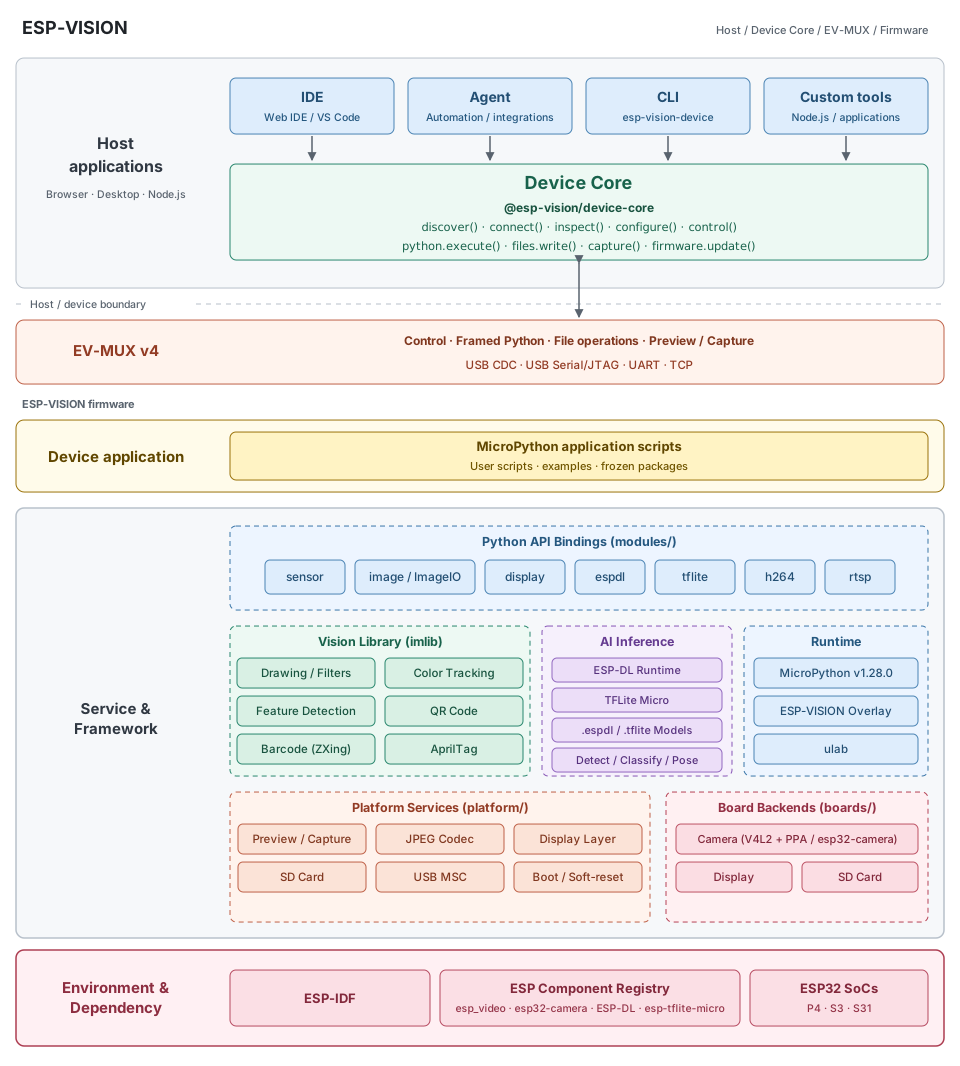
IDE / Agent / CLI / custom tools → Device Core → EV-MUX → firmware
The same SVG is used by the project README and system architecture chapter. Host applications select devices and provide UI/workflow policy; Device Core owns the shared API, protocol and session state; EV-MUX defines runtime communication with the firmware. Byte adapters supply serial/socket I/O without parsing another protocol stack. Representative APIs in the figure do not replace the full API reference. Discovery and ROM flashing have separate lifecycles; the ROM loader does not carry image writes through EV-MUX.
Create one createDevice({ transport }) object per device connection. The package root exports only this factory. Core owns parsing, request correlation, sessions, keepalive, REPL coordination and operation lifetimes. Applications own selection, presentation and policy. Transport adapters own physical connections and reliable raw bytes; bridges must neither acquire ownership nor re-encode EV-MUX.
The transport contract has two required methods. writeBytes(Uint8Array): Promise resolves after all bytes are accepted by the host connection and rejects failures. subscribe({ data, error, close }) forwards raw bytes, errors and closure and must synchronously return an unsubscribe function. Optional connect({ signal }) / disconnect() open and close the physical link. Core subscribes before connecting or handshaking; omit connect for an already open link. Short writes and WOULD_BLOCK are not completed writes. Unsubscribed connections must stop delivering data.
Standalone Node TCP example
Save the following as core-tcp.mjs in a project with the package installed and run node core-tcp.mjs <device-ip>. The device must be online with v4 firmware; its default TCP port is 3232. This example uses a supplied address; discovery is described below.
import net from 'node:net'
import { once } from 'node:events'
import { createDevice } from '@esp-vision/device-core'

const host = process.argv[2]
if (!host) throw new Error('Usage: node core-tcp.mjs <device-ip>')
const socket = new net.Socket()
const transport = {
  subscribe({ data, error, close }) {
    socket.on('data', data)
    socket.on('error', error)
    socket.on('close', close)
    return () => {
      socket.off('data', data)
      socket.off('error', error)
      socket.off('close', close)
    }
  },
  async connect({ signal }) {
    socket.connect({ host, port: 3232 })
    await once(socket, 'connect', { signal })
  },
  writeBytes(bytes) {
    return new Promise((resolve, reject) => {
      socket.write(bytes, error => error ? reject(error) : resolve())
    })
  },
  async disconnect() { socket.destroy() },
}
const device = createDevice({ transport })
const unsubscribe = device.on('python.output', text => process.stdout.write(text))
try {
  await device.connect({ role: 'tcp' })
  console.log(await device.inspect({ fields: ['identity', 'capabilities'] }))
  console.log(await device.python.execute({ source: 'print(1 + 2)', completion: 'wait' }))
} finally {
  try { await device.disconnect() }
  finally { unsubscribe() }
}
connect() negotiates ownership and probes the REPL, potentially interrupting existing Python programs. It is not a passive availability check. inspect() defaults to identity, capabilities and runtime; use fields to request network / storage explicitly. disconnect() releases ownership, ends pending work, unsubscribes and calls the transport close method. Always clean up in finally, including after connection failure.
Browser Web Serial example
Call connectSerial() from a user click; requestPort requires a secure context and user selection. This example uses role: 'usb' for USB CDC; use 'usj' for USJ. Release reader/writer locks before closing the port.
import { createDevice } from '@esp-vision/device-core'

async function connectSerial() {
  const port = await navigator.serial.requestPort()
  await port.open({ baudRate: 115200 })
  const reader = port.readable.getReader()
  const writer = port.writable.getWriter()
  let listeners = null
  let reading = null
  const transport = {
    subscribe(next) {
      listeners = next
      reading = (async () => {
        try {
          for (;;) {
            const { value, done } = await reader.read()
            if (done) break
            listeners?.data(value)
          }
          listeners?.close()
        } catch (error) { listeners?.error(error) }
        finally { reader.releaseLock() }
      })()
      return () => { listeners = null }
    },
    writeBytes: bytes => writer.write(bytes),
    async disconnect() {
      await reader.cancel().catch(() => {})
      await reading
      writer.releaseLock()
      await port.close()
    },
  }
  const device = createDevice({ transport })
  const unsubscribe = device.on('python.output', text => console.log(text))
  try {
    await device.connect({ role: 'usb' })
    await device.python.execute({ source: 'print(123)', completion: 'wait' })
  } finally {
    try { await device.disconnect() }
    finally { unsubscribe() }
  }
}
Browser networking uses a binary WebSocket bridge with the same transport contract and role: 'tcp'. Adapters must check WebSocket OPEN, bound bufferedAmount and report disconnection; calling send does not prove device receipt. UIs should subscribe to state and handle unexpected closure. See communication/host-integration for bridging.
Files and interactive Python
These operations assume a connected device. Receive output through device.on('python.output', handler). Upload and execution are separate; there is no implicit run-after-upload option.
const source = 'print("device-core example")\n'
await device.files.write({ path: '/core-example.py', data: source })
const readback = await device.files.read({ path: '/core-example.py', encoding: 'utf-8' })
if (readback !== source) throw new Error('Readback mismatch')
const run = await device.python.execute({ path: '/core-example.py', completion: 'start' })
const result = await run.done
console.log(result.ok, result.path)
await device.files.remove({ path: '/core-example.py' })

await device.python.input('print(123)\r')
await device.control({ action: 'stop' })
python.execute accepts exactly one of source and path. completion: 'wait' awaits the result; 'start' returns a handle with a done Promise. Upload success and startup do not prove execution completion. Infinite programs need control({ action: 'stop' }), continued receive processing and an execution result; a stop ACK does not prove resource cleanup.
files.list/read/write/remove/mkdir are the sole application file API. files.write accepts strings or Uint8Array; SDK 0.3.0 sends both through file.write raw binary blocks with continuous native writes and SHA-256 commit. Firmware must advertise file.write.binary; unsupported versions require an upgrade. Reads and directory operations currently use framed REPL. The filesystem must be mounted and writable with temporary-file space. Terminal input, automated scripts and filesystem helpers share one interpreter. Core rejects conflicting automated operations with DEVICE_BUSY; applications must not inject terminal input into a REPL held by an automated operation. See communication/python-files for details.
Wi-Fi configuration and status
await device.configure({ network: {
  credentials: { ssid: '<wifi-ssid>', password: '<wifi-password>' },
  enabled: true,
}, timeout: 45000 })
const { network } = await device.inspect({ fields: ['network'] })
console.log(network.state, network.ipv4)
await device.configure({ network: { enabled: false } })
// Clear saved credentials and disable networking:
// await device.configure({ network: { credentials: null } })
configure applies partial updates: omitted fields stay unchanged. credentials: null clears saved credentials and disables networking; it cannot accompany enabled: true. Credentials require both ssid and password; use an empty password for an open network. Core correlates the transaction and waits for completion rather than returning only firmware acceptance. Combined changes are sequential, not atomic. On failure, error.completed / error.pending describe acknowledged changes and unfinished operations; Core does not roll back. Pass timeout and signal in the same request object.
Prefer USB for provisioning because network changes may disconnect TCP. Do not log credentials; queries do not return saved passwords. Release USB before establishing a TCP session rather than transferring its token.
Discovery and identity checks
Firmware advertises _esp-vision._tcp.local with main-chip device ID, full board name, firmware version, canonical hostname and protocol version. The hostname is esp-vision-<full-board-name>-<last-6-mac-hex>-<firmware-version> and is consistent across serial, TCP, Python and discovery queries. Discovery does not connect to a device or acquire ownership; online does not mean idle.
Install the optional multicast-dns peer for Node discovery:
import { createDevice } from '@esp-vision/device-core'
import { createNodeDiscovery } from '@esp-vision/device-core/discovery/node'
import { tcpTransport } from '@esp-vision/device-core/node'

const device = createDevice({ discovery: createNodeDiscovery() })
const devices = await device.discover({ timeout: 3000 })
const selected = devices.find(item => item.compatible && item.addresses.length)
if (!selected) throw new Error('No compatible device found')
const tcpAdapter = tcpTransport({ host: selected.addresses[0], port: selected.port })
try {
    await device.connect({ transport: tcpAdapter, role: 'tcp', expectedDevice: selected })
    console.log(await device.inspect({ fields: ['identity'] }))
} finally { await device.disconnect() }
Applications call device.discover(). createNodeDiscovery() and createBridgeDiscovery() return providers with list({ timeout, signal }), not discover(); inject them through createDevice({ discovery: provider }). Starting in 0.1.1, official tcpTransport({ host, port }) and serialTransport({ serial, python }) adapters are exported by @esp-vision/device-core/node. Constructors do not open links; serial requires pyserial in the selected interpreter. See Advanced export API reference.
Browsers inject createBridgeDiscovery('ws://127.0.0.1:8766/device') from @esp-vision/device-core/discovery using a local bridge. Browsers cannot natively enumerate DNS-SD. Results contain deviceId, hostname, board, firmwareVersion, addresses, port and compatible; bridge results may also contain connectionUrl. The host builds a transport from the selection and passes expectedDevice to match ID and hostname before acquisition, protecting against stale DHCP addresses. This is not authentication. VLANs, multicast filtering and AP isolation may require manual addresses; refresh expired bridge handles.
Preview, logs and capture
const unsubscribePreview = device.on('preview', image => {
  const url = URL.createObjectURL(new Blob([image.data], { type: image.mimeType }))
  const previous = imageView.src
  imageView.src = url
  if (previous.startsWith('blob:')) URL.revokeObjectURL(previous)
})
const unsubscribeLog = device.on('log', text => systemLog.write(text))
const image = await device.capture({ source: 'camera', format: 'jpeg', timeout: 15000 })
// image: { data: Uint8Array, mimeType: 'image/jpeg', metadata }
// Call unsubscribePreview()/unsubscribeLog() and revoke the final URL on UI teardown.
imageView and systemLog are host UI objects. on returns an unsubscribe function. Image events and capture results contain raw JPEG bytes; UIs do not parse EV-MUX again. Core checks session and epoch before dispatch. Device programs trigger preview using img.flush() and frames may be dropped under congestion. Camera capture needs an executable VM.
capture({ source: 'screen', format: 'jpeg' }) calls dedicated debug.capture_screen and returns JPEG encoded from the last submitted LCD RGB565 frame. It runs in the VM task without camera calls or screen changes. An absent LCD returns NOT_SUPPORTED; an uninitialized display or absent valid frame returns DISPLAY_NOT_READY. It never falls back to the camera. Core reports unsupported capability on older firmware. High-throughput raw binary upload remains unimplemented. Hardware testing uses npm run test:hardware with --screen-output to display a pattern and save a screenshot; see communication/validation.
Reset, flashing and publication
await device.control({ action: 'reset', mode: 'soft', timeout: 15000 })
// await device.control({ action: 'reset', mode: 'hard' })
// await device.control({ action: 'bootloader' })
Core coordinates a new ready epoch and REPL barrier for soft reset. Inspect current state after timeout/cancellation rather than replaying business operations. Hard reset and downloader entry invalidate the link; an acknowledged request does not prove the rebooted device is online.
ROM flashing remains a separate lifecycle under @esp-vision/device-core/firmware. Hosts inject a ROM loader, approved images, chip/partition constraints and reset policy. Core ships no images and does not carry ROM download commands over EV-MUX. control({ action: 'bootloader' }) only requests downloader entry; it does not flash. See communication/interfaces for physical handoff.
Package source, protocol tests and release automation are maintained together under host/device-core/. IDE and Agent consume pinned published npm versions without long-lived source copies. SDK-only changes run JS tests, schema/package checks and publication dry runs without a firmware build matrix. Package releases are independent of firmware versions; publication jobs and npm view establish registry availability. Version/capability negotiation and hardware validation still determine actual compatibility; see communication/validation for acceptance evidence.
Firmware update application entry
Use device.firmware.check() to fetch the official release feed and per-version metadata automatically; catalog is an optional override for custom sources. Use device.firmware.update({ release, openLoader, ... }) to install a selected compatible release. The packaged CLI supplies its Node ROM adapter internally; CLI users do not configure a loader script. See Application API reference for complete catalog, cancellation and reset contracts; direct FirmwareFlashSession remains available to loader adapters.
Node hosts import openNodeRom from @esp-vision/device-core/node and pass openLoader: ({ signal }) => openNodeRom({ port, signal }); no custom loader implementation is needed. Browser hosts provide openLoader for their Web Serial environment. Set mode: 'install' on check and update to provision a blank board; the default updates only the application.
Browser ROM flashing (unreleased)
The new /browser entry point is not present in npm 0.3.0; build this branch or wait for the next SDK release. Use webpack, Vite or esbuild in a Web Serial-capable browser over HTTPS or localhost. No Python installation, host-maintained tasmota adapter or package-manager patch is needed.
import { createDevice } from '@esp-vision/device-core'
import { openBrowserRom } from '@esp-vision/device-core/browser'

// Request permission inside the click handler, before unrelated awaits.
const port = await navigator.serial.requestPort()
// Release any runtime serial connection before opening the ROM adapter.
const result = await createDevice().firmware.update({
  release: selectedRelease, board: selectedRelease.board,
  mode: 'update', // Explicit install requires qualified complete-image metadata.
  openLoader: ({ signal }) => openBrowserRom({ port, signal, logger: console }),
  onProgress: percent => updateProgress(percent),
})
if (result.needsReset) showManualReset()
selectedRelease comes from firmware.check for the physical board. Core downloads and validates before acquiring the ROM port, validates chip/revision/security before stub startup, checks existing layout (update) or measured capacity (install), and verifies every written byte. Never replace missing metadata with guessed offsets or silently switch update to install. Keep the page and port alive until the Promise settles: cancellation applies before writing and cannot interrupt a started write/readback. For a separate chip-detection UI, retain one adapter, await initialize(), then pass that adapter as openLoader; close it in finally even if download/metadata validation fails before Core acquires it. Native USB may require physical reset after verified flashing. This ROM adapter is separate from runtime EV-MUX serial transport and TCP OTA.
Pinned tasmota 9.4.2 supplies P4 revision 301/302 power/eFuse handling, S31 support, bundler-compatible stub JSON and official dual-licensed esp-flasher-stub v1.4.0. Core adds per-instance bounded pre-SLIP log tolerance, native USB MEM_END timeout recovery that still requires upstream OHAI confirmation, and size-scaled stub erase timeouts. Unsupported stubs and malformed SLIP packets remain explicit errors. The package root and Node entry points do not load this browser backend.