Host integration, Wi-Fi configuration and recovery
Recommended host stack
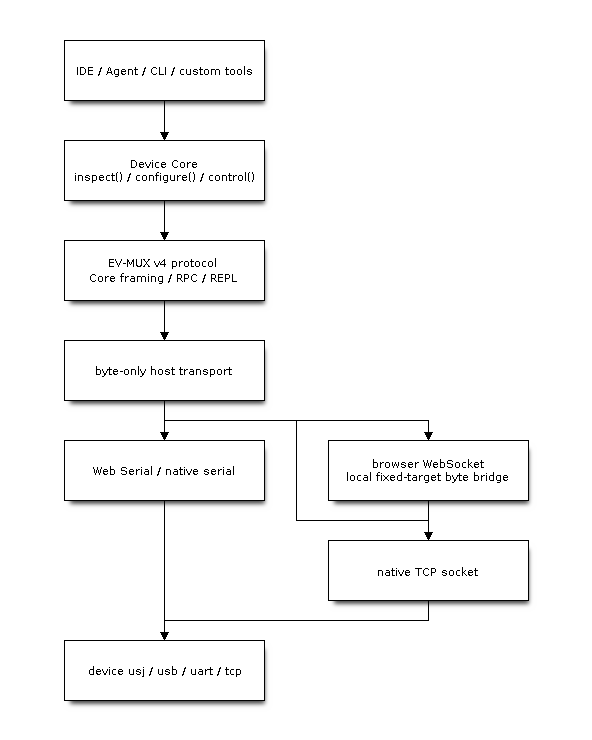
Figure 21: Shared Core owns protocol state; transport carries bytes. A network bridge must not acquire again, re-encode frames or execute Python, creating duplicate owners/correlation logic.
@esp-vision/device-core in host/device-core provides the shared protocol implementation. IDE, independent Agent and firmware hardware checks all use Core; Agent workflows, model providers and MCP plugins belong to the Agent host, not Core or firmware communication. Applications obtain the public API through createDevice(). Parser, framed REPL and session keepalive remain internal rather than being assembled again by each host.
See Device Core integration guide for complete Node TCP, browser Web Serial and high-level API examples. Hardware testing uses the package’s single npm run test:hardware entry point. Its serial adapter only forwards bytes; it is not a second Python EV-MUX client. See Communication acceptance, closed-loop tests and troubleshooting for camera and LCD check selection.
This adapter detail expands the shared Solution Architecture diagram: host applications → Device Core → EV-MUX → device firmware. Core owns protocol/session state; native serial, Web Serial, TCP and WebSocket bridges only move bytes. DNS-SD discovery precedes connection and ROM flashing is a separate loader path, not EV-MUX image transfer.
Integration sequence
Select a physical endpoint, verify device/USB topology and open transport.
Serial performs one bounded startup drain before its first request; TCP acquires immediately.
Start the continuous reader, acquire through hello with a new nonce, validate evMuxVersion/correlation and retain session.
Query capabilities/firmware identity and negotiate command/REPL budgets/timeouts.
Start reported-interval keepalive; keep the reader active throughout application operations.
Wait for current-epoch vmReady and verify executable REPL before VM work.
Coordinate files, run, stop and reset serially while receiving logs/preview.
Release session when possible before closing transport, reader and pending requests.
Why serial startup drain runs only once
Opening USB serial may reveal old complete/partial frames, tracebacks and IDF startup text; it does not trigger a discovery hello. serial.flush() normally waits for host TX rather than reading/clearing device replies.
At connection startup Core receives and processes startup bytes through the same parser for a target 300 ms; this does not establish a business session. An incomplete header/body at the end of this window fails the connection with a structured error and cleanup rather than truncating bytes and immediately sending commands.
Drain reduces observed old data; it neither proves every device/USB/host buffer empty nor diagnoses USB completion failures. Never clear input before every subsequent request, losing keepalive/preview/replies.
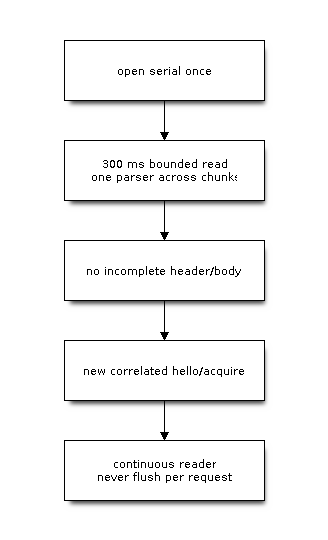
Figure 22: Drain prepares integration; it does not replace completion correlation. Continue rejecting stale seq/session/epoch.
One hardware-test entry point
Run from the repository root with Node.js 22. Serial mode also needs an executable Python with pyserial; TCP mode does not depend on Python. First verify identity and camera on an online device, then run all checks on USB:
npm --prefix host/device-core run test:hardware -- --tcp <device-ipv4>:3232 --checks identity,camera
npm --prefix host/device-core run test:hardware -- --serial <selected-port> --role usj --checks all --timeout 600000
Checks stop existing Python programs and may initialize the camera or display a test pattern. Schedule exclusive device use and close the owning IDE/terminal first; switching interfaces does not bypass a valid owner. See Communication acceptance, closed-loop tests and troubleshooting for checks, LCD JPEG output and acceptance evidence.
Actual Wi-Fi/NVS state machine
Initial configuration requires an acquired connection, usually USB/USJ/UART. An unconfigured TCP server cannot provide entirely wireless first-time provisioning. Native/Hosted Wi-Fi and Python WLAN share the underlying instance; background service creates no second WLAN driver.
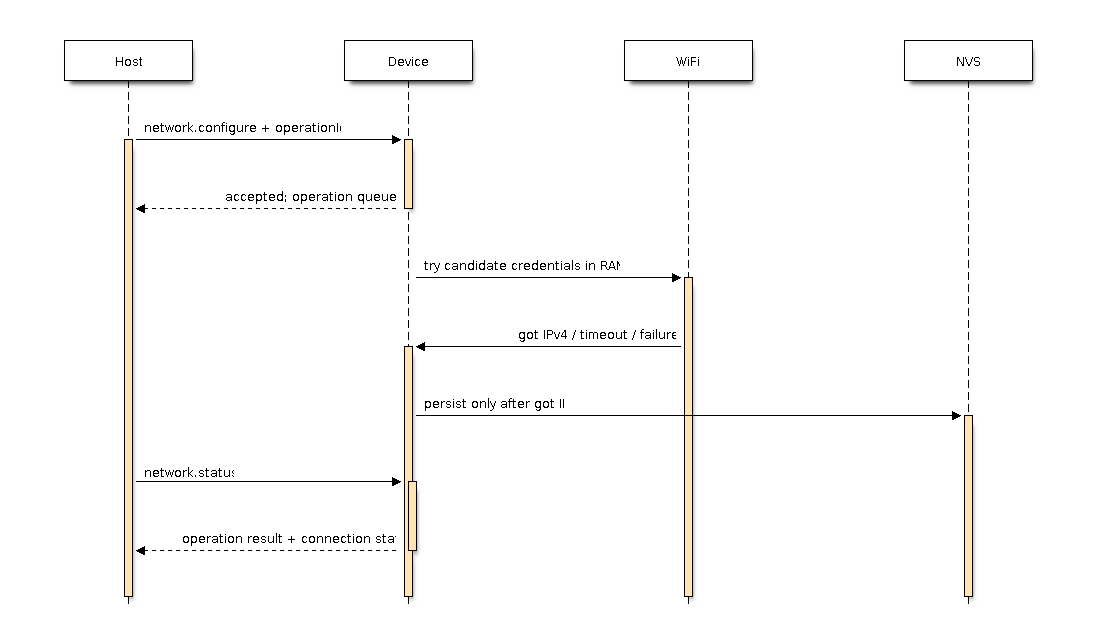
Figure 23: Acceptance, connection and persistence need separate confirmation. Changes start after accepted-reply TX, waiting at most about 1000 ms. Configure tries the candidate in RAM, persists only after obtaining IP within approximately 30 seconds, and restores saved configuration on failure.
{
  "action": "network.configure",
  "operationId": "fedcba9876543210fedcba9876543210",
  "ssid": "<wifi-ssid>",
  "password": "<wifi-password>"
}
Send through user.rpc/device.control with current sessionId in metadata. Network control does not require idle VM. network.status queries final state, network.enable controls persisted enablement and network.forget persists forgotten configuration; these are not Python WLAN method names pasted into RPC.
Use a fresh 32-character operationId per mutation, reusing it only to recover the same transaction with identical payload. network.changed hints at change; status is a bounded correlated query. Never infer latest transaction state from old events after reset/disconnect.
Existing NVS records take priority, including disabled, forgotten-empty and corrupt records; factory macros do not override them. Factory defaults persist then attempt connection only when no record exists. RPC user configuration obtains IP before saving: distinct source flows.
Python WLAN mutations return EBUSY during background transactions. Ordinary Python changes may temporarily affect runtime without implicitly rewriting persistent service records. Disabling background service still allows explicit Python WLAN use; TCP service and policy follow service lifecycle.
Examples use placeholder credentials; redact host logs/diagnostics. This TCP implementation has no authentication/encryption and follows a trusted development-network boundary.
Browser network integration
Browsers cannot open arbitrary TCP sockets. IDE uses a local fixed-target WebSocket-to-TCP binary bridge with explicit origins, a fixed device address, one active browser and TCP closure on browser disconnect. The bridge neither interprets EV-MUX nor acquires sessions.
The bridge belongs to the separate IDE repository; do not assume its npm scripts exist in the firmware root:
npm run network:bridge -- --device <device-ipv4>
Local IDE typically uses http://127.0.0.1:8766/ and ws://127.0.0.1:8766/device. Remote HTTPS needs the exact permitted origin and browser local-network/security permissions; use a trusted WSS proxy when TLS is needed. USB Web Serial and network bridges use the same createDevice API and byte-transport contract.
Confirming reset and cancellation
Soft reset: wait for the same owner with new vmEpoch, vmReady and REPL barrier. Asynchronous event/hello has a separate observation budget; absence alone is not reset failure, and presence alone is not executable REPL.
Hard reset/ROM: invalidate sessions/requests, await enumeration/runtime, reacquire and verify firmware identity. Record flashing verification/reset states separately; full readback verified without observed runtime restoration does not justify automatically rewriting images.
Cancellation: stop further upload/execution, interrupt target work where possible and confirm state. Preserve unknown completion where necessary. Recover network transactions by operationId; ordinary RPCs, REPL input and file append have no universal replay guarantee.
Host timeout budgets must remain distinct
Discovery/capabilities: reference correlated RPC default about 6 seconds.
Keepalive: about 3 seconds per request, within firmware total lease.
Serial startup drain: target 300 ms, once on initial connection.
Host RX frame assembly: reference budget about 12 seconds, allowing multi-second TCP read gaps.
Device RX: approximately 3/10 seconds idle/frame; opposite direction from host large-image reception.
VM queue: expires around 5 seconds; longer host waits do not enlarge it.
File readFile: Core total default 30 seconds; tested IDE scenarios use bounded 60 seconds.
Wi-Fi configure: attempt about 30 seconds; accepted only starts it, requiring final-state queries.
These are current defaults/reference values. Use actual capabilities and client options. Retry within bounds only for explicitly idempotent recovery; slow networking does not justify indefinite waits or automatic duplicate application commands.