Startup Sequence
ESP-VISION follows the MicroPython reset and boot model while adding initialization for the Flash filesystem, board storage, camera, display, and preview services. This chapter describes the sequence implemented by the current firmware. For the upstream model and general behavior, see the MicroPython v1.28.0 Reset and Boot Sequence.
Hard Reset and Soft Reset
A hard reset restarts the MCU and ESP-IDF runtime before creating a new MicroPython environment. It occurs after power-on, the board reset button, machine.reset(), watchdog or brownout reset, and wake-up from deep sleep. Use machine.reset_cause() when an application needs to distinguish the reset source.
A soft reset restarts the MicroPython environment without restarting the complete MCU runtime. It can be requested with Ctrl-D in the friendly REPL or machine.soft_reset(). ESP-VISION clears Python objects and modules, closes files and sockets through MicroPython cleanup, releases camera, display, preview, USB, PWM, timer, UART, thread, and other managed resources, and then repeats the Python startup sequence.
Some system state can survive a soft reset, including the RTC, CPU clock configuration, and an active network interface at the IP layer. Application code must not assume that Python objects representing those resources survive; recreate the objects and verify their state after every reset.
ESP-VISION Startup Order
After a hard or soft reset, ESP-VISION executes the following startup flow:
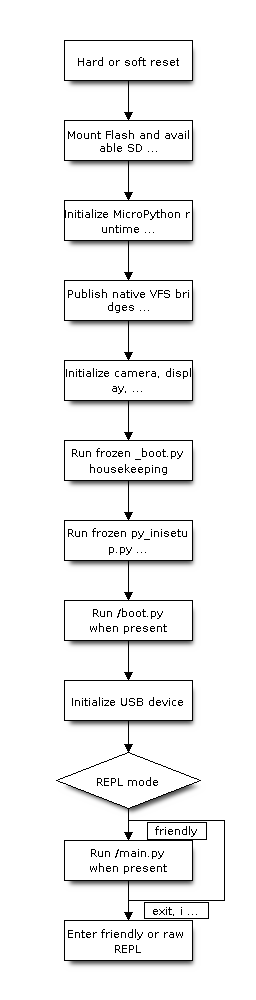
The raw REPL used by host automation can skip main.py during a soft reset. This allows development tools to gain control without automatically starting the product application.
First Boot and Flash Filesystem
The ESP-IDF storage manager owns the board filesystems independently of the MicroPython VM. It mounts the ffat partition internally at /flash and mounts an available SD card at /sdcard. On each VM start, native MicroPython VFS bridges publish the Flash volume at / and the SD volume at /sdcard. A soft reset recreates only these bridge objects and does not remount an already mounted physical filesystem; if the SD card was not mounted during cold boot, the mount is retried on each subsequent VM start so that a card inserted later becomes available after a soft reset.
An unformatted ffat partition is formatted as FAT during storage initialization. A legacy partition named vfs is only mounted when it already contains FAT and is never automatically formatted, so a possible LittleFS2 volume is not silently erased. Other mount or write failures are reported without destructive repair. The frozen py_inisetup.py then creates /boot.py, /main.py, /README.txt, and the /.esp_vision_disk marker when they do not already exist.
Existing startup files are not overwritten during a normal firmware update or soft reset. Board packages can provide board-specific default main.py and README.txt content through boards/<BOARD>/board_inisetup.py.
Using boot.py
Use boot.py for short, deterministic initialization that must complete before the application starts, such as selecting a product mode, preparing configuration, or bringing up a required network interface:
import network

wlan = network.WLAN(network.STA_IF)
wlan.active(True)
boot.py must return and must not contain the application’s permanent loop. ESP-VISION initializes the MicroPython USB device only after boot.py completes, so a blocked or long-running boot.py can prevent the USB REPL and host tools from becoming available.
Using main.py
Use main.py as the product application entry point. Keep the implementation in a separate module so startup policy and application logic remain independent:
import sys
import my_app

try:
    my_app.main()
except KeyboardInterrupt:
    raise
except Exception as error:
    print("Fatal application error:")
    sys.print_exception(error)
Allowing KeyboardInterrupt to propagate lets Ctrl-C stop the application and enter the friendly REPL. A production application can instead log the exception and call machine.reset() when automatic recovery is required, but an unconditional reset loop can make development and failure diagnosis difficult.
The default ESP-VISION main.py prints a board-ready message and sleeps in a loop so the VSCode extension and other host tools can take control. Press Ctrl-C to interrupt it and reach the REPL, or replace /main.py with the product entry point.
REPL and Recovery
main.py exiting normally or raising an uncaught exception transfers control to the friendly REPL. Ctrl-C injects KeyboardInterrupt into a running Python script, while Ctrl-D at the friendly REPL starts a soft reset.
If an application prevents normal startup, connect to the REPL, interrupt it with Ctrl-C, and rename or remove the startup file:
import os

print(os.listdir("/"))
os.rename("/main.py", "/main.disabled.py")
# Use Ctrl-D to start again without running the previous main.py.
If the REPL cannot be recovered, erase and reflash the board from the repository root. erase-flash removes the entire device Flash, including the internal filesystem and user data:
idf.py --board <BOARD> -p <PORT> erase-flash
idf.py --board <BOARD> -p <PORT> flash monitor
Reflashing without erase-flash normally preserves the data filesystem and therefore may preserve a faulty boot.py or main.py.