The Camera Pipeline
sensor.snapshot() looks like a single call, but behind it sits a hardware-specific capture pipeline that turns photons into an image.Image. Knowing the stages helps explain the configuration calls (set_pixformat, set_framesize, skip_frames) and the performance characteristics of each board.
From sensor to image
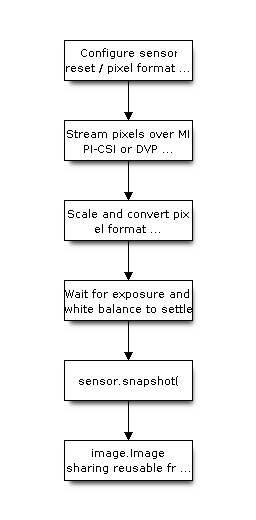
The sensor control bus applies the board defaults and requested format before streaming begins. Double buffering allows the next frame to fill while the current frame is processed. ESP32-P4 uses the hardware PPA for scaling and color conversion, while ESP32-S3 performs conversion in software. Calling sensor.skip_frames(time=2000) after configuration gives automatic exposure and white balance time to converge.
Per-board backends
The camera backend is selected per board at build time:
Board family |
Backend |
Notes |
|---|---|---|
ESP32-P4 |
|
MIPI-CSI sensors; hardware-accelerated scaling and color conversion. |
ESP32-S3 |
|
DVP sensors; conversion in software, so prefer smaller frame sizes. |
Because the public sensor API is identical across boards, the same script runs on both; only the achievable resolution and frame rate differ.
Frame sizes
set_framesize accepts named sizes (QQVGA, QVGA, VGA, …) drawn from a shared framesize table. Smaller frames cost less memory and less processing time per stage, so when a model or algorithm only needs a small input, capture small rather than capturing large and downscaling.