Packages and Deployment
MicroPython organizes reusable code as modules and packages, but an embedded product must also decide where that code is stored and how it is updated. This chapter describes package management and deployment for the MicroPython v1.28.0 version pinned by ESP-VISION; see the upstream package management and manifest references for the complete generic behavior.
Module and Package Layout
A module is normally a .py source file or a precompiled .mpy file. A package is a directory containing an __init__.py file and one or more modules or subpackages, so a reusable vision pipeline can use the following layout:
my_vision/
    __init__.py
    pipeline.py
    transport.py
Applications import package members with standard Python syntax:
from my_vision.pipeline import VisionPipeline

pipeline = VisionPipeline()
Package Management in the Current Firmware
MicroPython uses mip rather than CPython’s pip to install packages from micropython-lib, package indexes, URLs, or a local package.json description. The default ESP-VISION manifests do not currently embed the device-side mip module, so import mip is not available in the standard firmware; use mpremote on the development host to install packages into the device filesystem:
Important
The default ESP-VISION firmware does not support device-side mip. Running import mip or mip.install() on the device raises ImportError. The host-side mpremote mip command remains available and is the default package installation method.
mpremote connect <PORT> mip install --target=/lib <PACKAGE>
mpremote connect <PORT> mip install --target=/lib <PACKAGE>@<VERSION>
mpremote connect <PORT> mip install --target=/lib ./package.json
A package.json file describes the files and dependencies that mip installs at runtime or during provisioning. It is not a firmware manifest and does not determine which modules are compiled into ESP-VISION. Package compatibility must be checked against MicroPython v1.28.0 and the selected chip architecture because MicroPython packages can depend on firmware features or architecture-specific .mpy files.
Device-side installation with mip.install() requires a customized firmware that explicitly includes mip together with the required networking and TLS support. Host-side installation with mpremote is the recommended default because it does not increase the product firmware image or require the device to download code from the network.
Packages on the Filesystem
ESP-VISION mounts the internal Flash filesystem at / and adds /lib to sys.path. Install reusable packages under /lib; modules in the current directory, frozen modules, and packages under /lib can then be imported without changing the application code.
An SD card is mounted at /sdcard when enabled, but its package directory is not added to sys.path automatically. Add it explicitly before importing packages stored there:
import sys

sys.path.append("/sdcard/lib")
from my_vision.pipeline import VisionPipeline
Source .py files are compiled when imported, which consumes RAM for bytecode and adds import latency. Precompiled .mpy files avoid compilation on the device and reduce source exposure, but their bytecode still occupies RAM after loading and they must match the MicroPython version and architecture.
Packages Embedded in Firmware
Firmware manifests select Python modules and packages that are compiled and frozen into the firmware image. ESP-VISION keeps board manifests in boards/<BOARD>/manifest.py and currently uses them to freeze the port modules, ESP-VISION initialization modules, asyncio, and selected board-specific features.
For example, place my_vision/__init__.py and its modules under boards/<BOARD>/packages, then add the package to that board’s manifest:
package(
    "my_vision",
    base_path="$(ESP_VISION_ROOT)/boards/<BOARD>/packages",
)
The lower-level freeze() function can also freeze a directory or selected modules, while include() and require() reuse manifest fragments and packages from configured manifest libraries. Reconfigure and rebuild the selected board after changing its manifest:
idf.py --board <BOARD> reconfigure
idf.py --board <BOARD> build
idf.py --board <BOARD> flash
Choosing a Deployment Method
Use the expected update frequency and product ownership of a package to select its deployment method:
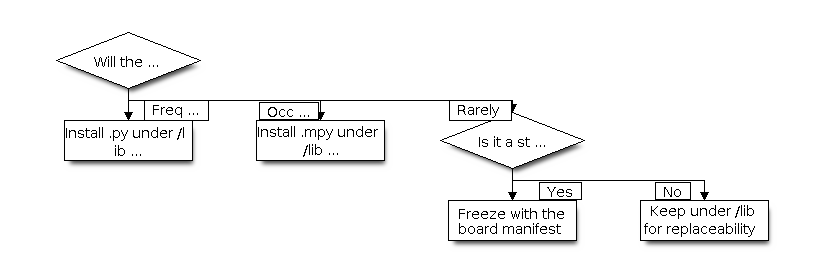
Package deployment decision
Property |
|
|
Frozen in firmware |
|---|---|---|---|
Storage |
Writable filesystem |
Writable filesystem |
Firmware Flash image |
Import behavior |
Compiled when imported |
Loaded without source compilation |
Executes directly from frozen bytecode |
Runtime RAM |
Bytecode and objects use RAM |
Bytecode and objects use RAM |
Frozen bytecode and constants can remain in Flash |
Update method |
Replace files or use |
Replace compatible |
Rebuild and flash firmware |
Primary use |
Development and frequently updated application code |
Replaceable modules with lower import overhead |
Stable product dependencies and startup modules |
Import Priority and Version Control
The current firmware searches the current directory, frozen modules through .frozen, and then /lib. A filesystem package with the same import name therefore does not override a frozen package during normal import; remove the frozen package from the manifest and rebuild the firmware, or use a different package name.
Keep board manifests and frozen package revisions in source control so firmware builds are reproducible. Use package.json to describe files and dependencies installed by mip, and use manifest.py to define modules embedded during the firmware build; these formats serve different deployment stages and are not interchangeable.
For ESP-VISION products, freeze stable framework extensions and startup dependencies, while keeping product scripts, configuration, and field-updatable modules under /lib. Large AI models, images, and video assets should normally remain data files in Flash, SD card, or external storage instead of being embedded as Python package data, so they can be updated and mapped by the appropriate runtime component.