Image Processing
The vision algorithms in the image – Image Processing module come from OpenMV’s imlib library, maintained in this repository as the components/imlib IDF component. They fall into a few families: point and geometric transforms, neighborhood filters, statistical analysis, and feature detection. This page explains what each family does and when to reach for it.
A typical processing pipeline
Most color-tracking or inspection scripts follow this processing flow:
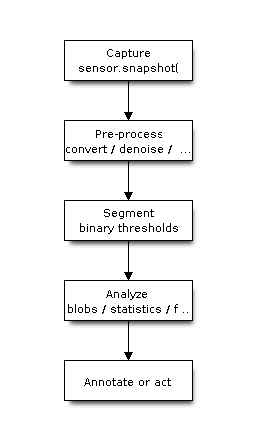
Pre-processing can combine image.Image.to_grayscale(), image.Image.gaussian(), and image.Image.histeq(); segmentation commonly uses image.Image.binary(); analysis then uses image.Image.find_blobs(), image.Image.get_statistics(), or a feature detector before the application draws results or takes an action.
Thresholding and segmentation
image.Image.binary() converts the image into a mask by testing each pixel against a list of color thresholds (see The Image Model for why thresholds are expressed in LAB). A pixel is “on” if it falls inside any of the supplied thresholds, which lets you track several colors at once. The companion image.Image.find_blobs() runs an 8-connected component labeling pass over the same thresholds and returns one image.blob per connected region, with centroid, bounding box, pixel count, orientation, and shape descriptors such as roundness and solidity.
Neighborhood (convolution) filters
These replace each pixel with a function of its (2*ksize+1) square neighborhood:
image.Image.mean()– box average; fast blur.image.Image.gaussian()– weighted average using a Pascal-triangle (binomial) approximation of a Gaussian; the standard noise-reduction blur. Setunsharp=Trueto sharpen instead.image.Image.laplacian()– second-derivative edge response; setsharpen=Trueto add it back to the original for edge enhancement.image.Image.morph()– apply an arbitrary integer kernel.mulandaddscale and bias the result; the defaultmulis1/sum(kernel)so the image brightness is preserved.
All of these share threshold/offset/invert keywords that turn the filter into an adaptive thresholding operation in a single pass.
Rank and edge-preserving filters
Rank filters sort the neighborhood instead of averaging it, which removes noise without blurring edges as much:
image.Image.median()– the percentile (default 0.5) value; excellent against salt-and-pepper noise.image.Image.mode()– the most common value.image.Image.midpoint()– abiasblend between the min and max.image.Image.bilateral()– a Gaussian blur weighted by both spatial distance (space_sigma) and color similarity (color_sigma), so it smooths flat regions while keeping edges crisp.
Morphology
image.Image.erode() and image.Image.dilate() grow or shrink the set pixels of a (usually binary) image using a square structuring element; image.Image.open() and image.Image.close() combine them to remove specks or fill small holes. The threshold argument controls how many neighbors must be set, generalizing the classic binary operators.
Histograms and statistics
image.Image.get_histogram() bins pixel values per channel; the returned image.histogram can compute Otsu thresholds (image.histogram.get_threshold()), percentiles, and full statistics. image.Image.get_statistics() returns mean, median, mode, standard deviation, quartiles, and min/max in one call, which is useful for auto-tuning thresholds at runtime.
Feature detection
Higher-level detectors find geometric structure:
image.Image.find_lines()andimage.Image.find_circles()use the Hough transform; theirthresholdis the minimum accumulator score and the*_marginkeywords merge near-duplicate results.image.Image.find_line_segments()uses Edge Drawing Lines; itsthresholdis the minimum Sobel gradient magnitude, whilemerge_distanceandmax_theta_diffcontrol segment merging.image.Image.find_rects()locates quadrilaterals (useful for fiducials and screens).image.Image.find_qrcodes()andimage.Image.find_apriltags()detect and decode the corresponding marker types; AprilTags can additionally return 6-DoF pose when camera intrinsics are supplied.
The current ESP32-P4 board profiles additionally provide image.Image.find_barcodes() through the ZXing-C++ backend.
Note
GPL-licensed OpenMV code paths are disabled in this build (OMV_NO_GPL=1), so a small number of upstream algorithms are intentionally unavailable. The per-board imlib_config.h selects which optional algorithms are compiled in; a method that is not enabled raises an exception at call time.