Codecs and Streaming
Once you have a frame you often want to get it off the board: preview it on a host, record it, or stream it live. ESP-VISION offers several codecs and transports, each suited to a different use case.
Still-image codecs: JPEG and PNG
image.Image.to_jpeg() (and its alias image.Image.compress()) encodes a frame to JPEG. JPEG is lossy: the quality keyword (1-100) trades size for fidelity, and subsampling controls how aggressively chroma is reduced (JPEG_SUBSAMPLING_420 is smallest, 444 is best quality). On boards with a hardware JPEG encoder this is offloaded; otherwise a software encoder (esp_new_jpeg) is used. image.Image.to_png() produces lossless PNG, which is larger but exact – useful for saving reference frames.
Recording sequences: ImageIO
imageio.ImageIO records a sequence of frames with their inter-frame timing preserved, so playback runs at the original speed. A file stream writes a container on storage; a memory stream keeps frames in a pre-allocated PSRAM buffer for fast capture and replay. See image.ImageIO – Image Stream.
Video codec: H.264
For continuous video, per-frame JPEG is wasteful because it cannot exploit the similarity between consecutive frames. h264.H264Encoder produces an H.264 stream where occasional keyframes (IDR/I) are self-contained and the frames between them only encode what changed. The encoder’s parameters tune this trade-off:
gop– keyframe interval. Shorter means faster recovery and easier seeking but larger output;0selects one keyframe per second.bitrate– target bits per second; the dominant size/quality control.qp_min/qp_max– bound the per-frame quantizer.
A lost P-frame corrupts the picture until the next keyframe, which matters for the streaming transport below.
Network streaming: RTSP
rtsp.RTSPServer serves encoded H.264 frames over RTSP so a client such as VLC or ffplay can view the camera at rtsp://<board-ip>:8554/. Feed each h264.H264Encoder.encode() result to rtsp.RTSPServer.send().
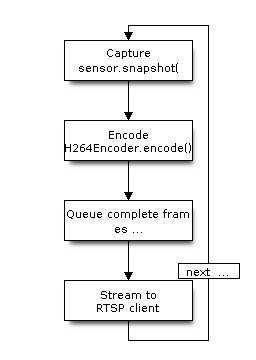
The server keeps a short, in-order frame queue; if a client is slow or absent it drops whole frames rather than blocking the capture loop or sending a partial frame that would corrupt the stream.
Host preview: USB CDC
During development the quickest way to see what the camera sees is image.Image.flush(), which pushes the current frame to the host as a binary JPEG on the EV-MUX preview.frame channel. The companion host tool decodes and displays it. This path needs no Wi-Fi and no SD card, making it the default feedback loop while iterating on a script.